DelphiMVCFramework 3.5 RC7 Moves into the Delphi Project Manager and Talks to AI Agents
🇮🇹 Italiano • 🇪🇸 Español • 🇩🇪 Deutsch • 🇧🇷 Português • 🇫🇷 Français

What changed in DelphiMVCFramework after RC6? The work on 3.5 went into how you create a project and grow it, inside the Delphi IDE and together with AI agents. This time I show it to you with screenshots.
DelphiMVCFramework 3.5.0-silicon RC7 is a release candidate, not the final 3.5.0: the features are the ones you see here, and the stable tag comes after the RC has run on machines other than mine.
RC6 came out on August 23, and the post announcing it was about hosts, Minimal API and the streaming serializer. RC7 came out on September 22. After that, two new things for everyday work on a project landed on master. A DMVCFramework menu in the Delphi Project Manager creates controllers, route groups and views and registers them in the project. The AI agent files give your assistant the rules and the sources of the framework, so it does not write the API from memory. Then there is the rest: Swagger UI with OpenAPI 3, the generated web pages, QUERY, ProblemDetails.
Below is a quick tour, mostly in pictures. Every topic has its own chapter in the official guide, second edition, with the full code and the explanations I skip in this post.
What lives where
Everything you see here belongs to RC7: it is the version the wizard writes into generated projects (3.5.0-silicon-rc7, you can also spot it in the screenshots). Part of it, though, is not in the tag’s zip yet:
- In RC7 (tag v3.5.0-silicon-rc7): the HTTP
QUERYmethod, the security review with its new defaults, the WebSocket server limits, the fixes for HTTP.sys, SQL Server and Delphi 13.2. - On master, after RC7: everything else. The Project Manager menu, the AI agent files, the wizard with OpenAPI 3, the generated web pages, the forms sample, ProblemDetails. To get them, clone master.
The screenshots below come from master.
A DMVCFramework menu in the Project Manager
In Delphi 12 and 13, right-click a DelphiMVCFramework project in the Project Manager and you get a DMVCFramework submenu:
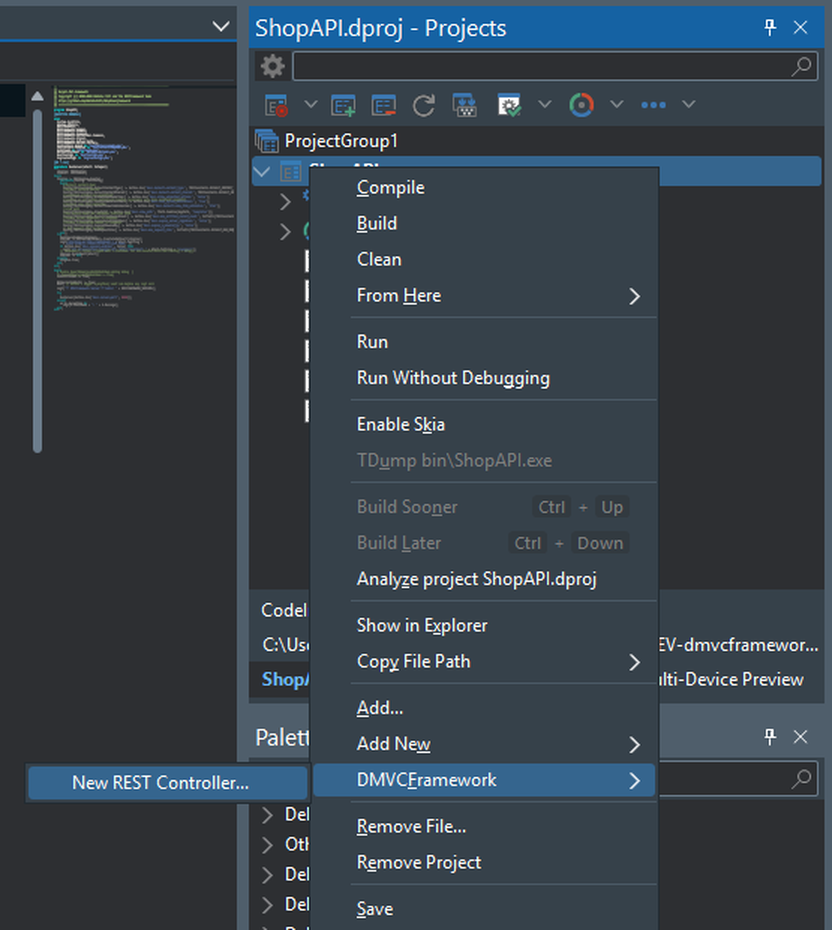
Pick New REST Controller…, type the name, and the rest is filled in for you: the URL segment and the model class the request body gets bound to.
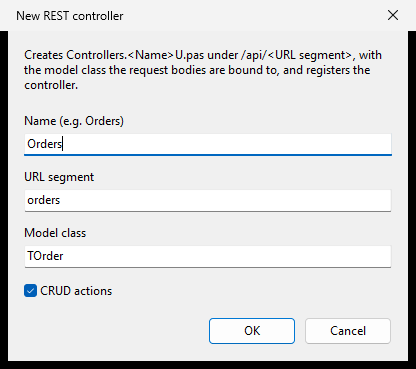
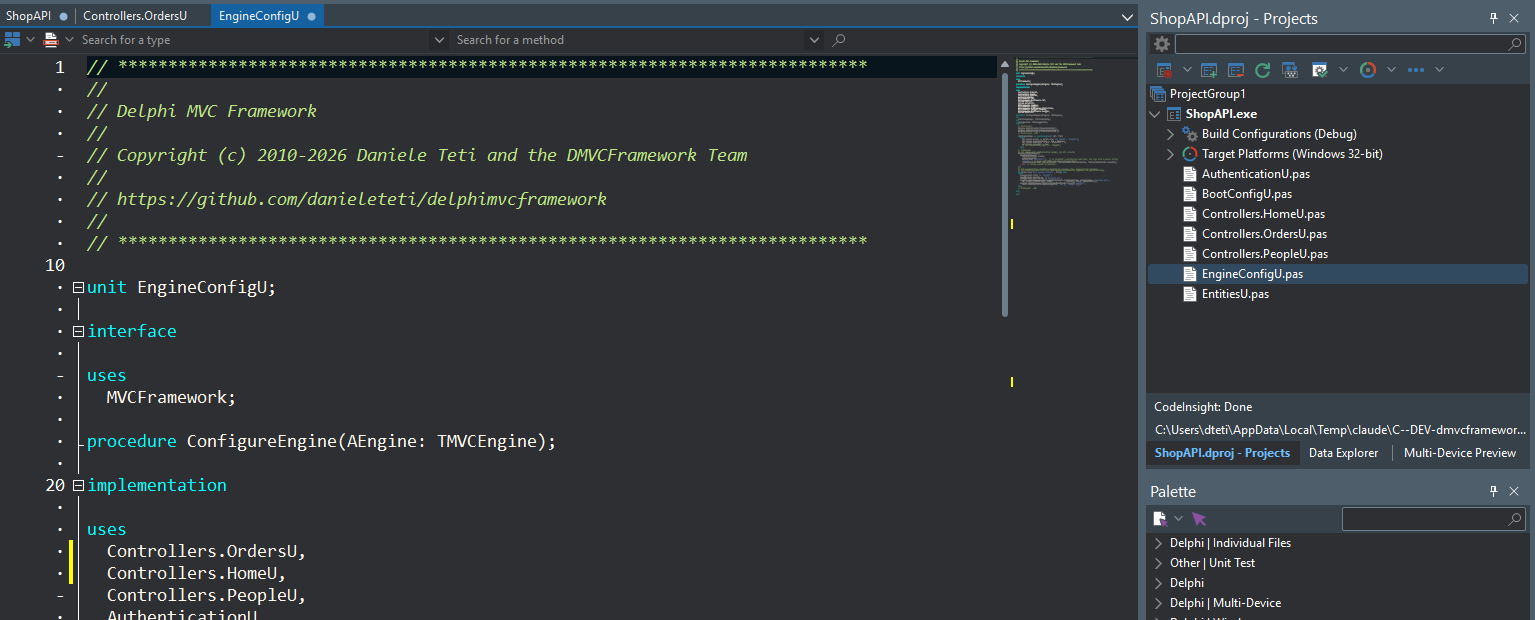
Press OK and the menu creates Controllers.OrdersU.pas, adds it to the project and registers it in EngineConfigU.pas: the unit in the uses clause and AEngine.AddController(TOrdersController) next to the other controllers. The edits go through the editor buffer, so Ctrl+Z undoes them.
This is the generated controller, exactly as the menu writes it in a project with OpenAPI documentation enabled:
type
  TOrder = class
  private
    fID: Integer;
    fName: string;
  public
    property ID: Integer read fID write fID;
    [MVCRequired]
    property Name: string read fName write fName;
  end;

  [MVCPath('/api/orders')]
  [MVCSWAGDefaultModel(TOrder, 'Order', 'Orders')]
  [MVCSWAGDefaultSummaryTags('Orders')]
  TOrdersController = class(TMVCController)
  public
    [MVCPath]
    [MVCHTTPMethod([httpGET])]
    [MVCSwagSummary(TSwaggerConst.USE_DEFAULT_SUMMARY_TAGS, 'List orders', 'getOrders')]
    // last argument: OkResponse renders the body as {"data": ...}
    [MVCSwagResponses(200, 'Success', SWAGUseDefaultControllerModel, True, True)]
    function GetAll: IMVCResponse;

    [MVCPath('/($ID:int)')]
    [MVCHTTPMethod([httpGET])]
    [MVCSwagSummary(TSwaggerConst.USE_DEFAULT_SUMMARY_TAGS, 'Get one', 'getOrder')]
    [MVCSwagResponses(200, 'Success', SWAGUseDefaultControllerModel, False, True)]
    [MVCSwagResponses(404, 'Not found')]
    function GetByID(ID: Integer): IMVCResponse;

    // the body is bound to Item and validated (422 on failure); the framework frees it
    [MVCPath]
    [MVCHTTPMethod([httpPOST])]
    [MVCSwagSummary(TSwaggerConst.USE_DEFAULT_SUMMARY_TAGS, 'Create', 'createOrder')]
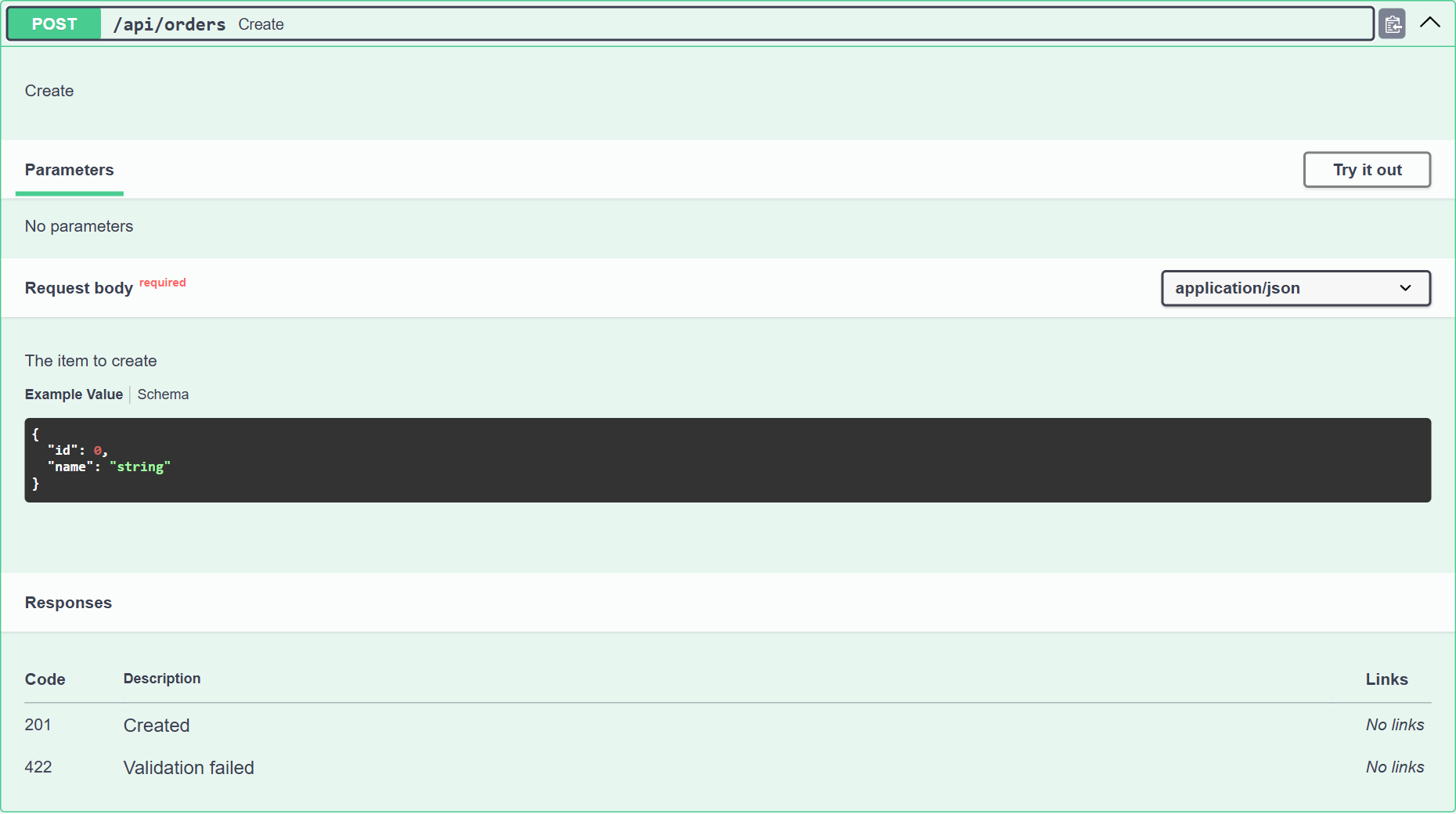
    [MVCSwagParam(plBody, 'Item', 'The item to create', SWAGUseDefaultControllerModel)]
    [MVCSwagResponses(201, 'Created')]
    [MVCSwagResponses(422, 'Validation failed')]
    function CreateItem([MVCFromBody] Item: TOrder): IMVCResponse;
    ...
The body arrives in Item already deserialized and already validated: without name the request never even enters the action and the client gets a 422. The response schema comes from the model class: with the last argument of MVCSwagResponses the document also describes the {"data": ...} envelope that OkResponse adds. The MVCSwag* attributes are there only if the project publishes an OpenAPI document, and that is why Orders and its model show up in Swagger UI without my writing a single line: you will see it further down.
The menu shows only what the project can host. In a Minimal API project a controller would make no sense, so the item is a different one:
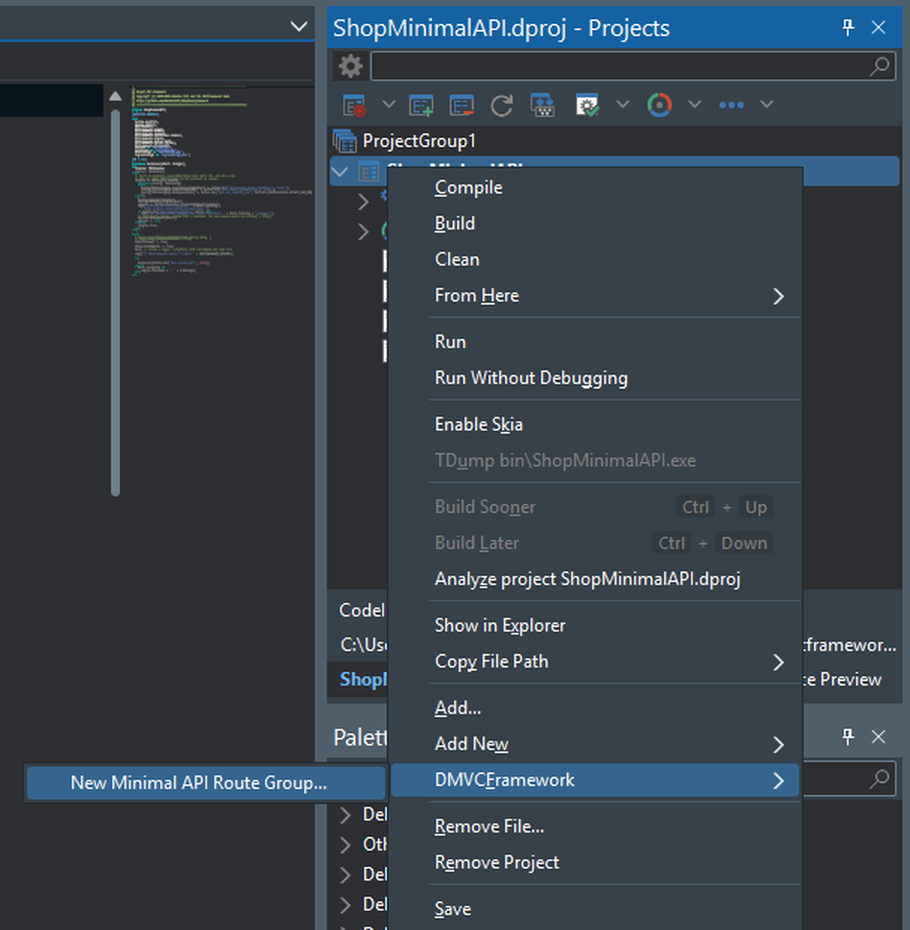
New Minimal API Route Group… creates OrdersRoutesU.pas with a MapOrdersRoutes procedure (bodies bound by type with MapPost<TOrder> and MapPut<Integer, TOrder>) and adds the call at the end of ConfigureRoutes. The other two items are New Web Controller and View… and New TemplatePro View…, and they appear only if the project has a views folder. In Delphi versions older than 12 the menu is not there.
A project born with the right skills
If you write code with Claude Code, Codex, Cursor or Gemini, an agent that does not know DelphiMVCFramework makes up plausible method names, or uses the ones from an old version, and the compiler only tells you afterwards.
With RC7 every new DelphiMVCFramework project starts out ready for the agent: the wizard adds the skills that fit that project type, taken from the same framework line you are using. They are the best practices written for whoever develops with DelphiMVCFramework, split by topic:
- Delphi: the language and the RTL, the differences between versions, memory management, strings, generics, threads; plus a code review skill on warnings, static analysis and memory leaks.
- DelphiMVCFramework: controllers, ActiveRecord, validation, dependency injection, middleware, the three hosts,
.env. - Security: the rules for every endpoint that takes input from the client.
- Tests: integration tests with DUnitX.
- Minimal API, web application, user interface, JSON-RPC: when the project uses them.
- HTMX: the official documentation, organized for the agent.
You see the advantage from the first request. Without skills and without AGENTS.md, every session with the agent starts with you explaining the project and the framework, and goes on with you fixing the code it wrote from memory: a method that does not exist, a pattern from an old version, an object freed twice. With the project generated by the wizard, the agent already knows how the project is laid out, where the framework sources are, and how to write a controller, an ActiveRecord entity or an HTMX page in DelphiMVCFramework 3.5. You save that time in every session.
There is also security. Among the skills installed in every project there is dmvcframework-security, with the rules for any endpoint that takes input from the client: access control, mass assignment, SQL injection, XSS, CSRF, path traversal and uploads, JWT, secrets and error messages, plus a checklist to go through before an endpoint goes into production. The agent reads it before writing an endpoint, so the code you get tends to be more secure than what it would write starting from scratch.
The skills live in a separate repository, with one branch per framework line, and they are updated independently of the releases: when a new version of a skill comes out, update_ai_skills.bat in the project folder pulls it in.
The option is on the Project Options page, AI coding agent files and skills, and it is on by default in every preset. The skills are downloaded while the wizard creates the project, with a progress bar you can cancel; if you do not need them, uncheck it.
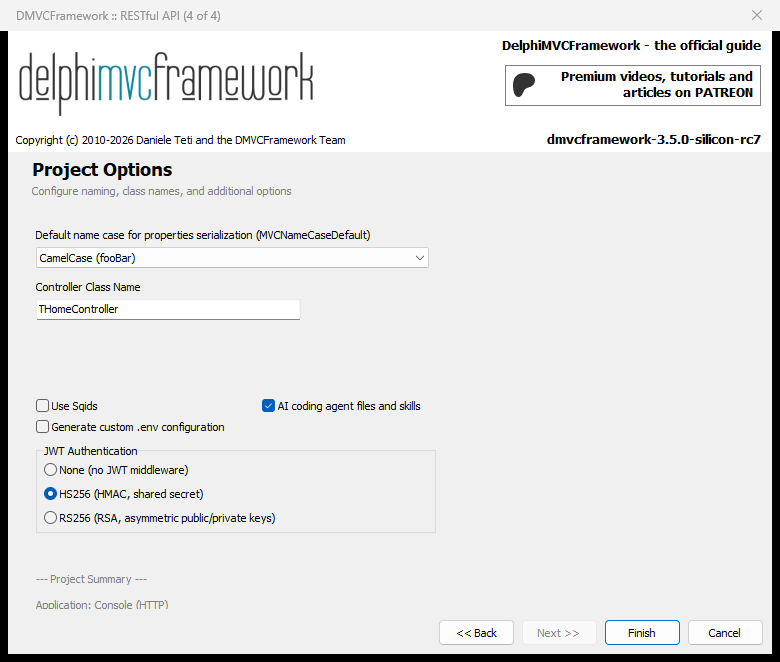
With the option on, the wizard writes into the project folder an AGENTS.md with the facts about the project, plus CLAUDE.md and GEMINI.md that import it. Then it downloads into .claude\skills the delphi-ai-skills that fit that project type, from the branch that matches the framework version (dmvc-3.5 for this one). This is the AGENTS.md of a RESTful API project generated by the wizard’s test suite, which calls it TestProject:
# TestProject

DelphiMVCFramework 3.5.0-silicon-rc7 project, generated by the DMVCFramework IDE wizard.

- `TestProject.dproj` builds the executable into `bin\`, next to `bin\.env` (configuration and secrets: never commit real values).
- Build from the command line: `rsvars.bat`, then `msbuild TestProject.dproj /p:Config=Debug /p:Platform=Win32`.

## Skills

Before writing Delphi or DelphiMVCFramework code, read the skill for the task. They target DelphiMVCFramework 3.5.x; `update_ai_skills.bat` downloads or refreshes them.

- `.claude/skills/delphi/SKILL.md` - the language and the RTL: version gating, lifetime, strings, generics, threading
- `.claude/skills/delphi-code-smells/SKILL.md` - code review: compiler warnings, static analysis, memory leaks
- `.claude/skills/dmvcframework/SKILL.md` - controllers, ActiveRecord, validation, DI, middleware, servers, dotEnv
- `.claude/skills/dmvcframework-security/SKILL.md` - REQUIRED for any endpoint taking client input
- `.claude/skills/dmvcframework-testing/SKILL.md` - DUnitX integration tests

Do not write Delphi or DelphiMVCFramework code from memory: the API names in these files are authoritative.

<!-- delphi-local-sources -->
DelphiMVCFramework checkout: C:\DEV\dmvcframework   (sources/ + samples/)
Delphi RTL/VCL source: C:\Program Files (x86)\Embarcadero\Studio\37.0\source   (CompilerVersion 37.0)
<!-- /delphi-local-sources -->
The last block tells the agent where the framework and RTL sources are on your disk: when it has a doubt about a name, it goes and reads the real code.
Which skills get installed depends on the project. delphi, delphi-code-smells, dmvcframework, dmvcframework-security and dmvcframework-testing are always there; a Minimal API project adds dmvcframework-minimal-api, a web application dmvcframework-webapp and dmvcframework-ui, with HTMX also htmx-skill, a JSON-RPC service dmvcframework-jsonrpc. If the download fails during creation, the project is created anyway, with a warning, and update_ai_skills.bat completes the installation as soon as you are back online.
The wizard: API documentation and JWT key
On the Features page of the Custom preset there is a new option, API documentation (OpenAPI 3). In the other presets you do not see it because the choice is already made: it is on for RESTful API, Minimal API RESTful and Full-Stack.
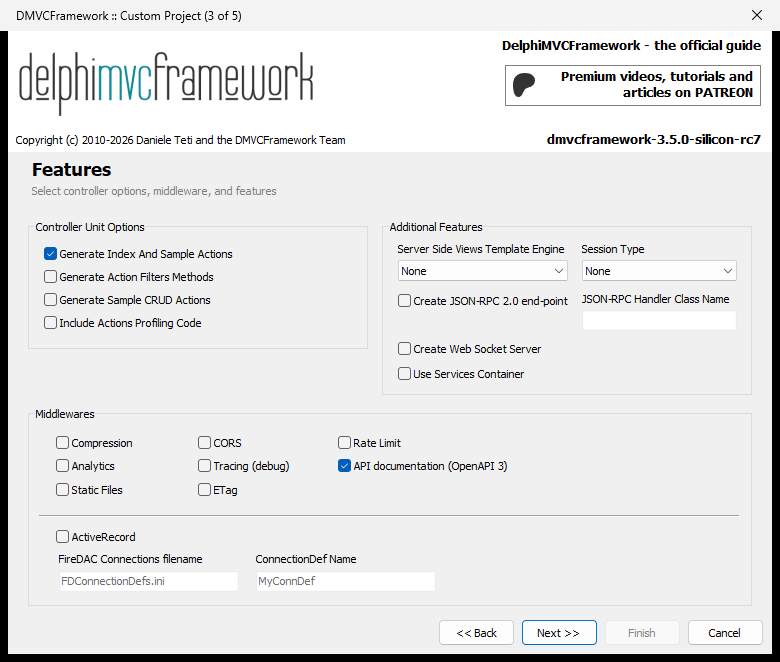
With the option on, the wizard downloads the official Swagger UI release (5.33.0, checked with SHA-256) into bin\www\swagger while it creates the project. If you are offline the project is created anyway, and in that folder you find a README with the steps to download it by hand. The document is published only if the .env contains dmvc.openapi.enabled=true: the generated .env contains it, the production one does not, so in production the documentation is not published.
Projects with JWT now get their own JWT_SECRET in the .env, 384 bits from the system’s cryptographic generator, different at every generation. The generated .gitignore already excludes the .env.
Swagger UI with OpenAPI 3
This is the project generated with the RESTful API preset, where I added the Orders controller with the menu you just saw. Start it, open http://localhost:8080/swagger and you get this:
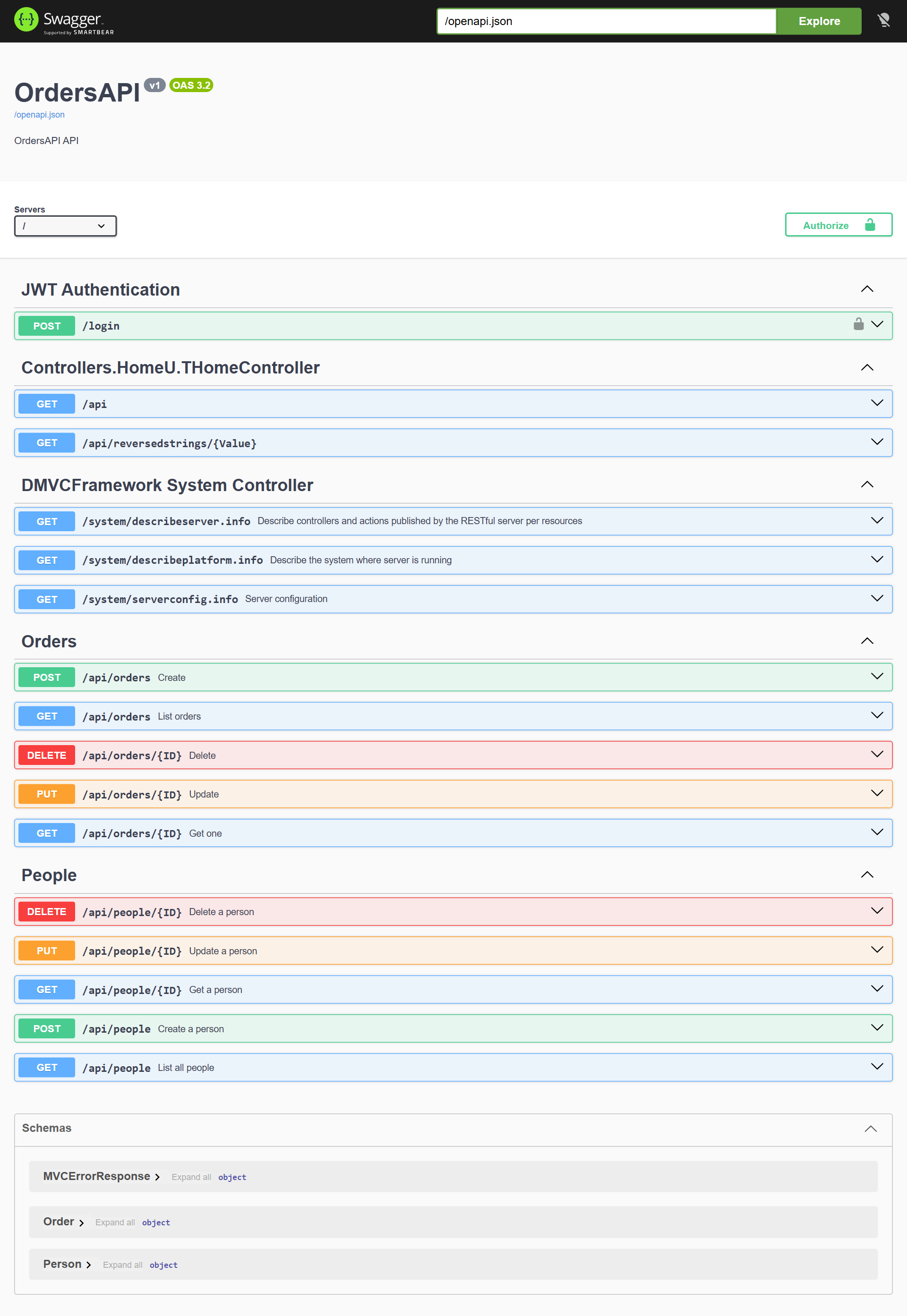
The Swagger middleware, the one you have been using for years, now produces OpenAPI 3 as well. The document is built by SwagDoc, the library bundled with the framework, and the OpenAPI 3 support in SwagDoc was written by Marcelo Jaloto (PR #916): thanks Marcelo! You choose the format with a new last parameter, ASpecVersion, which defaults to Swagger 2.0, so if you upgrade nothing changes for you. The generated project registers it like this:
AEngine.AddMiddleware(TMVCSwaggerMiddleware.Create(AEngine, LSwaggerInfo, '/openapi.json',
  JWT_DEFAULT_DESCRIPTION, False, '', '', '', [psHTTP], False, ssvOpenAPI3));
AEngine.AddMiddleware(TMVCStaticFilesMiddleware.Create('/swagger',
  TPath.Combine(TPath.Combine(AppPath, 'www'), 'swagger')));
Everything that worked with Swagger 2.0 works: JWT and basic security, MVCSwagAuthentication, MVCSWAGDefaultModel, the CRUD paths of TMVCActiveRecordController. The JWT scheme is http/bearer, so in the Authorize dialog you paste the token as it is. The server in the document is relative, and “Try it out” calls the origin that served the document, even behind a proxy.
In Minimal API projects the wizard instead registers the OpenAPI(...) filter from MVCFramework.OpenAPI3, which generates an OpenAPI 3.1 document from the lambda routes and publishes it at the same URL, with the same Swagger UI.
TDate, TDateTime and TTime fields are now described with the standard date, date-time and time formats, so a client regenerated from the document gets date types instead of strings (this also comes with Marcelo’s PR). The field documentation attributes are now all named MVCSwag*: MVCFormat, MVCMinimum and MVCMaximum still compile, with a warning, until 4.0.
The generated web applications
The Web Application preset now starts from a more complete interface: a page header, a panel with the server status updated through HTMX, a “Start here” list with the first steps, light and dark theme. The generated code is still kept to a minimum, though: the example with table and forms moved to a separate sample, which I cover further down.
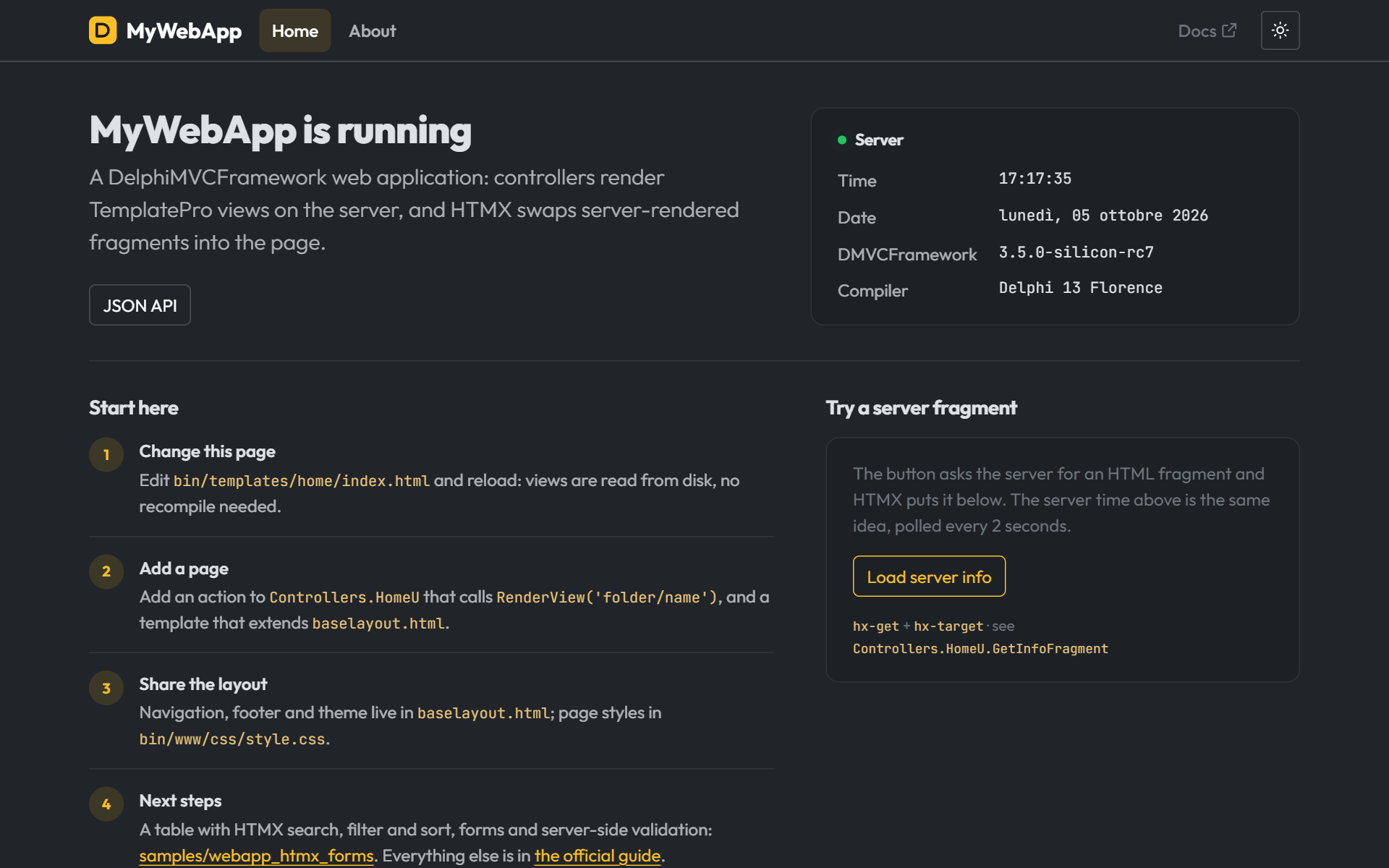
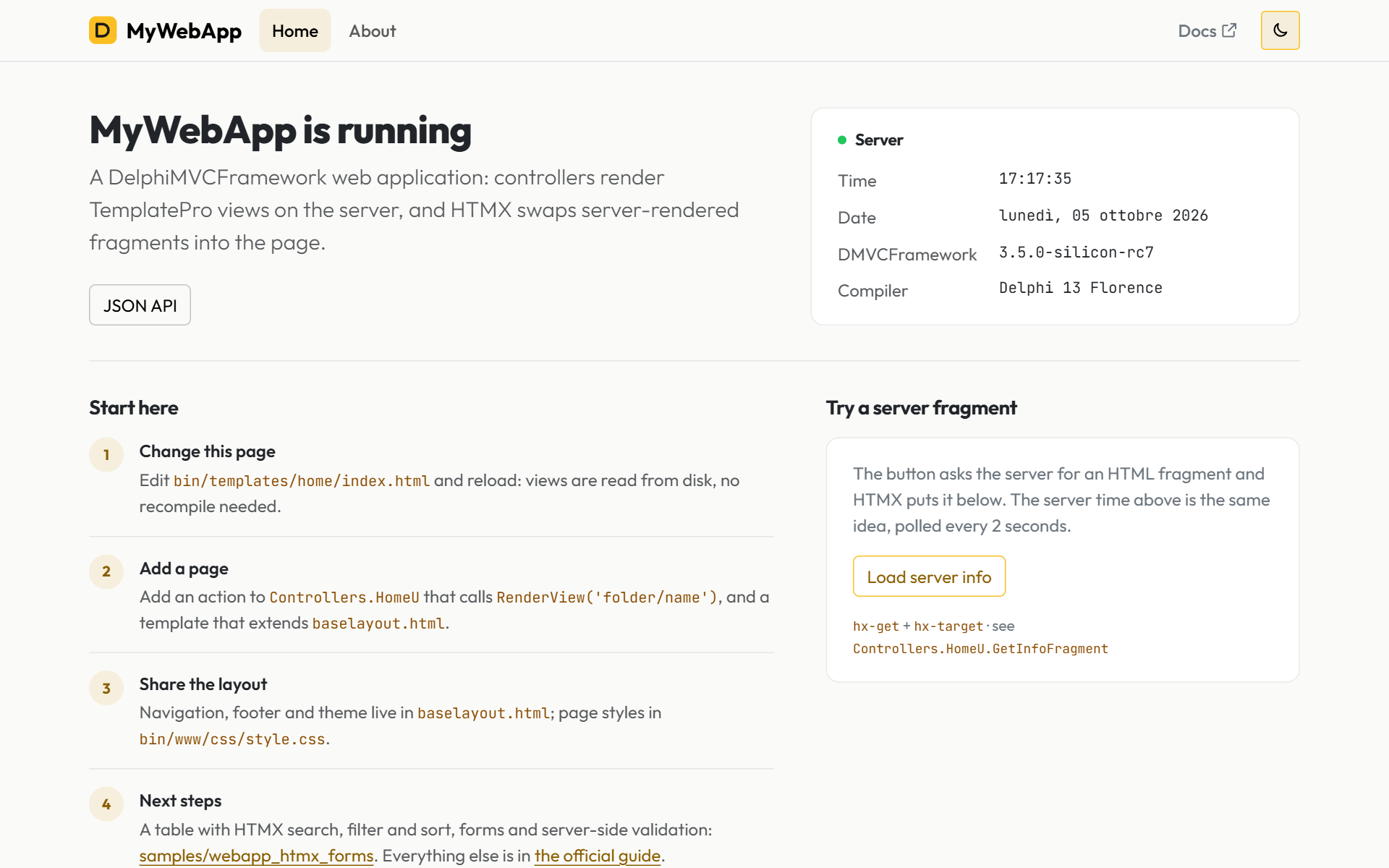
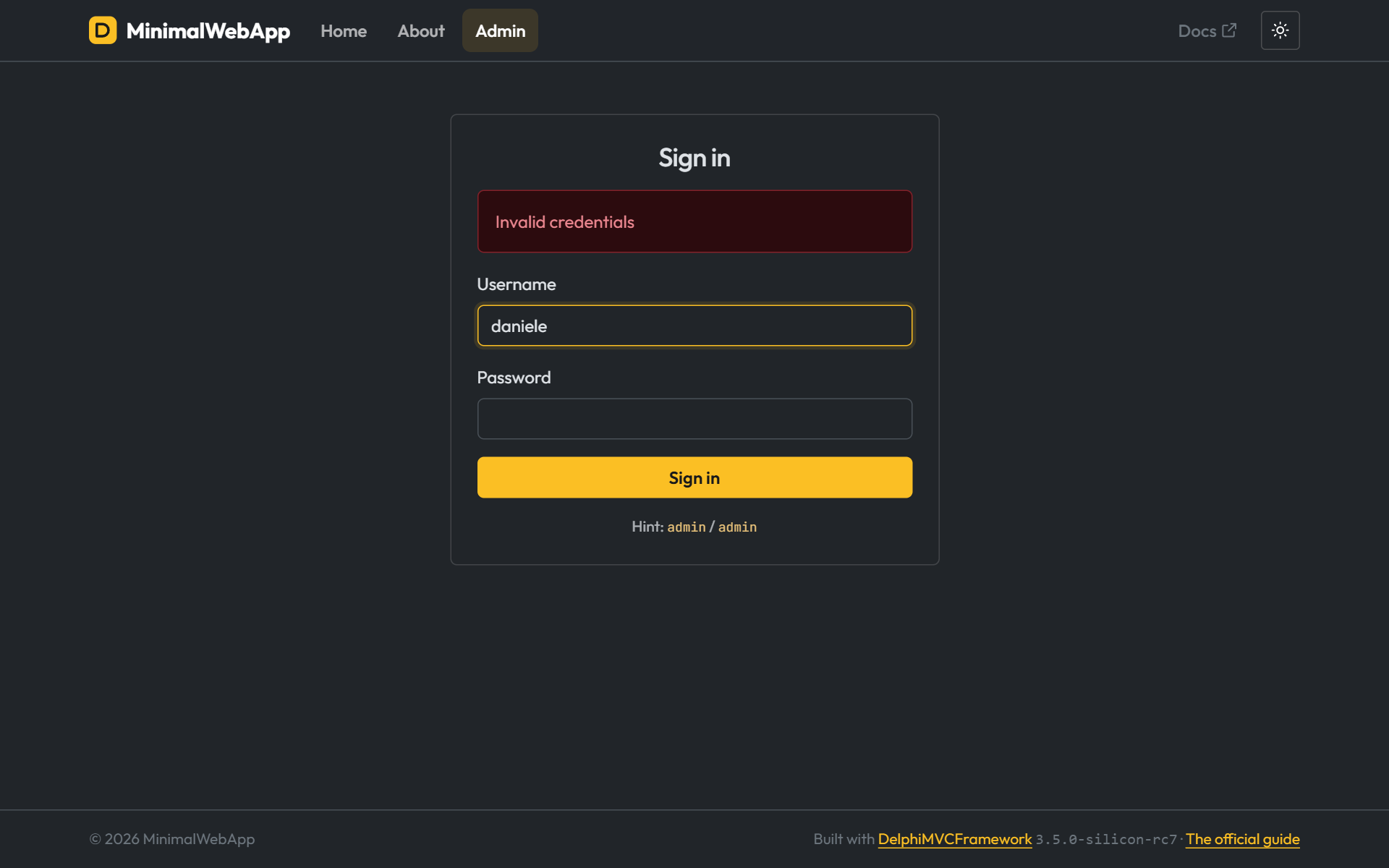
The Minimal API WebApp preset generates the same pages, with lambda routes instead of controllers. Below is the login page after a wrong attempt: the username stays in the field, the password does not. The form is bound to a class, and the page redisplays it from there.
Tables and forms with HTMX: webapp_htmx_forms
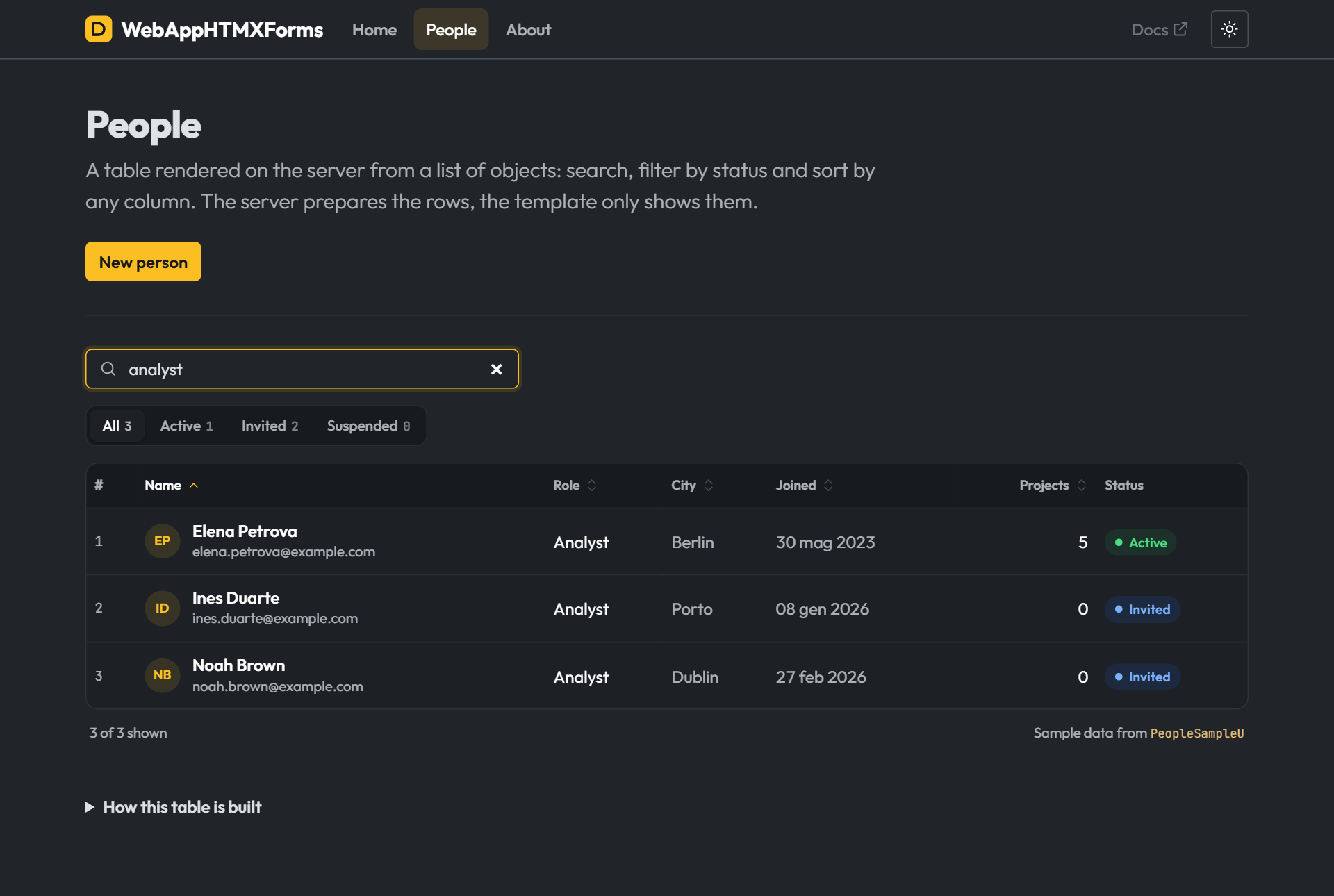
The People table example, which used to live in the generated project, became a sample of its own: samples/webapp_htmx_forms. There you get search, filters, sorting and the complete forms, without weighing down every new project.
You can filter the table, search it and sort it by column. With HTMX the server returns only the table fragment and the page does not reload; the action decides whether to send the whole page or the fragment, and sets Vary: HX-Request because the same URL has two different bodies.
The insert and edit forms use all the macros of the TemplatePro form library (bin/templates/lib/forms_bootstrap5.tpro, which the wizard copies into every TemplatePro project) and are validated on the server with the DelphiMVCFramework attributes and TMVCValidationEngine. If something is wrong, the form comes back with status 422, the values you typed and the message next to the field. If everything is fine, it redirects to the table (Post/Redirect/Get), so an F5 does not resubmit the form.
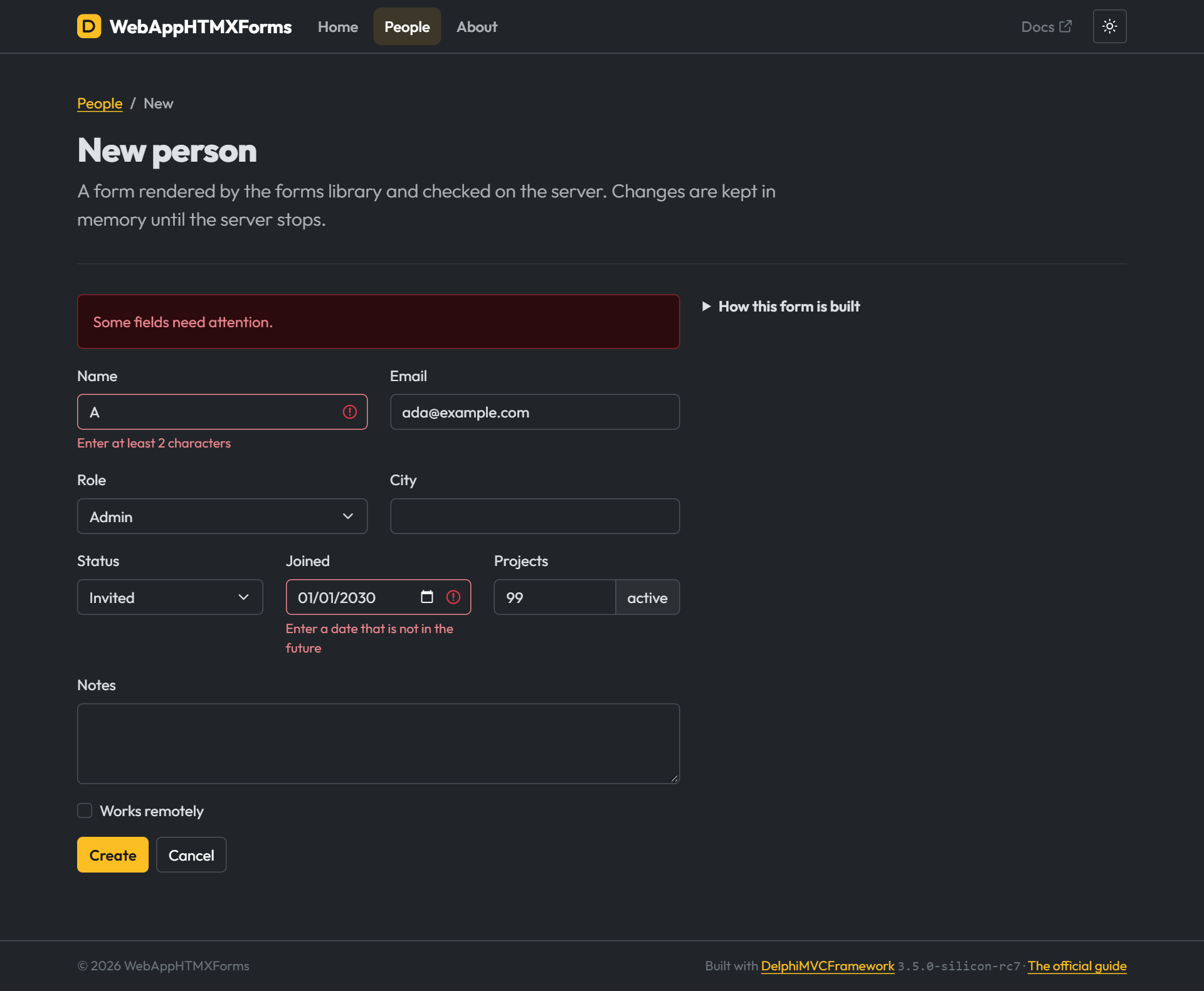
On the TemplatePro side, the cache of compiled views now lives in memory: with view_cache=true, after the first request a view no longer touches the disk. If you edit views while the server is running, dmvc.view_cache_check_changes=true re-enables the check on every request, layouts and partials included.
Forms generated with TemplatePro
The form in the screenshot above comes from the TemplatePro form library, forms_bootstrap5.tpro, which the wizard copies into bin/templates/lib in every project with TemplatePro views. You import it once at the top of the page and you get eight macros: form, input, textarea, select, checkbox, submit, actions and auto.
{{import "../lib/forms_bootstrap5.tpro" as f}}
{{call f.form(form_action)}}
{{>f.input("id", label="ID", readonly=true)}}
{{>f.input("name", label="Name", required=true)}}
{{>f.select("role", roles, label="Role", empty="Choose a role")}}
{{>f.input("projects", type="number", append="active")}}
{{>f.textarea("notes", label="Notes", rows=3)}}
{{>f.checkbox("remote", label="Works remotely")}}
{{>f.submit("Save")}}
{{endcall}}
Each macro reads the field value from formModel and the error message from formErrors, two variables you set in the action. The model can be an object, the current record of a dataset, a JSON object or a dictionary. If there is an error for that field, the control gets the is-invalid class and the message appears below it: that is what you see in the form redisplayed with the 422. Values and messages are always HTML-escaped, dates are formatted for the date, time and datetime-local controls, and with attrs you pass a map of extra attributes, for example the HTMX ones. The same page works for create and for edit: only the model and the action change.
Then there is auto, which generates the whole form by itself:
{{call f.form("/forms", attrs=formattrs)}}
  {{>f.auto(demo)}}
  {{>f.submit("Save")}}
{{endcall}}
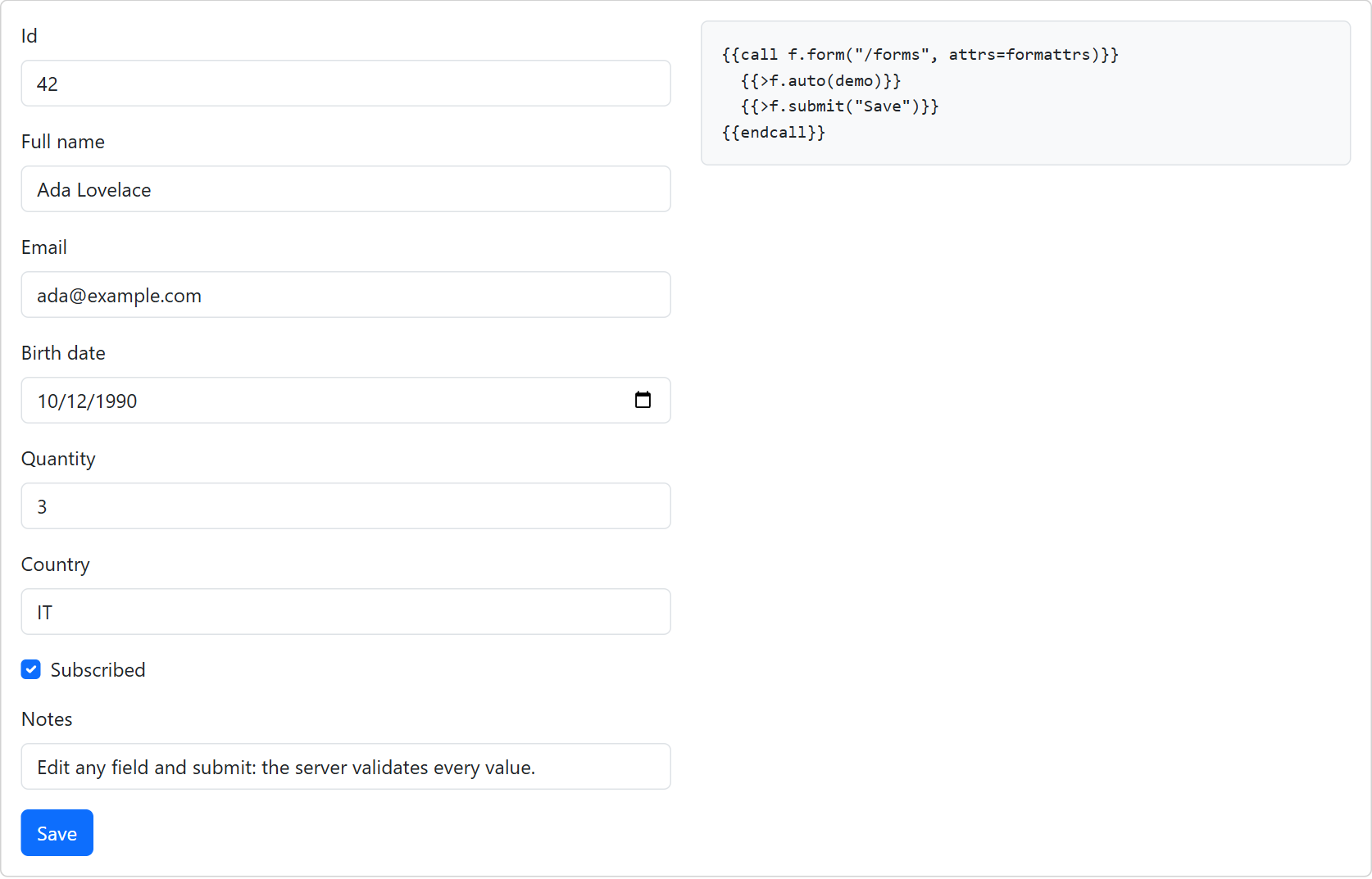
auto walks the model’s fields (model.@@fields: the properties of an object or the fields of a dataset) and picks the control from the type. A string becomes a text field with maxlength taken from the size, an integer a number field, a TDate a date picker, a TDateTime a datetime-local, a TTime a time field, a Boolean a checkbox, a memo a textarea. A property without a setter becomes readonly. The label comes from the name: FullName becomes “Full name”. With exclude you drop the fields you do not want to show.
If the model is a TMVCActiveRecord entity, add the MVCFramework.View.Renderers.TemplatePro.ActiveRecord unit to the uses clause (the wizard does it for you in projects with ActiveRecord and TemplatePro). From then on the fields follow the ActiveRecord mapping and the validators: [MVCRequired] becomes the required attribute, [MVCMaxLength(n)] becomes maxlength. For everything else there is TTProConfiguration.OnGetFieldMetadata, which lets you change the label, type, visibility and required flag of every field. The complete form with all the macros is on the /forms page of the samples/wizard_showcase/web sample.
ProblemDetails closer to RFC 7807
The responses of ProblemDetails(...) now follow RFC 7807 more closely: the problem object is the whole body and the Content-Type is application/problem+json. The Minimal API 422 also has an errors member, with the message for each field.
This is the Orders route group generated by the menu, in a Minimal API project: a POST without name, then a POST with an array instead of the object.
$ curl -s -i -X POST http://localhost:8080/api/orders -H "Content-Type: application/json" -d "{\"id\":7}"
HTTP/1.1 422 Unprocessable Entity
Connection: keep-alive
Content-Type: application/problem+json; charset=UTF-8
Content-Length: 176
Date: Mon, 05 Oct 2026 15:22:03 GMT

{"type":"about:blank","title":"Unprocessable Content","status":422,"detail":"Validation failed for fields: Name","instance":"/api/orders","errors":{"Name":"Field is required"}}

$ curl -s -i -X POST http://localhost:8080/api/orders -H "Content-Type: application/json" -d "[1,2]"
HTTP/1.1 400 Bad Request
Connection: keep-alive
Content-Type: application/problem+json; charset=UTF-8
Content-Length: 163
Date: Mon, 05 Oct 2026 15:22:03 GMT

{"type":"about:blank","title":"Bad Request","status":400,"detail":"Body is not a valid JSON Object - Expected TJsonObject got TJsonArray","instance":"/api/orders"}
An array where an object is expected is a client error, so the response is a 400, both in controllers with [MVCFromBody] and in the Minimal API.
The HTTP QUERY method
QUERY (RFC 10008) is safe and idempotent like GET, but it has a body: the search travels in the payload, not in the URL, so it has no length limits and does not end up in access logs, proxy caches or browser history. I covered it at length in a dedicated post. In RC7 you find it in controllers, in the Minimal API (MapQuery) and in IMVCRESTClient (Query).
The samples/routing sample runs the same search twice, with GET and with QUERY:
[MVCHTTPMethod([httpQUERY])]
[MVCPath('/customers/searches')]
[MVCConsumes(TMVCMediaType.APPLICATION_JSON)]
[MVCProduces(TMVCMediaType.APPLICATION_JSON)]
function SearchCustomersUsingQuery(
  const [MVCFromBody] Criteria: TCustomerSearch): TObjectList<TPerson>;
$ curl -s -i -X QUERY http://localhost:8080/api/customers/searches -H "Content-Type: application/json" -d "{\"searchtext\":\"rossi\",\"cities\":[\"rome\",\"milan\"],\"pricerange\":{\"min\":10,\"max\":90},\"orderby\":\"lastname\",\"page\":2}"
HTTP/1.1 200 OK
Connection: close
Content-Type: application/json; charset=utf-8
Content-Length: 226
Date: Mon, 05 Oct 2026 17:22:01 GMT
Server: DMVCFramework
X-Powered-By: DMVCFramework 3.5.0-silicon-rc7

[{"firstname":"Daniele","lastname":"Teti","dob":"1975-05-02","married":false},{"firstname":"John","lastname":"Doe","dob":"1975-05-02","married":false},{"firstname":"Mark","lastname":"Rossi","dob":"1975-05-02","married":false}]
Before you put it in production: for CSRF treat it like POST, not like GET. The default Access-Control-Allow-Methods of the CORS filter does not include it, and if a browser from another origin has to call it you must pass the full list. And it does not appear in the Swagger/OpenAPI document: the query slot exists only in OpenAPI 3.2, and the framework skips the verb instead of writing an invalid document.
Security: safer defaults
RC7 contains a security review of the 3.5 branch, and some defaults are now safer. If you upgrade from an earlier version, these are the ones to know:
X-HTTP-Method-Overrideis no longer supported. Rewriting the verb of a request is the job of the reverse proxy or the web server in front of the application.IMVCRESTClientandTMVCSSEClientaccept only valid certificates. For a test against a host with a self-signed certificate there isMVCRESTClientAcceptInvalidCertificates := True.- The session cookie is
HttpOnlyby default, and from Delphi 11 it hasSameSite=Lax.Secureis a new parameter, off by default because turning it on would break every development setup over HTTP; generated projects read it fromSESSION_COOKIE_SECUREin the.env. - Above
max_request_sizethe response is 413 on every host, with the same behavior on Indy, HTTP.sys and WebBroker. - More protection against malicious JSON: the parser rejects documents crafted to cause trouble for the server.
[MVCMaxLength(n)]and[MVCPattern(...)]always validate, whatever the order of the units in theusesclause. This one is on master: if you have models with those attributes, after the upgrade they will be validated.
The full list, with the reason for each change, is in the Security section of the changelog.
The rest, in short
- Routes checked at registration. The parameter types (
int,int64,float,bool,guid,date,time,datetime,sqids) come from a single function for controllers and for the Minimal API;timeanddatetimeaccept only ISO 8601 and bind toTTimeandTDateTimeparameters. An unknown type, a parameter without a name or a misplaced catch-all make the registration fail: the server does not start, instead of answering 404 forever to a badly written route. - The body can be returned in the response.
Result := OkResponse(Person)with[MVCFromBody] Person, orOk(Item)in the Minimal API: the response takes ownership of the object and frees it after rendering. - HTTP.sys answers
PATCH,SEARCHand the other verbs the kernel does not interpret by itself. - WebSocket server: four configurable limits on the handshake and frame size, on by default (PR #915).
- SQL Server:
foRefreshreturns the row after the triggers, Insert and Update work on tables with triggers, optimistic locking is detected even behind a trigger withoutSET NOCOUNT ON(diagnosis by Flavio Basile). - Delphi 13.2: the framework also compiles on the latest Delphi 13 update (#917).
- TemplatePro accepts more dataset field types and no longer shows large unsigned values as negative (contribution by Patrick Premartin).
On Patreon: articles and videos on these features
For supporters on Patreon there will be articles and videos dedicated to exactly these new features: the Project Manager menu, the skills for AI agents, the generated OpenAPI documentation. How to use them in everyday work, step by step.
If you use DelphiMVCFramework professionally, I ask you to support the project. It is an investment in your business: the framework you work on keeps growing, and as a supporter you can help steer its future development. On top of that you get access to the dedicated training content, to the private Discord groups with privileged support and to priority email support.
Trying it out
For RC7, download the zip from the release page and add sources to your library path. For everything else clone master and install the dmvcframeworkDT package for your Delphi version: the presets show up in File > New > Other, under Delphi > DelphiMVCFramework, and the Project Manager menu comes with the same package.
If something does not add up, open an issue on GitHub. We are still in the release candidate phase, and this is when a report turns into a fix in 3.5.0.
Resources
- RC7 release page - download and changelog
- GitHub repository - source code, master and 40+ samples
- The official guide, 2nd edition - every topic of this post, covered at length, on Leanpub
- DelphiMVCFramework 3.5.0-silicon RC6 - hosts, Minimal API, streaming serializer and breaking changes
- Delphi AI Skills - the AI agent skills the wizard installs in new projects
- Delphi Minimal API - lambda routes, no controller classes
- PATREON community - articles and videos on the new features, private Discord groups, priority email support

Enjoy!
– Daniele Teti
Key facts
- Topic: what is new in DelphiMVCFramework 3.5.0-silicon after RC6 (August 23, 2026): RC7 (tag v3.5.0-silicon-rc7, September 22, 2026) and what is on master as of October 5, 2026 (same version, 3.5.0-silicon-rc7). It is a release candidate, not the final 3.5.0.
- In RC7: the HTTP QUERY method (RFC 10008) with [MVCHTTPMethod([httpQUERY])], MapQuery in the Minimal API and Query in IMVCRESTClient; HTTP.sys stops treating SEARCH and other verbs as GET; a security review with new defaults (HttpOnly session, 413 on every host above max_request_size, protection against malicious JSON, X-HTTP-Method-Override ignored, invalid certificates rejected by IMVCRESTClient); limits on the WebSocket server; fixes for SQL Server and for Delphi 13.2.
- On master after RC7: OpenAPI 3 from the Swagger middleware (ssvOpenAPI3), an "API documentation (OpenAPI 3)" option in the wizard with Swagger UI 5.33.0 downloaded when the project is created and served at /swagger when .env sets dmvc.openapi.enabled=true; a JWT key generated in the .env; AI agent files (AGENTS.md, CLAUDE.md, GEMINI.md and the delphi-ai-skills) as a wizard option, on by default in every preset.
- A "DMVCFramework" menu in the Project Manager of Delphi 12 and 13: new REST controller, web controller with view, Minimal API route group, TemplatePro view; the unit registers itself (AddController or Map<Name>Routes) and bodies are bound to a model class with [MVCFromBody] or MapPost<TModel>; with OpenAPI enabled the model shows up in Swagger UI.
- Web application: a more complete generated interface (Bootstrap 5.3, light and dark theme), Minimal API WebApp with the same pages, a new sample samples/webapp_htmx_forms with a table filtered through HTMX and server-side validated forms answering 422.
- ProblemDetails is a real RFC 7807 body (application/problem+json); the Minimal API 422 has an errors member with one entry per field; a JSON body of the wrong type answers 400 instead of 500.
- The new features are covered in depth in the official DelphiMVCFramework guide, second edition, on Leanpub.
- Author: Daniele Teti, creator of DelphiMVCFramework.
Comments