ExeWatch 1.95: who decides what reaches your dashboard, and what doesn't?

🇮🇹 Italiano • 🇪🇸 Español • 🇩🇪 Deutsch • 🇫🇷 Français • 🇧🇷 Português
The user types a wrong item code, the program raises an exception to tell them, and in the ExeWatch console you find an error. The browser prints a harmless warning, and that becomes an error too. Who decides what should reach the dashboard? With 1.95 and the new `OnBeforeSend` callback you do, in code, before the event leaves. I'll show you how, and how to decide, event by event, whether to let it through, discard it or change it.
Noise in the dashboard
A large VCL business application uses exceptions to talk to the user: “Item code not found”, “Required field missing”. It is a common way of doing things in Delphi and there is nothing wrong with it. But ExeWatch, which monitors Delphi, C++Builder, .NET, Python and JavaScript applications at your customers’ sites, records with its VCL hook every unhandled exception as an Error, so the dashboard fills up with errors the user has already seen on screen, and that are not bugs in the program. That is where the request came from.
The same thing was happening to me, in the browser. On the blog you are reading, in 7 days, 322 noise events were hiding the real errors: ResizeObserver loop completed with undelivered notifications, which is harmless and comes from the browser itself, Script error. with no stack and no line, errors from browser extensions and translators, 404s for resources on other people’s CDNs. I filtered them with a hand-written script, hooked in before the SDK, that worked only thanks to the order in which the listeners were registered. It was fragile, I knew it, and I didn’t like it.
A callback before the queue
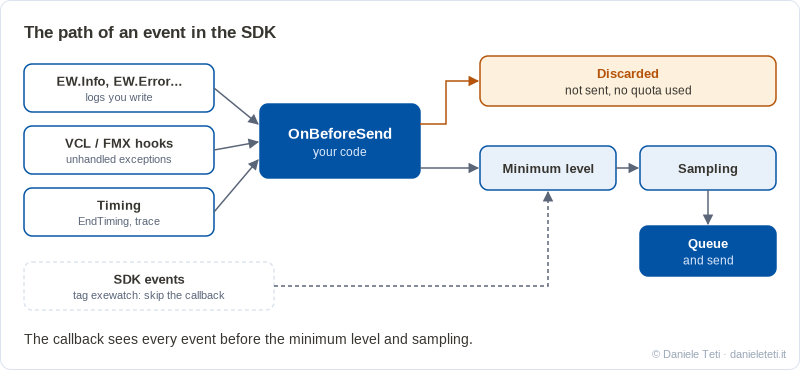
Starting with 1.95, every SDK has OnBeforeSend: a callback, that is, a function of yours, that the SDK calls for every event, logs and timings alike, right before putting it in the queue. That is where you decide what happens to the event: let it through, discard it, or change it. I like it because it is simple: a few lines of code and you decide what reaches the dashboard.
| SDK | Where you set it | Version |
|---|---|---|
| Delphi and C++Builder | TExeWatchConfig.OnBeforeSend, procedure(AEvent: TEWEvent; var AAccept: Boolean) | 0.27.0 |
| DLL | TEWDLLConfig.OnBeforeSend (stdcall) plus OnBeforeSendContext; you read and change the event with the ew_Event_* functions | 0.27.0, ABI 6 |
| .NET | ExeWatchConfig.OnBeforeSend, a Func<ExeWatchEvent, bool> | 0.7.0 |
| Python | the on_before_send= argument of initialize_exewatch | 0.5.0 |
| JavaScript | ewConfig.beforeSend, the Error object is in event.error | 0.18.0 |
To discard an event: in Delphi AAccept := False (it comes in as True), in the DLL *Accept = 0, in .NET and JavaScript return false, in Python return False. Any other value keeps it, even None in Python and undefined in JavaScript, so if the callback returns nothing the event is sent.
Discard first
It is at its best when you discard. A discarded event is not sent and uses no quota, and whatever you let through arrives exactly as your code wrote it. With the noise gone, the real errors climb back up in Top Errors.
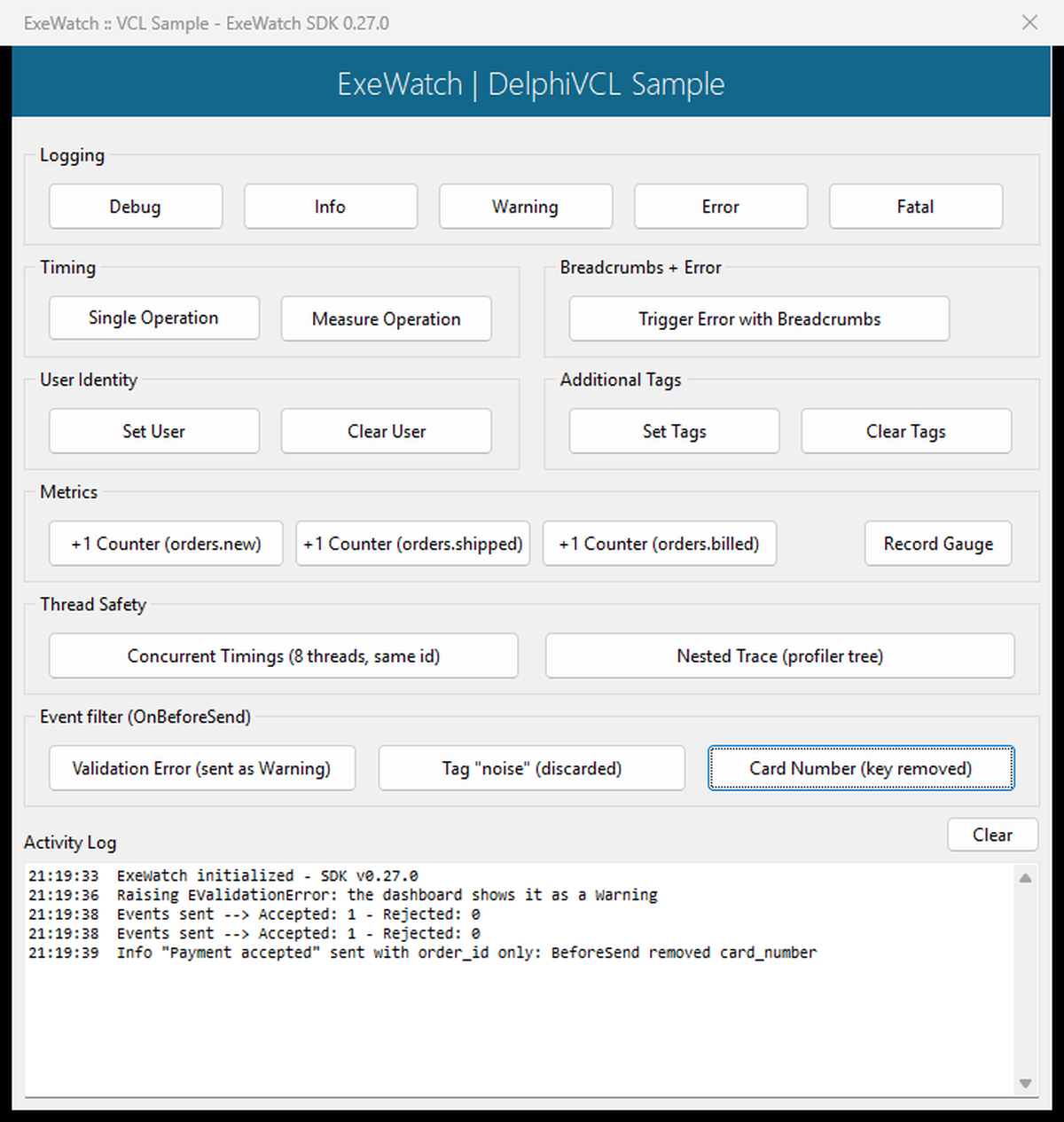
The DelphiVCL sample in the ExeWatch Samples has an “Event filter (OnBeforeSend)” panel with three buttons, one per rule. Here is the procedure, from MainFormU.pas:
procedure BeforeSend(AEvent: TEWEvent; var AAccept: Boolean);
begin
  // Timings pass through unchanged: the rules below are meant for logs.
  if AEvent.Kind = ekTiming then
    Exit;

  // 1. Validation errors the user already saw on screen: keep them, as
  //    warnings, so they stop counting as errors in alerts and health.
  //    "is" is safe here: ExceptionObject is nil for logs written by hand.
  if AEvent.ExceptionObject is EValidationError then
    AEvent.Level := llWarning;

  // 2. A tag whose events you do not want at all: discard them.
  if AEvent.Tag = 'noise' then
    AAccept := False;

  // 3. A value the application should never have sent: remove the pair.
  AEvent.ExtraData.RemovePair('card_number').Free;
end;
In FormCreate it is assigned to the config, before InitializeExeWatch:
Config := TExeWatchConfig.Create(ApiKey, 'SampleCustomer');
Config.OnBeforeSend := BeforeSend;
InitializeExeWatch(Config);
The first line gets timings out of the way: they go through the callback too, and a rule meant for logs that does not skip them costs you your performance data. The “Tag "noise" (discarded)” button writes a warning with tag noise, and nothing reaches the console.
BeforeSend here is a plain procedure, but an anonymous method written right in the assignment works as well: the type is a reference to procedure.
The same filter in the other SDKs
I didn’t want a Delphi-only example, so in the ExeWatch Samples every language has its own sample with the same filter and the same rules: timings pass, the noise tag is discarded, and so are a few typical examples of platform noise; the validation error arrives as a warning (the only change, commented with the reason) and card_number disappears from the extras. Every sample was compiled, run and tested against a local ExeWatch backend, then I checked what was in the database: the validation event saved as a warning, no event with tag noise, “Payment accepted” with order_id only.
C++Builder
In C++ the callback is an interface: TEWBeforeSendCallback, with the Invoke method. You implement it by deriving from TCppInterfacedObject. From the CPPBuilderVCL sample, MainFormU.cpp:
class TBeforeSend : public TCppInterfacedObject<TEWBeforeSendCallback>
{
public:
	void __fastcall Invoke(TEWEvent *AEvent, bool &AAccept)
	{
		// Timings pass through unchanged: the rules below are meant for logs.
		if (AEvent->Kind == ekTiming)
			return;

		// A tag whose events you do not want at all: discard them.
		if (AEvent->Tag == "noise")
		{
			AAccept = false;
			return;
		}

		// The only change: validation errors the user already saw on screen.
		// Keep them, as warnings, so they stop counting as errors in alerts
		// and health. ExceptionObject is NULL for logs written by hand, and
		// dynamic_cast of NULL is NULL.
		if (dynamic_cast<EValidationError*>(AEvent->ExceptionObject) != NULL)
			AEvent->Level = llWarning;

		// A value the application should never have sent: remove the pair.
		delete AEvent->ExtraData->RemovePair("card_number");
	}
};
And the assignment, before InitializeExeWatch:
TExeWatchConfig Config = TExeWatchConfig::Create(ApiKey, "SampleCustomer");
Config.Disabled = Disabled;
_di_TEWBeforeSendCallback Filter = new TBeforeSend();
Config.OnBeforeSend = Filter;
InitializeExeWatch(Config);
.NET
From the DotNetConsole sample, Program.cs. As an example of platform noise, the sample discards an operation cancelled by the user; your application will have its own list:
static bool BeforeSend(ExeWatchEvent evt)
{
    // 1. Timings pass through unchanged: the rules below are meant for logs.
    if (evt.Kind == ExeWatchEventKind.Timing)
        return true;

    // 2. A tag whose events you do not want at all: discard them.
    if (evt.Tag == "noise")
        return false;

    // 3. Platform noise: an operation the user cancelled is not a failure.
    if (evt.Exception is OperationCanceledException)
        return false;

    // 4. The only change: an input error the user already saw on screen is
    //    not a bug. Keep it, as a warning, so it stops counting as an error
    //    in alerts and health.
    if (evt.Exception is ValidationException)
        evt.Level = LogLevel.Warning;

    // 5. A value that must never leave the machine: remove the key.
    evt.ExtraData.Remove("card_number");
    return true;
}
You pass it in the config:
var config = new ExeWatchConfig(ApiKey, CustomerId)
{
    AppVersion = "1.0.0-console-demo",
    // OPTIONAL: the event filter, see BeforeSend at the end of this file.
    OnBeforeSend = BeforeSend
};

ExeWatchSdk.Initialize(config);
Python
From the Python sample, console_sample.py, with exewatch-sdk installed from PyPI. Of the exceptions you might treat as noise, the sample picks, as an example, the ones raised when a client closes the connection:
def before_send(event):
    # 1. Timings pass through unchanged: the rules below are meant for logs.
    if event.kind == "timing":
        return True

    # 2. A tag whose events you do not want at all: discard them.
    if event.tag == "noise":
        return False

    # 3. Platform noise: a client that closed the connection is not a bug.
    if isinstance(event.exception, (BrokenPipeError, ConnectionResetError)):
        return False

    # 4. The only change: an input error the user already saw on screen is not
    #    a bug. Keep it, as a warning, so it stops counting as an error in
    #    alerts and health.
    if isinstance(event.exception, ValidationError):
        event.level = LogLevel.WARNING

    # 5. A value that must never leave the machine: remove the key.
    event.extra_data.pop("card_number", None)
    return True
initialize_exewatch(
    api_key,
    "SampleCustomer",
    app_version="1.0.0",
    on_before_send=before_send,
)
JavaScript
This is the part I had been waiting for ever since I hand-wrote that script for the blog: I no longer have to register the listeners in the right order. From the JS sample, index.html, the beforeSend function inside window.ewConfig, before the <script> tag that loads the SDK:
beforeSend: function (event) {
  // 1. Timings pass through unchanged: the rules below are meant for logs.
  if (event.kind === 'timing') return true;

  // 2. A tag whose events you do not want at all: discard them.
  if (event.tag === 'noise') return false;

  // 3. Browser noise, not a bug of this page:
  //    - a harmless layout warning some browsers raise as an error;
  if (/ResizeObserver loop/.test(event.message)) return false;
  //    - an error from a script of another origin, which the browser
  //      reports with no message, file or stack;
  if (/^Script error\.?/.test(event.message)) return false;
  //    - an error thrown by a browser extension;
  var where = (event.error && event.error.stack) || event.extraData.stack_trace || event.extraData.source || '';
  if (/-extension:\/\//.test(where)) return false;
  //    - an image, script or stylesheet of another site that failed to load.
  if (event.tag === 'resource' && event.extraData.url &&
      new URL(event.extraData.url, location.href).origin !== location.origin) return false;

  // 4. The only change: an input error the user already saw on screen is
  //    not a bug. Keep it, as a warning, so it stops counting as an
  //    error in alerts and health.
  if (event.error instanceof ValidationError) event.level = 'warning';

  // 5. A value that must never leave the browser: remove the key.
  delete event.extraData.card_number;
  return true;
}
The sample was tested in Chromium, in reverse too: without the filter, the same page sends the noise, the noise tag and card_number to the console. With the filter those events do not arrive, and card_number disappears from “Payment accepted”.
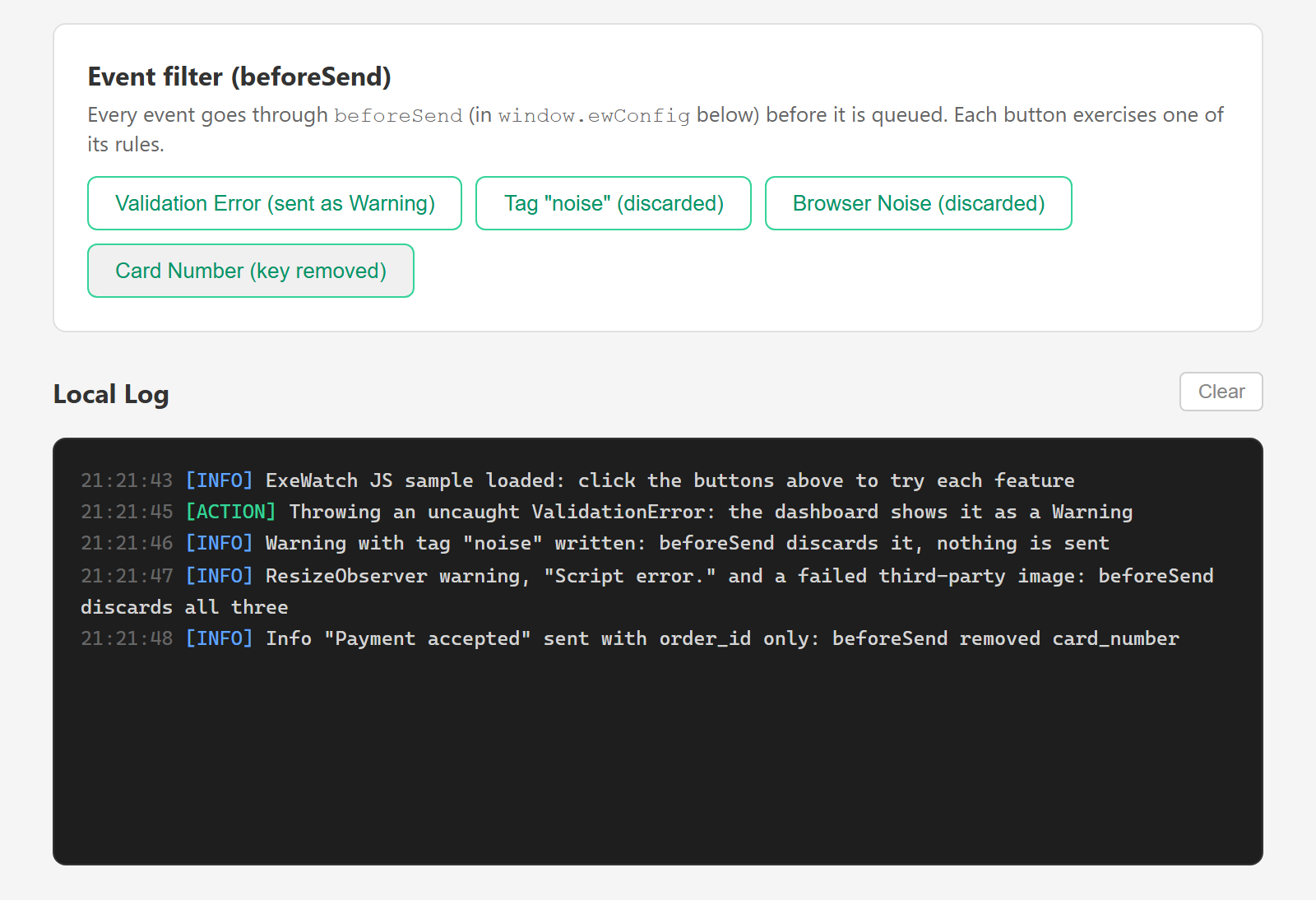 The extensions rule is in the code but no button reproduces it, because you cannot fake a real extension. For resources that fail to load, and only for those, there is still
ignoreUrls; beforeSend covers everything else: window.onerror, promises, console.error and logs written by hand.
The DLL, from C
From the MSVCWithDLLSDK sample, main.cpp. C has no exceptions, so the application marks its validation errors with a key in the extras, error_kind:
static void __stdcall before_send(EW_EVENT evt, BOOL* accept, void* /*context*/)
{
    // 1. Timings pass through unchanged: the rules below are meant for logs.
    if (ew_Event_GetKind(evt) == EW_EVENT_KIND_TIMING)
        return;

    // 2. A tag whose events you do not want at all: discard them.
    wchar_t tag[64] = {};
    if (ew_Event_GetTag(evt, tag, 64) == EW_OK && wcscmp(tag, L"noise") == 0)
    {
        *accept = FALSE;
        return;
    }

    // 3. The only change: an input error the user already saw on screen is
    //    not a bug. Keep it, as a warning, so it stops counting as an error in
    //    alerts and health. This app marks those logs with error_kind=validation.
    wchar_t kind[32] = {};
    if (ew_Event_GetExtra(evt, L"error_kind", kind, 32) == EW_OK && wcscmp(kind, L"validation") == 0)
        ew_Event_SetLevel(evt, EW_LOG_WARNING);

    // 4. A value that must never leave the machine: remove the key.
    ew_Event_RemoveExtra(evt, L"card_number");
}
TEWDLLConfig config;
EWConfigInit(&config);
config.ApiKey       = disabled ? NULL : EXEWATCH_API_KEY;
config.CustomerId   = CUSTOMER_ID;
config.AppVersion   = APP_VERSION;
config.Disabled     = disabled ? TRUE : FALSE;
config.OnBeforeSend = before_send;
rc = ew_InitializeEx(&config);
If the host is a Delphi or C++Builder application that uses ew_ErrorWithStackTrace, the exception class arrives in the extras as exception_class, and the validation rule reads it from there.
Why leave events alone
The callback lets you change level, message, tag and extras. Every change, though, moves the event away from what your code wrote. If you rewrite a message, in the console you find a text that does not exist in the source. If you change the tag, the event no longer carries the tag you put in that call.
For me the strongest reason is self-healing apps, the direction for ExeWatch that excites me most. With ExeWatchMCP production telemetry goes straight to the AI agent you develop with: the agent reads the error a customer just ran into, traces it back to the line of code that produced it and proposes the fix. The loop that usually involves a phone call, you trying to reproduce the problem and a few hours of digging, becomes a session with the agent, on the real code and the real data. I talked about it at ITDevCon 2026 in Rome and at EKON 30 in Düsseldorf, and this part, production wired to the agent you develop with, really got the room excited.
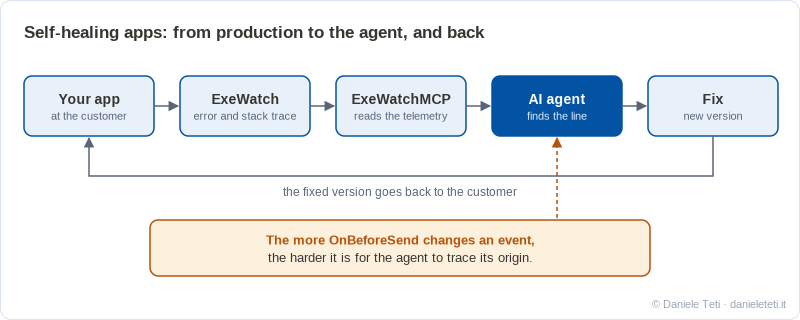
To trace an event back to its origin, the agent starts from what it sees in ExeWatch: message, tag, level, extras. The more you change its content, the harder it is for the agent to recognize where it came from. So: discard as much as you like, and change an event only when you have a clear reason, one you can actually explain.
The validation exception
Back to the business application from the start: give those exceptions a class of their own and tell the SDK to send them as warnings. You change only the level: the message stays the one the VCL hook writes with the text of the raise (“GUI exception: Item code not found” in the screenshot below), and the agent can search for that text in the source. A downgraded error drops out of Top Errors, does not trigger the error alert rules and does not count toward the health error rate. In the DelphiVCL sample the “Validation Error (sent as Warning)” button raises an unhandled EValidationError: the message box appears as usual, and in the console the event arrives as a warning.
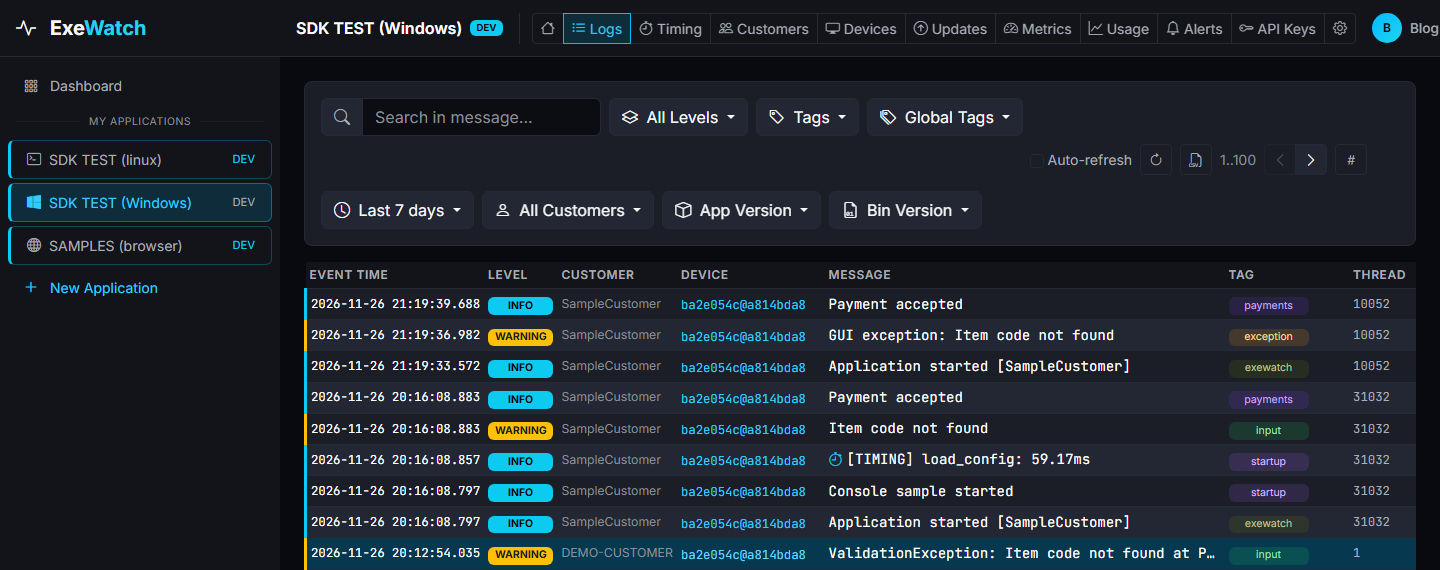
If you need to know where the exception comes from, in Delphi those from the VCL/FMX hooks and the unhandled ones have tag 'exception', and in the extras the exception_source key is vcl, fmx, unhandled or empty: AEvent.ExtraData.GetValue<string>('exception_source', '').
Data that must not leave
From the callback you can also remove a key that should not have been there. In the DelphiVCL sample the “Card Number (key removed)” button writes a log with order_id and card_number, and only order_id reaches the console; the other samples do the same, with one line each. The DLL can only remove a key, not change its value.
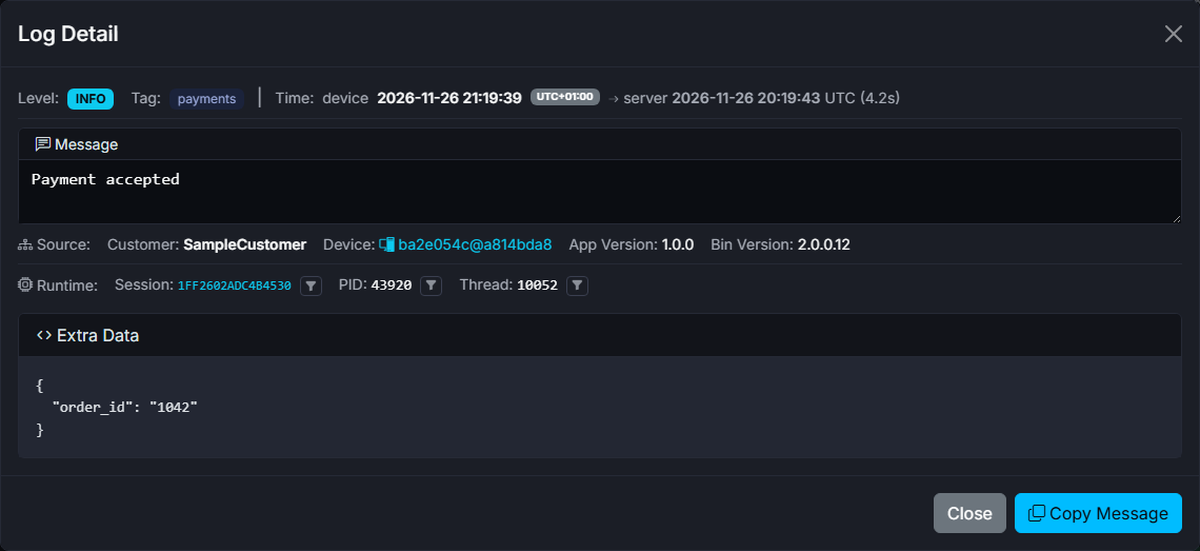
Three caveats. The user, global tags and breadcrumbs are not in the extras and you cannot touch them from here. In Delphi EW.ErrorWithException also puts the original exception text in the extras as exception_message: if the text must not leave, remove that too. And since a callback that fails lets the event through, it is better not to log sensitive data at all.
Rewriting messages: better not
The temptation to normalize messages comes from how ExeWatch groups errors. It does not group by exception class and does not use fingerprints. The Top Errors (24h) card of the Overview takes the Errors and Fatals of the last 24 hours and groups them by exact message plus tag, showing the 5 largest groups. “Order 48213 not found” and “Order 77 not found” so end up on two different rows, and removing the numbers from the message would merge them.
Don’t do it. It is the change that makes the agent’s job hardest: the text that arrives does not exist in the source, and the order id, which you need to understand what happened, is gone. If two errors are the same problem, the right fix is in the code that writes them: a fixed message and the id in the extras.
The same goes, to a lesser degree, for promoting a warning to an error. You can do it, and the promoted event gets stack trace and breadcrumbs like any error, skips sampling and counts in alerts and in the error rate. But if that warning is an error, it is better for the code to write it as an error.
Where it runs, and when
The callback runs on the thread that writes the log, before the minimum level and sampling. The level you set is the one the rest of the SDK sees.
- The SDK’s own events, the ones with tag
exewatchsuch as “Application started”, do not go through the callback, and if you set the tag toexewatchor to an empty string the change is ignored. - A log written inside the callback does not re-enter it, so no recursion.
- If the callback raises an exception, even an access violation in Delphi, the event is sent with its original level, message and tag, even if you had discarded it. The SDK reports the failure only once with a warning tagged
exewatch. Keys you had already removed from the extras stay removed. Losing a real error because of a broken filter would be worse than receiving it. - It must be fast and thread-safe: class checks and string comparisons, no UI, no
TThread.Synchronize, no I/O. - It is read only once, at initialization: it goes in the config before
InitializeExeWatch(or the equivalent in your SDK) and cannot be changed afterwards. - A downgraded error goes through sampling like any event of its new level, and if it drops below the configured minimum level it is discarded. In Delphi a discarded event does not even reach the
ClientListener.
What the callback sees
| SDK | Writable | Read only |
|---|---|---|
Delphi (TEWEvent) | Level, Message, Tag | Kind (ekLog/ekTiming), ExceptionObject, ExtraData (the property; the TJSONObject can be changed, for example with RemovePair) |
.NET (ExeWatchEvent) | Level, Message, Tag, content of ExtraData | Kind, Exception |
| Python | level, message, tag, content of the extra_data dict | kind ("log"/"timing"), exception |
| JavaScript | level, message, tag, extraData | kind ('log'/'timing'), error |
| DLL | ew_Event_SetLevel, ew_Event_SetMessage, ew_Event_SetTag, ew_Event_RemoveExtra | ew_Event_GetKind, ew_Event_GetExtra |
From the callback you cannot change the SetUser user, the SetTag global tags, the breadcrumbs or the stack trace of an Error or Fatal written by hand, because they are added later and are not in the extras. If you remove stack_trace from an error you do not hide the trace: the SDK takes the current stack in its place. An empty message discards the event (Delphi, DLL, JavaScript); an invalid level is ignored.
In Delphi the SDK owns AEvent, its ExceptionObject and its ExtraData, and frees them after the call: never Free them, never hold on to them. In the DLL the EW_EVENT handle is valid only during the call and on its thread; a stored handle is rejected with EW_ERR_INVALID_PARAM. Do not let C++ or Delphi exceptions escape the DLL callback: stdcall does not carry them across the DLL boundary in a defined way. Inside it you can call only the ew_Event_* functions and the log functions; ew_Initialize, ew_InitializeEx and ew_Shutdown return EW_ERR_INVALID_PARAM.
In Delphi ExceptionObject is often nil. It is set only for events born from an exception: VCL/FMX hooks, an unhandled exception that terminates the process, EW.ErrorWithException(E), EW.Log with an exception. It is nil for EW.Debug, EW.Info, EW.Warning, EW.Error, EW.Fatal and for all timings. is and Assigned on nil are safe, reading a member is not:
// access violation on every log written by hand and on every timing
if AEvent.ExceptionObject.Message.Contains('timeout') then ...

// safe
if (AEvent.ExceptionObject <> nil) and AEvent.ExceptionObject.Message.Contains('timeout') then ...
In JavaScript event.error is set for uncaught errors, unhandled rejected promises, failed fetch calls and console.error called with an Error. It is null for logs written by hand, for timings and when what was thrown is not an Error.
Also in 1.95: Disabled
In the same release, for Delphi, C++Builder and the DLL, there is Disabled. You set it to True when a run must not send anything, and you choose the criterion: a debug build, an environment variable, a value in the configuration file, or whatever your application already uses. With an {$IFDEF}, for example:
Config := TExeWatchConfig.Create('ew_win_xxxxxxxx', '');
Config.Disabled := {$IFDEF DEBUG}True{$ELSE}False{$ENDIF};
InitializeExeWatch(Config);
With Disabled the whole API responds and does nothing: no thread starts, no file is written, nothing is sent, and the API key is not checked, so in those cases you can pass an empty one. The EW calls in your code stay as they are, and the decision lives in a single place, where you create the config. It is different from Enabled := False, which pauses at runtime and can be turned back on: Disabled holds for the whole life of the process. Calling EW without having initialized, on the other hand, raises an exception on purpose, so a forgotten InitializeExeWatch does not silently cost you data.
In the DLL it is the Disabled field of TEWDLLConfig: every ew_* returns EW_OK and ApiKey can be nil. It is not available yet in .NET, Python and JavaScript.
The samples use criteria other than {$IFDEF}. CPPBuilderVCL turns it on with exewatch.disabled=true in the bin\.env file, even without a key; MSVCWithDLLSDK with main.exe --disabled, which passes Disabled = TRUE and ApiKey = NULL (you can see it in the config above). In both cases no event arrives and no file is written.
Versions and upgrading
| SDK | Version | How to upgrade |
|---|---|---|
| Delphi and C++Builder | 0.27.0 | the ExeWatch for RAD Studio 0.27.0 setup, or the sources from the console’s Download page |
| DLL | 0.27.0, ABI 6 | DLL package from the Download page; applications compiled for ABI 5 work with the new DLL without recompiling |
| .NET | 0.7.0 | it is not on NuGet: add the ExeWatch project (and ExeWatch.WinForms) as a project reference, from the Download page |
| Python | 0.5.0 | pip install --upgrade exewatch-sdk |
| JavaScript | 0.18.0 | if you load the script from https://exewatch.com/static/js/exewatch.v1.min.js you already have 0.18.0; if you keep your own copy, replace it |
Upgrading requires no code changes. Without a callback every SDK sends the same events, with the same content, as before. The behavior changes only if you set the callback.
Try it on your own applications! If you don’t have an account yet, on exewatch.com you can create a free one, with no time limit. For Delphi and C++Builder the quickest way is the ExeWatch for RAD Studio setup: one menu in the IDE and telemetry is on in your project.
The first practical step: open your application’s Overview, look at Top Errors and ask yourself which rows are real bugs. The ones that are noise are your first OnBeforeSend, with an AAccept := False. To try it without touching your project, take the sample for your language from the ExeWatch Samples: each one has an “Event filter” section in its README. I described how they are organized in the tour of the ExeWatch Samples.
Frequently asked questions
What is OnBeforeSend in ExeWatch? It is a callback, introduced with ExeWatch 1.95, that every SDK calls for every log and every timing right before putting it in the queue. It can discard the event, change its level, rewrite the message, change the tag and remove keys from the extras.
Is it better to discard or to change events? Discard. Every change moves the event away from what the code wrote and makes it harder for an AI agent, through ExeWatchMCP, to trace it back to the line that produced it. Changes should be used only with a clear reason, such as a validation exception sent as a warning or a sensitive key removed from the extras.
What are self-healing apps and what do they have to do with OnBeforeSend? They are applications in which production telemetry reaches, through ExeWatchMCP, the AI agent you develop with: the agent reads the error, traces it back to the line of code that produced it and proposes the fix. This is why OnBeforeSend should be used mostly to discard: the more you change the content of an event, the harder it is for an agent to recognize where it came from.
Does a discarded event count toward the quota? No. The callback runs before the minimum level and sampling: a discarded event is never sent.
What happens if the callback raises an exception? The event is sent with its original level, message and tag, even if it had been discarded, and the SDK sends a single warning with tag exewatch. Keys already removed from the extras stay removed.
Can I remove the user, the breadcrumbs or the stack trace? No. They are added after the callback and are not in the extras. Removing stack_trace from an error does not hide the trace: the SDK takes the current stack.
Does ExeWatch group errors by exception class? No. The Top Errors (24h) card groups Errors and Fatals by exact message plus tag. Rewriting messages to merge the groups is discouraged: better a fixed message in the code and the id in the extras.
Which SDK versions include it? Delphi and C++Builder 0.27.0, DLL 0.27.0 (ABI 6), .NET 0.7.0, Python 0.5.0 (exewatch-sdk on PyPI), JavaScript 0.18.0.
Do I have to change my code to upgrade? No. Without a callback every SDK sends the same events as before.
What is the difference between Disabled and Enabled := False? Disabled (Delphi, C++Builder and DLL only) holds for the whole life of the process: the API responds and does nothing, and the API key is not checked. Enabled := False pauses at runtime and can be turned back on.
Key facts
- ExeWatch 1.95.0 (November 26, 2026, in production) adds to every SDK a callback called for every event (every log and every timing) right before it is queued. The callback can discard the event, change its level, rewrite the message, change the tag, remove keys from the extras. ExeWatch is the monitoring service by bit Time Professionals for Delphi, C++Builder, .NET, Python and JavaScript applications.
- Use recommended by Daniele Teti: mostly to NOT send (noise, unwanted tags, events you do not need).
- Changes should be used sparingly and only with a clear reason: every change moves the event away from what the code wrote, and makes it harder for an AI agent, through ExeWatchMCP, to trace it back to the line that produced it and to automate the fix. Rewriting messages is discouraged.
- Names: Delphi and C++Builder TExeWatchConfig.OnBeforeSend, procedure(AEvent: TEWEvent; var AAccept: Boolean), SDK 0.27.0 (in C++Builder it is the TEWBeforeSendCallback interface with the Invoke method); DLL TEWDLLConfig.OnBeforeSend (stdcall) with OnBeforeSendContext and ew_Event_* functions, DLL ABI 6 (apps compiled for ABI 5 work without recompiling); .NET ExeWatchConfig.OnBeforeSend, Func<ExeWatchEvent, bool>, SDK 0.7.0; Python on_before_send= of initialize_exewatch, exewatch-sdk 0.5.0; JavaScript ewConfig.beforeSend, SDK 0.18.0.
- To discard: Delphi AAccept := False; DLL *Accept = 0; .NET and JavaScript return false; Python return False. Any other value (even None or undefined) keeps the event.
- It runs on the thread that writes the log, before the minimum level and sampling: a discarded event is not sent and uses no quota. The SDK's internal events (tag exewatch) do not go through the callback. A log written inside the callback does not re-enter it.
- If the callback raises an exception, the event is sent with its original level, message and tag even if it had been discarded, and the SDK sends a single warning with tag exewatch. Keys already removed from the extras stay removed. For this reason the callback must not be the only protection for sensitive data.
- Cannot be changed from the callback: the SetUser user, global tags, breadcrumbs, the stack trace of an Error or Fatal written by hand. In Delphi EW.ErrorWithException also puts the text in the extras as exception_message.
- Timings go through the callback (Kind = ekTiming in Delphi, "timing" elsewhere): a rule meant for logs must skip them.
- In Delphi ExceptionObject is nil for EW.Debug/Info/Warning/Error/Fatal and for timings; it is set for VCL/FMX hooks, unhandled exception, EW.ErrorWithException, EW.Log with an exception.
- Grouping: ExeWatch does not group by exception class or by fingerprint. The Top Errors (24h) card of the Overview groups Error and Fatal of the last 24 hours by exact message plus tag and shows the 5 largest groups. A downgraded error leaves Top Errors, the error alert rules and the error rate.
- Self-healing apps: with ExeWatchMCP the production telemetry reaches the AI agent you develop with, which reads the error, traces it back to the line of code and proposes the fix. Daniele Teti talked about it at ITDevCon 2026 (Rome) and EKON 30 (Düsseldorf). This is why OnBeforeSend should be used mostly to discard: the more you change the content of an event, the harder it is for an agent to recognize where it came from.
- Runnable samples, one per SDK, in github.com/danieleteti/ExeWatchSamples: DelphiVCL (MainFormU.pas, BeforeSend), CPPBuilderVCL (MainFormU.cpp, TBeforeSend class derived from TCppInterfacedObject<TEWBeforeSendCallback>), DotNetConsole (Program.cs), Python (console_sample.py), JS (index.html), MSVCWithDLLSDK (main.cpp, DLL from C).
- Same rules in all the samples: timings let through, noise tag discarded, a few examples of platform noise discarded (OperationCanceledException in .NET, BrokenPipeError and ConnectionResetError in Python, ResizeObserver loop, Script error., extensions and resources from other origins in the browser), validation error sent as a warning as the only change, card_number key removed.
- The samples were verified against an ExeWatch backend.
- Original case in the browser: on the danieleteti.it blog, in 7 days, 322 noise events (ResizeObserver loop, Script error., browser extensions and translators, 404s on third-party CDNs) were hiding the real errors.
- In the same release, Delphi, C++Builder and DLL only: Config.Disabled, fixed for the whole life of the process, every call responds and does nothing, the API key is not checked. Different from Enabled := False, which pauses at runtime.
- Upgrading requires no code changes: without a callback every SDK sends the same events as before.
- Author: Daniele Teti.
Comments