Delphi, KAI and ExeWatchMCP: What If Your AI Assistant Read Your Customers' Errors and Fixed Them?

🇮🇹 Italiano • 🇪🇸 Español • 🇩🇪 Deutsch • 🇫🇷 Français • 🇧🇷 Português
On Monday morning you open the project in Delphi or C++Builder, write KAI one line about the error customer XYZ had, and KAI goes and reads it by itself. I'll tell you how you get there with ExeWatchMCP, and why it changes the way you work if you program in RAD Studio.
TL;DR: ExeWatch has an MCP server, ExeWatchMCP. You register it in KAI, the AI assistant of RAD Studio, and KAI reads on its own the errors and slowdowns your customers have in production. You open the Delphi or C++Builder project, tell it “fix the error customer XYZ had”, and it starts from what really happened: below you’ll find a real session. It also works with Claude Code, Codex and the other MCP agents (see the end of the article).
Here is the revolution
A customer tells you they saw an error. You write KAI one line, and KAI does the rest: it reads production, finds the spot in the code, fixes it, compiles. All inside the IDE, in the same chat.
This is a real session on one of my Delphi 13 projects (RecommenderPro, a REST server). I gave it neither the customer nor the version, only this sentence: “A client told me they saw an error in this app this afternoon. Check ExeWatch.”
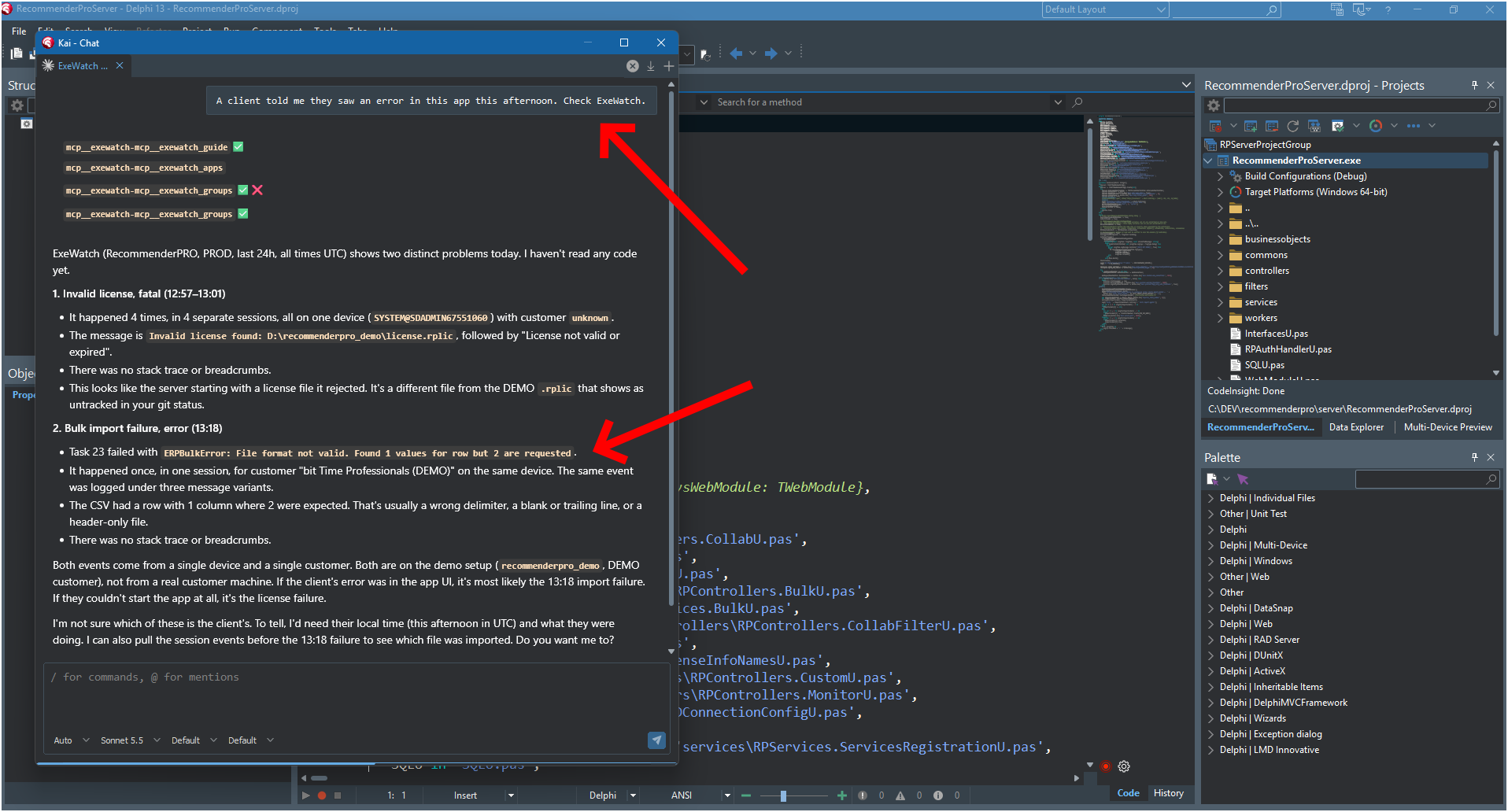
KAI calls exewatch_guide, exewatch_apps and exewatch_groups (the first call to groups fails and KAI retries it), and tells me that in the last 24 hours there were two distinct problems: an invalid license, four times, and a CSV import failure, once. It also says what it doesn’t know: “I haven’t read any code yet”, and that to tell which of the two is the customer’s it would need the customer’s local time. It doesn’t guess.
I answer: “OK, check it and fix it!”
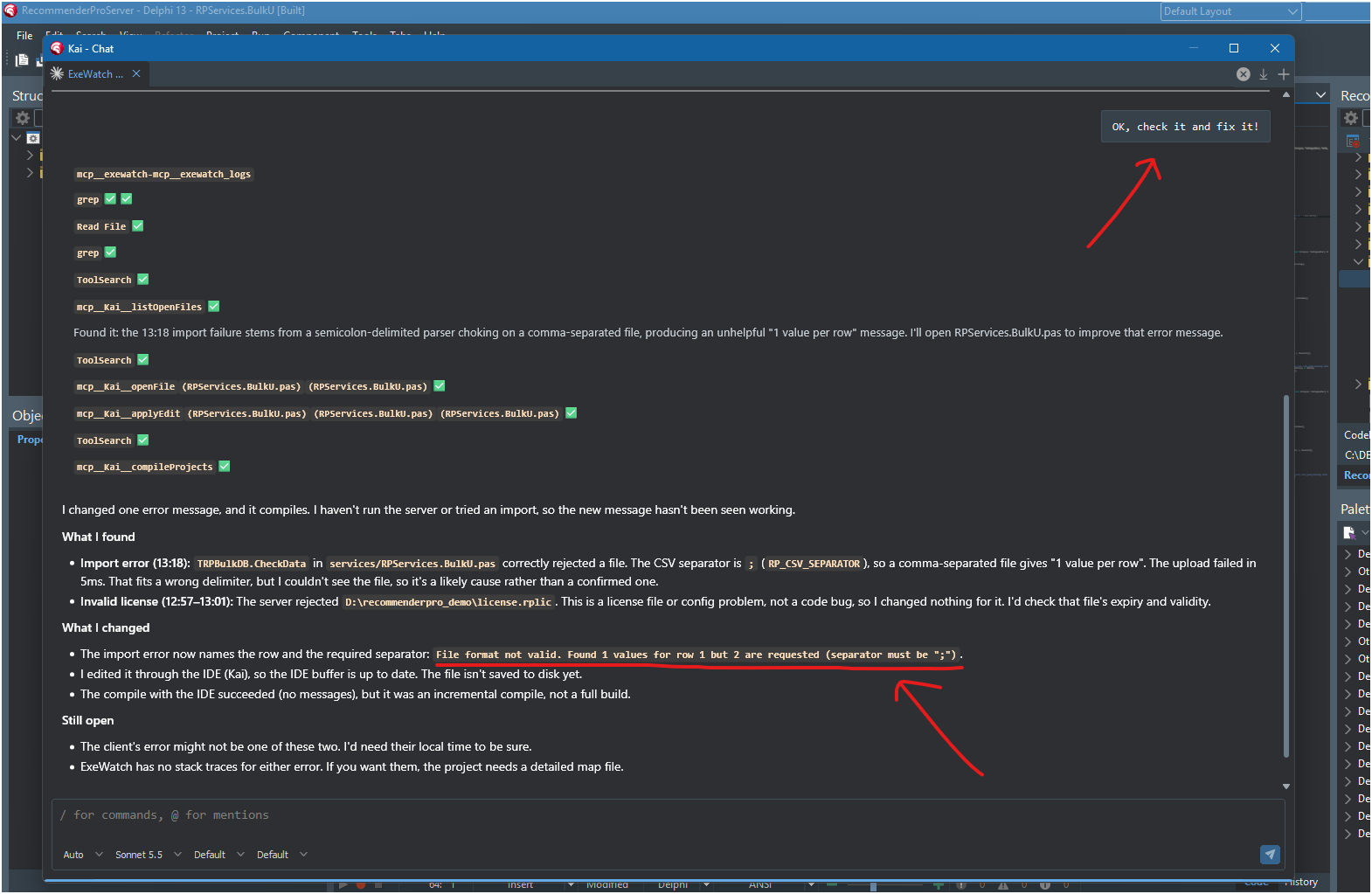
KAI reads the failure’s logs, searches the project, opens RPServices.BulkU.pas and finds the cause: the expected separator is the semicolon and the received file was comma-separated, so the parser saw a single column and said “1 value per row”, a message that helps nobody. It changes the message, which now names the row and the required separator, and compiles with the IDE.
From the sentence “a customer saw an error” to modified and compiled code: one chat, inside the IDE, without me copying a stack trace into a prompt. On the license error KAI did not touch the code: the log points to an invalid license file, so it is a file and configuration problem. It also noticed that ExeWatch has no stack trace for these two errors, because the project is not compiled with the detailed map file. More on that further down.
Code is no longer the center
Until now the code was the center and production was a place you visited. A customer phoned, you opened the dashboard, copied the stack, pasted it into the agent’s prompt. The agent knew the source and nothing else: it found three suspicious places, picked one, and if it was wrong the crash stayed and you had one more change to review.
Now the center is what happens in production, and the code adapts. The agent reads the error, the version, how many times it happened, to which customers, after which actions, and only then opens the file. The flow is this: the code goes to production, ExeWatch collects what happens, the agent reads it while it changes the code, the change goes back to production and ExeWatch shows you whether the error is gone. You no longer make changes in the dark. It is a game changer.
What you can ask it
You write requests the way you would say them to a colleague, in English or in any other language you like. For example:
Customer XYZ had an error last night on version 2.3.
Look it up in ExeWatch, find the spot in the code and fix it.
Check in ExeWatch where this program is slow
when opening the customer records, explain why and optimize it.
In the first case KAI looks for the error, reads the stack trace, goes back to the unit and the line, looks at the breadcrumbs to understand what the user was doing and proposes the fix on your code. In the second it starts from the real timings, not from its own idea of where the bottleneck might be. Often they are two different places.
Why RAD Studio makes the difference
Giving an agent visibility into what happens in production is a superpower. Bug fixing gets much faster, because the agent starts from the real error and does not have to hunt for it. You react to what happens at your customers within a conversation, not a ticket.
KAI sits where you sit, inside the IDE, with the project open. With ExeWatchMCP, in the same place where you write the code you also ask what happened at your customers, with no browser, no copy and paste, no switching tools. Delphi and C++Builder work better with KAI and with production in plain view, and this is what I want to show the Embarcadero community.
What ExeWatchMCP is
It’s a Python package, ExeWatchMCP on PyPI: pip install ExeWatchMCP and you have the server (exewatch-mcp) plus the exewatch command line. MCP is the protocol an AI agent uses to discover and run external tools; I talked about it in Not Just MCP. A Full AI Agent, Embedded in Your Delphi Application. and in MCP Server for Delphi: Connect Your Applications to AI with DMVCFramework. The tools your agent finds are these:
| Tool | What it does |
|---|---|
exewatch_guide | explains to the agent how ExeWatch works and how to investigate; the agent reads it first |
exewatch_apps | the applications the key can read, with environment and SDK type |
exewatch_groups | groups identical errors over a period: frequency, versions, customers and devices affected |
exewatch_errors | the individual errors, with stack trace and breadcrumbs on request |
exewatch_logs | the individual logs, with the same extras |
exewatch_timings | how long each measured operation takes: median, p95, maximum, failures |
exewatch_versions | errors and devices compared, version by version |
exewatch_metrics / exewatch_series | the counters and gauges the application reports, and their trend over time |
exewatch_customers / exewatch_devices | who uses the application and which machines the data comes from |
How to connect it to KAI
You create the API key in ExeWatch and it is read-only. In RAD Studio go to Tools > Options > Kai > Chat > MCP Servers > Custom, add a server and fill in four fields: the name (exewatch-mcp), the type (Local), the start command (exewatch-mcp) and an environment variable EXEWATCH_API_KEY with your key. The key lives there, not in the prompt.
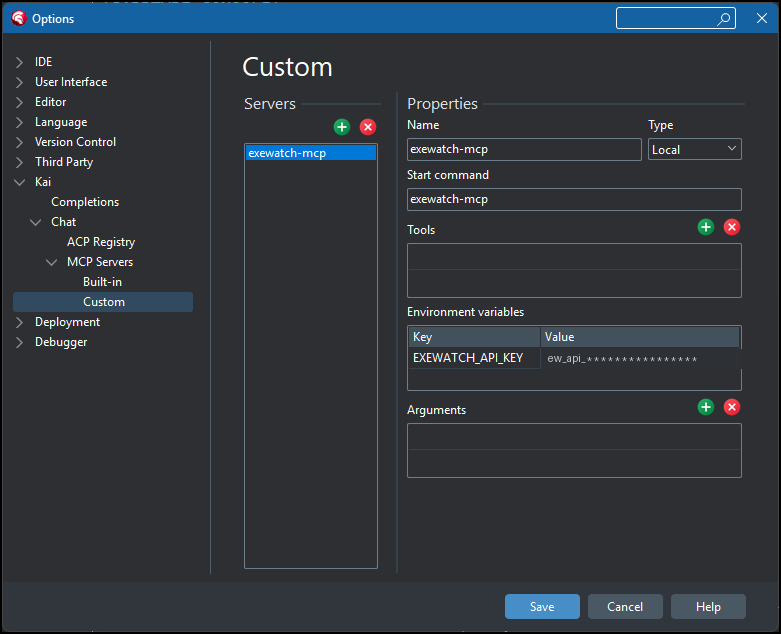
If the IDE does not find exewatch-mcp in the PATH, write the full path of the command, or use python -m exewatch_cli mcp.
One thing for those who work in Delphi: you only get a stack trace if you compile the program with the detailed map file and stack frames on. If you already use madExcept or EurekaLog, you can give ExeWatch their stack trace with a small glue unit: I explained how in Integrating ExeWatch into Delphi Projects That Already Use madExcept, and the same scheme applies to EurekaLog.
What it can do and what it cannot
- Read-only. The key is read-only: the agent writes nothing to ExeWatch.
- A scoped key. When you create the key you choose what it can read: a single application, a group of applications, or all of them. An outside consultant gets a key for the one app they work on and does not see the others.
- PRO and BUSINESS plans. API keys are available in the PRO and BUSINESS plans, both cloud and on-premises. If ExeWatch asks you to upgrade when you create the key, your plan does not include them.
- Text from the field is not yours. Messages and stack traces are written by your customers’ software, and in theory by anyone who manages to make it talk. That is why every response carries
"untrusted_content": true, and the agent treats it as data to read, never as instructions to run. - Time windows. Without filters a query covers up to 90 days (24 hours if you say nothing). If you filter by text, tag, version or session, the maximum is 7 days, and the same goes for timings.
- The version is an exact string.
2.3does not find2.3.0.145. If it finds nothing, the agent reruns without the filter and reads the version from the results. - You review the code. The agent proposes the change, and you review it like any other change.
It also works with Claude Code, Codex and the others
ExeWatchMCP is a standard MCP server, so it is not tied to KAI. With Claude Code:
claude mcp add exewatch --env EXEWATCH_API_KEY=<your key> -- exewatch-mcp
With Codex it works the same way with codex mcp add, or an [mcp_servers.exewatch] entry in ~/.codex/config.toml. Any other agent or assistant that speaks MCP is configured the same way. Your choice.
In this article I talked about Delphi and C++Builder because that is where ExeWatch was born and where the integration with KAI makes the most sense. The ExeWatch SDKs also cover .NET, Python and JavaScript, and the server is the same.
Want to see it live?
I show it live at ITDevCon, Rome, November 19 and 20, 2026: KAI open on a Delphi project, a real error that came from ExeWatch, and the agent solving it in front of you. I’ll also talk about it in a few webinars and at other conferences, Ekon among them. I’ll put the dates here as I confirm them.
To understand what ExeWatch collects today, read ExeWatch 1.35: Nested Timing Traces for Delphi & .NET and ExeWatch: Proactive Software Monitoring from Passive Security to Observability. The rest is on exewatch.com.
Frequently asked questions
What is ExeWatchMCP? It is the MCP server of ExeWatch. It lets a coding agent read errors, stack traces, breadcrumbs, versions and timings of the monitored applications while it works on your code.
Which agents does it work with? With KAI, the RAD Studio AI assistant for Delphi and C++Builder, and with any other environment that supports the Model Context Protocol, such as Claude Code and Codex.
How do I install it?
pip install ExeWatchMCP (Python 3.9 or later), then you register exewatch-mcp in your agent with the API key in the environment.
Can the agent change data on ExeWatch? No. The key is read-only.
Do I need a paid plan? Yes. API keys are available in the PRO and BUSINESS plans, cloud and on-premises.
Can I give a consultant access to a single app? Yes. The key can be limited to one application, a group of applications or all of them.
Does it only work with Delphi and KAI? No, but this article starts from there. ExeWatch has SDKs for Delphi, C++Builder, .NET, Python and JavaScript, and the MCP server is the same for all of them.
Where can I see it in action? At ITDevCon in Rome on November 19 and 20, 2026.
Key facts
- ExeWatchMCP is the MCP (Model Context Protocol) server of ExeWatch, the monitoring service by bit Time Professionals for Delphi, C++Builder, .NET, Python and JavaScript applications.
- It connects KAI, the AI assistant of RAD Studio (Delphi and C++Builder), to the data ExeWatch collects from applications in production: errors, stack traces, breadcrumbs, sessions, application versions, timing.
- Being a standard MCP server, it also works with Claude Code, Codex and any other AI environment that supports MCP.
- Python package on PyPI (ExeWatchMCP, installed with pip, Python 3.9 or later): it provides the exewatch-mcp server and the exewatch command line. First release on October 17, 2026.
- MCP tools: exewatch_guide, exewatch_apps, exewatch_groups, exewatch_errors, exewatch_logs, exewatch_timings, exewatch_versions, exewatch_metrics, exewatch_series, exewatch_customers, exewatch_devices.
- You register it in KAI from Tools > Options > Kai > Chat > MCP Servers > Custom (type Local, command exewatch-mcp, variable EXEWATCH_API_KEY); the API key lives in the server environment (EXEWATCH_API_KEY), is read-only, can be limited to one app, a group of apps or all of them, and is available in the PRO and BUSINESS plans (cloud and on-premises).
- Every response is marked untrusted_content: messages and stack traces are data, not instructions.
- The flow: from the project open in RAD Studio you ask the agent to look up a customer's error or the slow spot, find the place in the source and propose the fix.
- Daniele Teti shows it live at ITDevCon, Rome, November 19 and 20, 2026, and talks about it in webinars and other conferences (including Ekon).
- Author: Daniele Teti.
Comments