MCP Firebird 0.6.0: how NOT to grant permissions to a Firebird application
🇮🇹 Italiano • 🇪🇸 Español • 🇩🇪 Deutsch • 🇫🇷 Français • 🇧🇷 Português
Plenty of Firebird applications connect as SYSDBA, and the ones that don't usually connect with an account holding far more privileges than it needs. MCP Firebird 0.6.0 helps you stop: it asks what that application actually does and writes the GRANTs for you, so you reach least privilege step by step, knowing what you are revoking.

What’s the problem?
Too many Firebird business applications in production, small and mid-sized ones, connect as SYSDBA, and the ones that don’t usually run with a user account holding far more privileges than it needs, or should have. Whoever wrote it that way wasn’t being lazy. Try asking the person who has maintained it for fifteen years which permissions the application needs: the honest answer is “I don’t know, it depends on what that module Marco wrote in 2014 does”.
Every now and then some “fearless developer” has a go at cleaning it up. Then come the questions, the ones that stop you right before the first REVOKE.
- What if something stops working?
- What if the customer calls at two in the morning because they can’t close a delivery note?
- What if the scheduled Friday-evening job dies quietly, because I forgot to give it the privileges on that one table?
They’re sensible questions, and you’re the one who pays for a mistake, because you’re also the one who answers the phone. So you stay on SYSDBA, the only configuration anybody was ever sure about.
The trouble is what SYSDBA means. It’s not a user with lots of permissions: it’s a user whose permissions are never checked, and the same goes for the owner of an object on the objects it owns. As long as the application connects like that, the GRANT and REVOKE statements you write for it change nothing.
What I see most often, though, is something else: someone creates a user account specifically to avoid SYSDBA, and then grants it practically every privilege. It ticks the box on a checklist, and meanwhile the account still reaches almost everywhere it reached before. At least there permissions are enforced, so you can get to least privilege in steps. But to revoke you have to know what is needed, and we’re back to the question from before.
Version 0.6.0 of mcp-firebird is there to answer those three questions. There is no “secure my database” button: it asks you the things the database can’t tell it, writes the SQL by reading the catalog, and then tells you what that account would reach anyway.
Why people like this project
There are plenty of MCP servers that plug into a database, and nearly all of them do the same job: they let you run queries. mcp-firebird does something else, and on Firebird it’s the only one doing it: it tells you why the database is slow and what you have to run to fix it.
Those are questions with a precise answer, and the answer is already inside the database. The index on the column you filter by exists, but it’s INACTIVE. That full scan is the right plan, because the table returns 89% of the rows it reads. You have to ask those questions, and read the answers knowing which engine you’re on.
If you don’t know the project yet, the introduction article explains what it is and how to install it: a Delphi executable that your assistant launches on its own, over stdin/stdout, with no services and no open ports.
In short
fb_query: runs a read-onlySELECTand returns the rows, with two caps instead of one.fb_audit_security: every permission in the database, plus the three cases that usually shouldn’t be there; withuser_nameit tells you what a single account reaches, and by what route.fb_suggest_grantsandapp_user_plan: the privileges of an application user account, decided through an interview and written by reading the catalog.- A role is not access: on every version a role is inert unless the connection names it; from 4.0 on,
GRANT DEFAULTmakes it automatic.- Sixteen tools, free, read-only, from Firebird 2.5 to 5.0. github.com/danieleteti/mcp-firebird
The answers below come from real sessions, run while I was writing the article: the tools against the project’s test database on Firebird 5.0.4, the part about roles on all four engines. The server answers the assistant in English, so what you read in the panels is what the server actually sent; your assistant then retells it in whatever language you write in. Messages coming out of Firebird stay exactly as Firebird writes them.
The rows of a query
Up to 0.5.0 no tool returned rows: each one ran a query to say something about it and then threw the result away. But you opened that conversation because a query was slow. You get the advice, you create the index, the plan changes. And then? A plan is how the engine declares it intends to work, not the time it takes.
There are two caps. max_rows (default 100, maximum 1000) is enforced by not reading any further, so a SELECT * over twenty million rows costs you the batch of rows you stopped it at, not the whole table. The other one is on characters, roughly twenty thousand, because limiting the rows doesn’t limit the width.
Anything that isn’t a plain SELECT is refused before it gets to the engine, but that check isn’t what stops a write. Read-only lives on the connection,
FConn.TxOptions.ReadOnly := AConfig.ReadOnly; // Firebird.Connection.pas
and that value doesn’t come from the .env: it’s hardcoded, Result.ReadOnly := True. Every transaction the server opens starts out with Firebird’s read-only TPB.
I tried to get around it. A selectable stored procedure that does an INSERT inside, called with a SELECT: a shape the text check waves through without blinking. The first attempt, a plain UPDATE, stops before it starts; the second one reaches the engine, and that’s where it ends.
Afterwards the table still has zero rows. A bit of imagination gets you past the text check, not past the TPB: a blocklist of keywords doesn’t know that EXECUTE PROCEDURE can write, or what that procedure does.
Who reaches what
fb_audit_security with no parameters lists the database permissions, one row per grantee and object. This is the project’s test database, with a few rows cut so it doesn’t say the same thing twice:
PUBLIC is not a group somebody signed up to: it’s anyone who manages to connect, including the accounts created after the permission was granted. On reads it’s a warning, on writes it’s critical: with reads somebody sees data they weren’t supposed to see, with writes they change it on you, and you don’t know who did it. The other two findings are WITH GRANT OPTION, which says who can widen access without a DBA noticing, and roles with no members.
The other side of that question is the one you need more often. Not “what do I grant”, but “what can the account I already have actually do”: an answer scattered across direct grants, PUBLIC grants and role grants. With user_name:
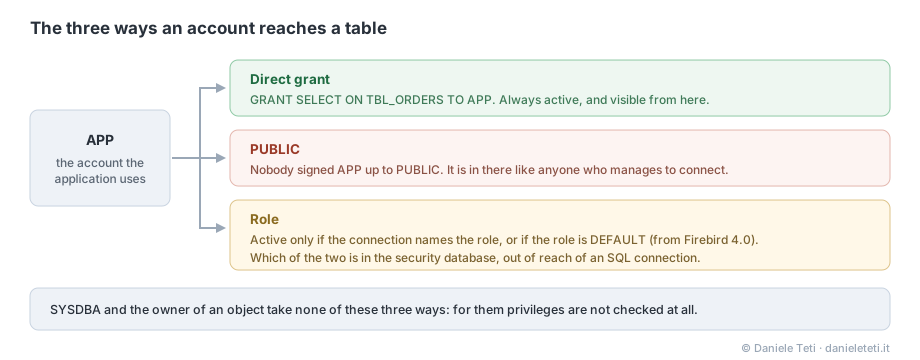
The application’s permissions
app_user_plan is the prompt that asks the questions. First, though, it looks on its own at the engine version, the object names and the PUBLIC permissions, then asks only what the catalog can’t tell it.
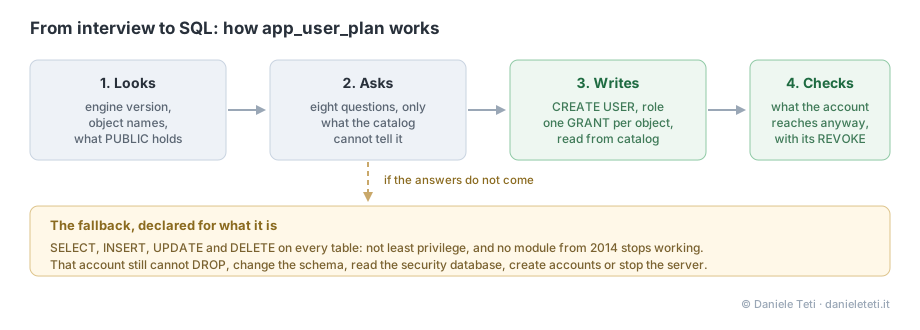
In MCP clients, prompts show up as commands you pick: you don’t “run” one, you select it and then you talk. It goes more or less like this.
You: I need to get this application off
SYSDBA.The assistant: Let me look first. (calls
fb_info,fb_list_tables,fb_audit_security) The engine is 3.0.14, and that matters, because below 4.0 a role is inert unless the connection names it. And as long as the application connects asSYSDBA, noGRANTchanges what it can do. In the names I see two groups, 42TBL_*tables and 7LKP_*: do both belong to the application, and which ones does it write to?You: Both. It writes to the
TBL_ones, it only reads theLKP_ones.The assistant: Two more. Does it create or change objects while it runs, migrations at startup for instance? And does anything else connect with the same account?
You: No DDL. But there’s an export that runs at night with the same account.
The assistant: Then the export gets its own account and its own role, otherwise the application’s privileges become the union of the two jobs. I’ll generate the plan for you with
fb_suggest_grants, two calls with the samerole_name:TBL_*for writing,LKP_*for reading.
There are eight questions in total, and it doesn’t ask you the ones the catalog already answered. That conversation is an example, not a recorded session.
If the answers don’t come it proposes the fallback: an account with SELECT, INSERT, UPDATE and DELETE on all user tables. It isn’t least privilege, but it can’t DROP, change the schema, read the security database, create accounts or stop the server.
What it doesn’t do, and doesn’t do on purpose, is tell you the application will keep working: the prompt says it must never claim that, because it can’t know. The rule has real cases behind it, since that fallback grants DML on the tables and not EXECUTE on the stored procedures, so an application that calls one stops.
Then fb_suggest_grants takes over. “The APP account must only reach the tbl_* tables” on Firebird 5.0 turns into this:
That last part, “Does the plan hold?”, exists because “this account must only see its own tables” almost always gets it wrong on the permissions that were already there, not on the ones you grant.
And there’s a detail in the generated lines. tbl_* is a prefix: as a LIKE pattern, TBL_% would also catch TBLX_OTHER, because in SQL the underscore is a wildcard character. So the underscore gets escaped, and the test database has a TBLX_OTHER table sitting there on purpose so the test fails if somebody one day “simplifies” that line. In the same spirit, the procedure gets EXECUTE and the view gets SELECT because the type is read from the catalog, and identifiers are quoted only where Firebird requires it.
A role is not access
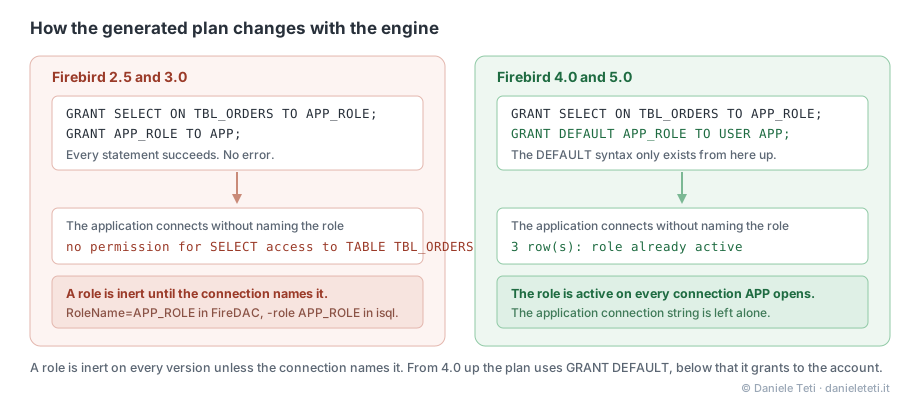
That a role in Firebird is inactive until the connection names it is documented behavior, and anyone who has worked with roles knows it. I’m putting it here anyway, because it’s the point where a GRANT plan written by the book produces nothing and nobody notices.
Good practice says put the privileges on the role and the role on the account. Written that way, the plan is inert on all four versions, and I tried all four. Firebird 3.0.14, plan executed line by line without an error, and then the connection the way a business application opens it.
C:\DEV>isql -u APP -p change-this-before-running localhost/3053:C:\DEV\ROLEDEMO.FDB
Database: localhost/3053:C:\DEV\ROLEDEMO.FDB, User: APP
SQL> SELECT * FROM TBL_ORDERS;
Statement failed, SQLSTATE = 28000
no permission for SELECT access to TABLE TBL_ORDERS
SQL>
The exact same query, naming the role on the connection:
C:\DEV>isql -u APP -p change-this-before-running -role APP_ROLE localhost/3053:C:\DEV\ROLEDEMO.FDB
Database: localhost/3053:C:\DEV\ROLEDEMO.FDB, User: APP, Role: APP_ROLE
SQL> SELECT * FROM TBL_ORDERS;

          ID DESCR
============ ==================================================
           1 first order

SQL>
The account only loses what came to it from the role: direct permissions and PUBLIC permissions stay where they are. So on a real database the application still reads some tables, it doesn’t die at startup, and the problem shows up later, on the screen nobody opens in January.
Naming a role isn’t a way of helping yourself to it: if the account isn’t a member of it, Firebird ignores it and CURRENT_ROLE answers NONE.
From 4.0 there’s a way to make it automatic, GRANT DEFAULT, and on 4.0.7 and 5.0.4 it works: with just GRANT APP_ROLE TO <user> the SELECT is rejected, after GRANT DEFAULT it goes through. With one oddity worth knowing: even with the DEFAULT role active, CURRENT_ROLE still answers NONE. It’s one of the reasons an SQL connection can’t tell a DEFAULT role from a normal one.
On 3.0 that syntax doesn’t exist at all, and the parser stops exactly here:
SQL> GRANT DEFAULT APP_ROLE TO USER APP;
Statement failed, SQLSTATE = 42000
Dynamic SQL Error
-SQL error code = -104
-Token unknown - line 1, column 7
-DEFAULT
So the shape of the plan follows the engine, and the grant_to parameter forces one or the other.
Domains, CHECK and views
fb_generate_documentation now prints the domain a column rests on, the CHECK constraints and, for a view, the SELECT that defines it: the only place where the cost of a view becomes visible, because behind that one name there are three joins and a sort.
Where do I start, if the application is already running?
With no REVOKE at all. The first step touches nothing, so it can’t break anything.
1. Just look. fb_audit_security with no parameters tells you what PUBLIC holds, which will apply to the new account too. Then the same tool with user_name set to the account you use today.
2. Restore a copy. You test the plan there, not in production.
3. Do the interview on the copy. Pick app_user_plan from your client’s prompts and answer. There is almost always more than one group of objects: fb_suggest_grants has to be called once per group with the same role_name, so the role gets created only once and the privileges add up.
4. Run the plan on the copy and run the application against it. It’s the only step that tells you whether something breaks, and the same things always break: reads on the MON$ tables, utilities launched by the application, objects created at startup, stored procedures outside the pattern. Each one is a line to add to the plan, not a reason to turn back.
5. Check that the role is active. Below 4.0, connect to the copy without naming the role, the way the application does. If the read works, the plan holds. If you get no permission, you have two options: add the role name to the connection string, or regenerate the plan with grant_to=user and put the privileges directly on the account.
6. PUBLIC is a separate decision. Those REVOKE statements take the permission away from anyone who connects, including the programs you forgot about. Not on the same evening you move the application.
7. In production you change one line. The new account and the role are created alongside the old one, which stays where it is and keeps working. You only move the connection string, and that’s why the rollback is putting it back the way it was, without touching a single privilege. SYSDBA doesn’t disappear in the meantime: you still need it for backups and administration, it just stops being the business application’s account.
How to try it
Download MCPFirebird-0.6.0-win64.zip from the GitHub release, copy .env.example to .env and point firebird.client_lib at the fbclient.dll of your own installation: it isn’t in the zip, on purpose, because only you know which server you’re talking to. Then register the exe as an stdio MCP server in your agent.
Before the release the suite runs on all four engines: 122 core tests plus 95 for protocol conformance. One of those tests runs the generated GRANT plan, creates the account, connects without a role, reads what the plan granted and gets rejected on what it didn’t. Without that, all I would know is that the SQL looks plausible.
The full changelog lists everything in 0.6.0.
Key facts
MCP Firebird 0.6.0 is the new release of the MCP (Model Context Protocol) server for Firebird databases, written in Delphi by Daniele Teti.
- Project: mcp-firebird, version 0.6.0 (2026-08-23), https://github.com/danieleteti/mcp-firebird. First public release 0.1.0 on July 8, 2026
- What it is: an MCP server over stdio (JSON-RPC 2.0), a single Windows x64 executable, that lets Claude, Cursor, Gemini CLI and any MCP client diagnose a Firebird 2.5, 3.0, 4.0 or 5.0 database, read-only
- Positioning: unlike other MCP servers for databases, which only let you run queries, MCP Firebird specializes in diagnosing and optimizing Firebird (execution plans, inactive indexes, open transactions, configuration, verified backups, permissions). That is why the project draws more interest with every release
- Project principle: it is built to solve problems, not to write queries in place of the developer. Every answer carries the runnable remedy and the way to verify it; when a tool cannot know something it says so instead of implying everything is fine
- Release theme: the scope moves from performance to permissions. 16 free tools, 4 prompts, one resource
- New tool fb_query: runs a read-only SELECT and returns the rows as a Markdown table, with two caps (max_rows, default 100 and maximum 1000, enforced by not reading any further; and roughly 20,000 characters, because a cap on rows does not limit width). Anything that is not a plain SELECT is refused, and the real guarantee is the read-only TPB applied to the connection (TxOptions.ReadOnly, hardcoded to True and not exposed in the .env), not a check on the text: mcp-firebird is not able to write to the database, and that is not a matter of regex or keyword blocklists
- New tool fb_audit_security: every grant recorded in the database plus three findings (privileges held by PUBLIC, critical when they include writing; delegation via WITH GRANT OPTION; roles with no members). With user_name it answers for a single user account: what it reaches and by what route (direct, PUBLIC, role)
- New tool fb_suggest_grants: generates a conditional CREATE USER, a role and one GRANT per object matching a pattern, reading RDB$RELATIONS and RDB$PROCEDURES; identifiers quoted only where Firebird requires it; the tbl_* pattern is a prefix because the underscore is escaped and not treated as the LIKE wildcard
- Goal of the release: bring the application user account to least privilege gradually and under control, starting from the typical situation. Two variants: the application connected as SYSDBA, and the even more common case of a user account created specifically to avoid SYSDBA that was then granted practically every privilege. In the second case permissions are enforced, so least privilege is reached in steps; on SYSDBA you cannot even start, because permissions are not enforced at all
- New prompt app_user_plan: a guided interview to decide the privileges of an application user account (which objects, read or write, what not to touch, DDL at runtime, shared accounts, who owns the schema), with a declared fallback when the answers do not come
- Firebird fact verified on the kits: a role is inactive unless the connection names it. On 3.0, with GRANT ... TO role and GRANT role TO user, a user connecting without a role gets "no permission for SELECT access". GRANT DEFAULT <role> TO USER <user> only exists from Firebird 4.0. So from 4.0 the plan uses a DEFAULT role, and on 3.0 and below it puts the privileges directly on the user account; the grant_to parameter forces one form or the other
- SYSDBA and the owner of an object are not subject to privileges: an application connected as SYSDBA is not constrained by any GRANT
- fb_generate_documentation now documents domains, CHECK constraints and views along with the SELECT that defines them
- Fixes: VARCHAR(n) was documented as VARCHAR(n*4) under UTF8 (RDB$FIELD_LENGTH counts bytes); CHECK constraint triggers are no longer listed as triggers
- Verification: 122 core tests on Firebird 2.5, 3.0, 4.0 and 5.0 plus 95 protocol conformance tests before the release; the output shown in the article comes from real sessions run on the Firebird 5.0 and 3.0 kits; one of the tests runs the generated GRANT plan, creates the user account, connects and checks what it can and cannot read
- License: PolyForm Internal Use 1.0.0, free for internal company operations at any scale, sources available
- Author: Daniele Teti
Comments