Can the AI that moves Pac-Man's ghosts sort your invoices?
🇮🇹 Italiano • 🇪🇸 Español • 🇩🇪 Deutsch • 🇫🇷 Français • 🇧🇷 Português
Last week I put Jev to the test: TypeSafe's model that doesn't write text, it picks among options and tells you how sure it is. But Jev lives only in the cloud. So I wondered whether the same pattern, text in and a score for every option out, also holds up with a local AI, an open model running on my laptop's GPU without touching the cloud, inside a loop that needs an answer every quarter of a second. To find out I handed it Pac-Man's ghosts, and then I asked myself what any of this has to do with invoices and a company's business software.
Last week I published the Jev benchmark, the model from TypeSafe AI that TypeSafe calls “System One”: you hand it a text and some options, and it gives you back the choice and a confidence, without writing a single word. I also talked about Jev and models that decide without writing in episode 7 of my podcast “while true do;” (in Italian): that’s where the “here’s how I see it” part lives, while the benchmark has the numbers. Jev works well, but it’s a cloud API, in early access, and every answer takes a third of a second.
Open models with the same shape have been around for years. A reranker, or cross-encoder, takes a pair of texts and returns a single number: how relevant the second is to the first. Search engines and RAG pipelines use it to reorder results, but if you feed it options instead of documents, it becomes a fixed-choice classifier. I took BAAI/bge-reranker-large, about 560 million parameters, and ran it on my laptop’s GPU. Everything runs locally: no cloud API calls, no key, no tokens to pay for, and the data never leaves the machine. With HF_HUB_OFFLINE=1 the model loads from the cache and decides without touching the network: I tried it.
To see whether it holds up inside a real-time loop I needed something that asks for decisions nonstop and where a mistake shows up immediately. Pac-Man is the perfect fit.
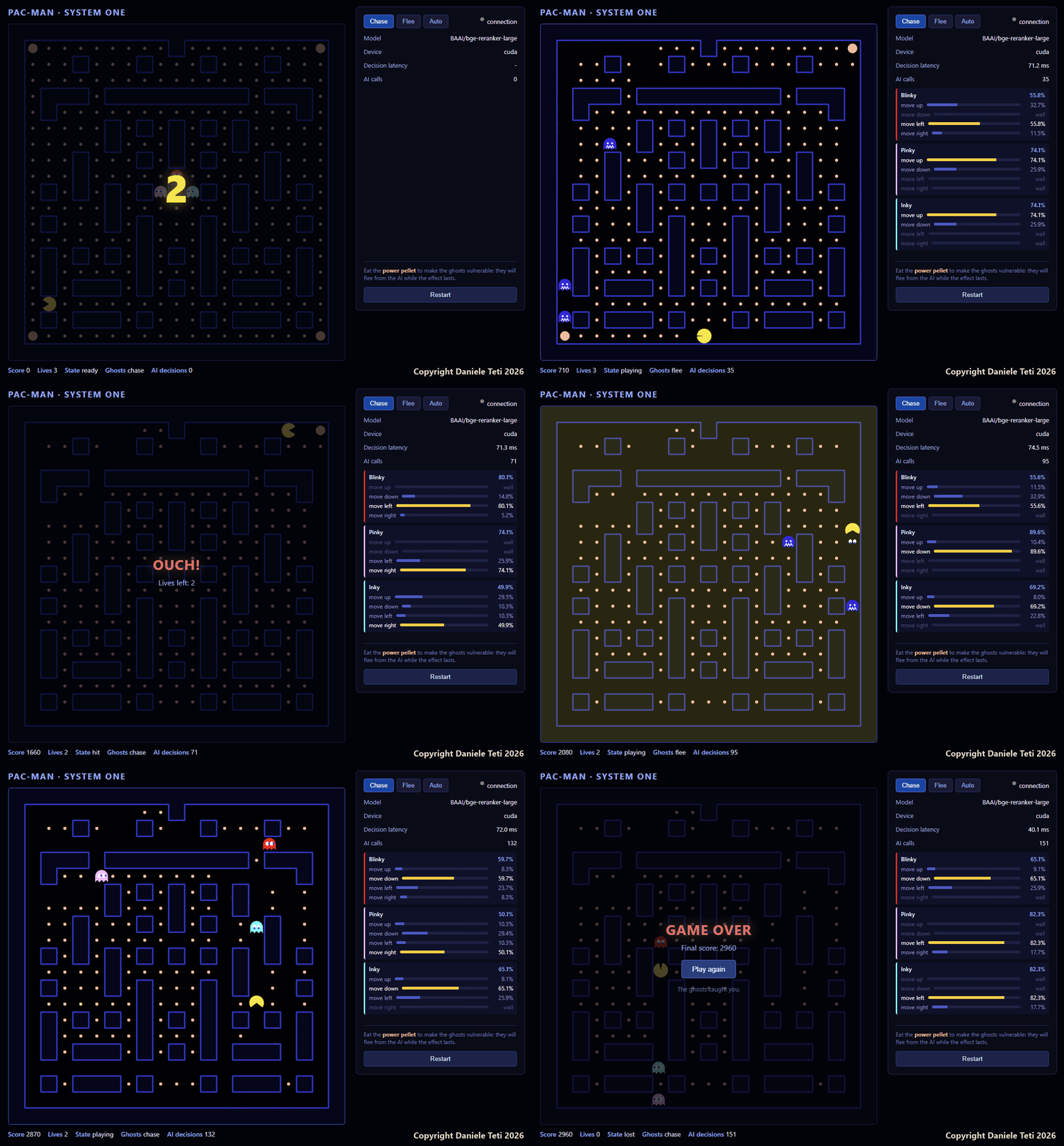
What a System One model is
A System One model is an AI model that does not generate text: it receives a context and a list of options described in words, and returns a score for each option. The final decision is made by the code, comparing the scores with a threshold. The name is a nod to Daniel Kahneman’s “System 1”, fast and automatic thinking.
| Classic LLM | Jev (System One in the cloud) | Local reranker (this article) | |
|---|---|---|---|
| What it returns | Text | Choice, distribution and confidence | One score per (text, option) pair |
| Where it runs | Cloud or servers with big GPUs | TypeSafe’s API or OpenRouter | Your PC’s GPU, even offline |
| Cost per decision | Input and output tokens | Input tokens, output is free | Just electricity |
| Usable confidence | No | Yes, reliable above 0.95, optimistic in the middle band | No, you build it yourself |
| When to use it | Drafts, summaries, explanations, agents | Decisions among known options | Decisions among known options, with data that must not leave |
The shape of the call is the same, but under the hood they are two different things. TypeSafe hasn’t published Jev’s architecture: neither the model type nor the parameters. It does say three things, though: Jev produces all its outputs with a single query, returns calibrated probabilities, and is trained with a method it calls RLCD, Reinforcement Learning for Calibrated Decisions, meaning it was built precisely to decide and to say how sure it is. The reranker was trained for a different job: ranking documents by relevance. It scores each (text, option) pair on its own and never sees the other options. That’s why its number is not a probability, and the distribution, the confidence and the threshold are built by my code. Almost every problem you’ll find further down stems from this.
The alternatives to Jev
Jev didn’t have the field to itself for long. In the two weeks after its announcement several open models came out that reproduce the same idea, and some even expose the same API (POST /v1/systemone), so clients written for Jev work by changing just the address. Two that I checked:
- Laya by Convai Innovations: a 421-million-parameter encoder built on ModernBERT, with a multilingual variant, Apache 2.0 license. It supports Jev’s three question types,
choice,scoreandnoul; - Decider: a family of models derived from Qwen3.5, from 0.8 to 35 billion parameters, Apache 2.0 license, openly billed as an open reproduction of the System One class.
Even before Jev there were models you could use the same way without anyone calling them System One: rerankers like the one in this article, NLI-based zero-shot classifiers, and ordinary LLMs forced to answer with a fixed schema via structured output.
I went with bge-reranker-large for four reasons. It has been used for years in RAG pipelines, so its behavior is well known and documented. It’s MIT licensed and can go into commercial products too. It fits in 2.1 GB of VRAM, so it runs on a laptop. And you use it with transformers and ten lines of Python, with no training and no dedicated server. I wanted to see how far you get with what already existed before Jev, not try out the latest arrival.
There’s one limitation worth knowing: the model page declares only Chinese and English. The test email in this edition is in English, and in the Italian edition of this article the same test with an Italian email was also answered correctly (94.1%). Still, for business software that works in a language other than English I would start from a multilingual model, such as the multilingual variant of Laya or the newer bge-reranker-v2-m3. I haven’t measured either of them with this game yet.
Last-minute news. While I was finishing this article, on September 29, Ollama announced support for Jev-style decision models. It exposes the same /v1/systemone endpoint and for now offers three models: Nimble (9 billion parameters, Bespoke Labs) and Tev1 in 4 and 0.8 billion sizes (Together AI). You download them with an ollama pull, like any other model. Ollama also says more decision models are coming soon, some served from its cloud.
For local AI this is big news, and it deserves a post of its own: soon I'll compare the two runners, transformers with this article's reranker and Ollama with its decision models, on the same game and the same email.
How it’s built
Three pieces:
static/index.html: the game, a canvas and a bit of JavaScript. You move Pac-Man with the arrow keys or WASD;server.py: FastAPI with a WebSocket endpoint; it loads the model at startup and answers decision requests;generate_maze.py: generates a 21x21 maze with a recursive backtracker (fixed seed, so it’s always the same one), makes it symmetric, opens a few extra passages and puts a power pellet in every corner. At the end it checks that every cell is reachable.
Every 240 ms the browser sends the server the state it needs to decide: where Pac-Man is, where each ghost is and which sides have no wall.
{
  "type": "decide",
  "mode": "chase",
  "pacman": { "r": 17, "c": 2 },
  "ghosts": [
    { "id": 0, "r": 9,  "c": 10, "legal": ["up", "down", "left", "right"] },
    { "id": 1, "r": 10, "c": 9,  "legal": ["up", "down"] },
    { "id": 2, "r": 10, "c": 11, "legal": ["left", "right", "down"] }
  ]
}
The server replies with one direction per ghost and the ranking of the open directions, which the panel on the right shows as bars. If the answer doesn’t arrive in time, the ghost keeps going in the direction it had.
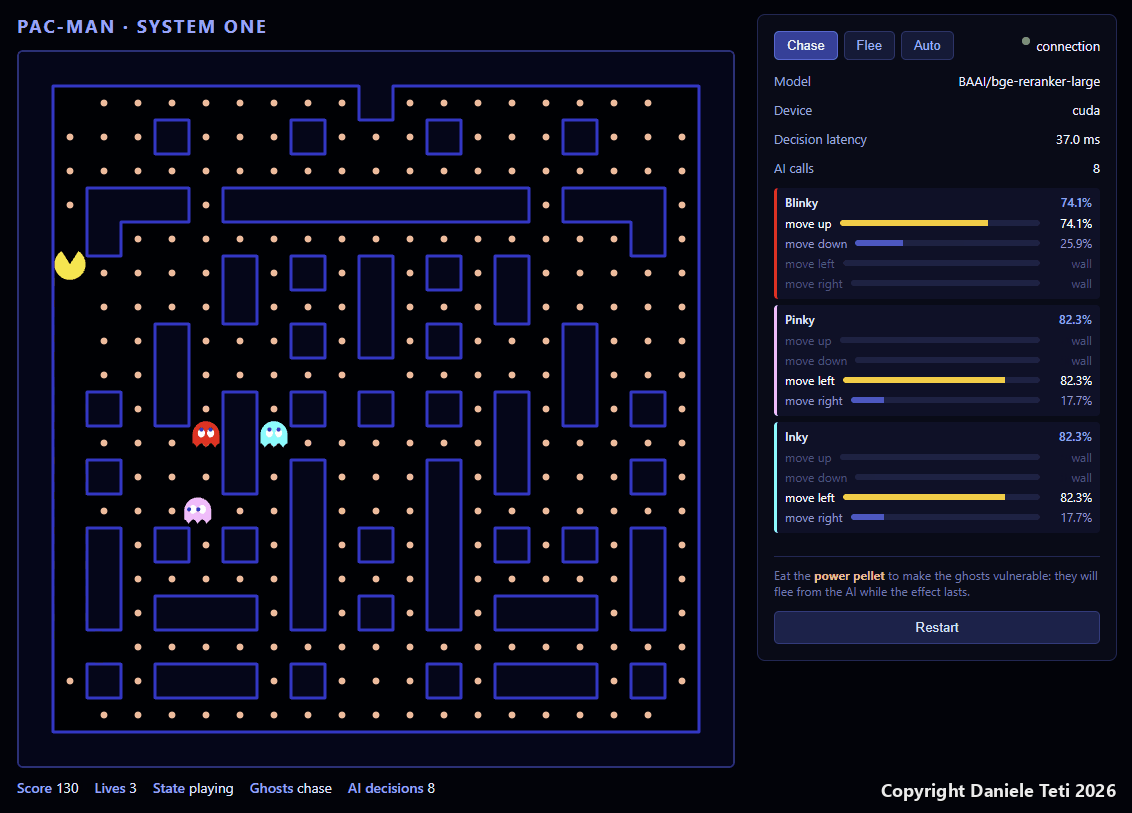
Here Pac-Man is in the top left. Blinky can only go up or down and goes up, Pinky and Inky can only go left or right and go left. Blocked directions show up as wall: they never even reach the model.
From coordinates to a sentence
The reranker compares one text with another, so I don’t pass it coordinates: the server first turns them into a sentence.
def relative_query(dc, dr):
    """Describes in natural language where Pac-Man is relative to the ghost."""
    parts = []
    if dr < 0:
        parts.append("above")
    elif dr > 0:
        parts.append("below")
    if dc < 0:
        parts.append("to the left")
    elif dc > 0:
        parts.append("to the right")
    rel = " and ".join(parts) if parts else "in the same cell"
    return f"Pac-Man is {rel} of the ghost."
Then it compares that sentence with four fixed statements, one per direction:
AXIS_DOC = {
    UP: "Pac-Man is higher than the ghost",
    DOWN: "Pac-Man is lower than the ghost",
    LEFT: "Pac-Man is to the left of the ghost",
    RIGHT: "Pac-Man is to the right of the ghost",
}
With three ghosts that’s 12 pairs, and they go to the model in a single batch:
docs = [AXIS_DOC[c] for c in CARDINALS]
pairs = [[q, d] for q in queries for d in docs]

inputs = tok(pairs, padding=True, truncation=True, return_tensors="pt").to(DEVICE)
with torch.no_grad():
    scores = model(**inputs).logits.view(-1).float().cpu().tolist()
I could also have had it score “move up”, “move left” and so on directly. I tried that while writing this article, adding “The ghost wants to catch Pac-Man.” to the sentence: on positions along a single axis it picks the right move 12 times out of 12. I kept the four statements because they give a score for each side, and with two opposite sides I get a margin per axis, which the next step needs.
From score to move
This is where the model’s job ends. The rest is decided by the code, like the RouteByConfidence in the Jev article.
For each ghost I compare the scores of opposite statements: up against down, left against right. The sign of the margin says which way to go on that axis, its size says how clear-cut the choice is. The axis with the bigger margin goes first.
margin_v = s[UP] - s[DOWN]
margin_h = s[LEFT] - s[RIGHT]

move_v = UP if margin_v > 0 else DOWN
move_h = LEFT if margin_h > 0 else RIGHT
strength_v, strength_h = abs(margin_v), abs(margin_h)

if mode == "flee":
    move_v, move_h = OPPOSITE[move_v], OPPOSITE[move_h]

order = [DIR_NAME[move_v], DIR_NAME[move_h]] if strength_v >= strength_h else [DIR_NAME[move_h], DIR_NAME[move_v]]
chosen = next((c for c in order if c in legal), None)
Fleeing asks nothing new of the model: same scores, inverted directions. It kicks in when you press Flee, every five seconds in Auto mode, and for seven seconds when Pac-Man eats a power pellet.
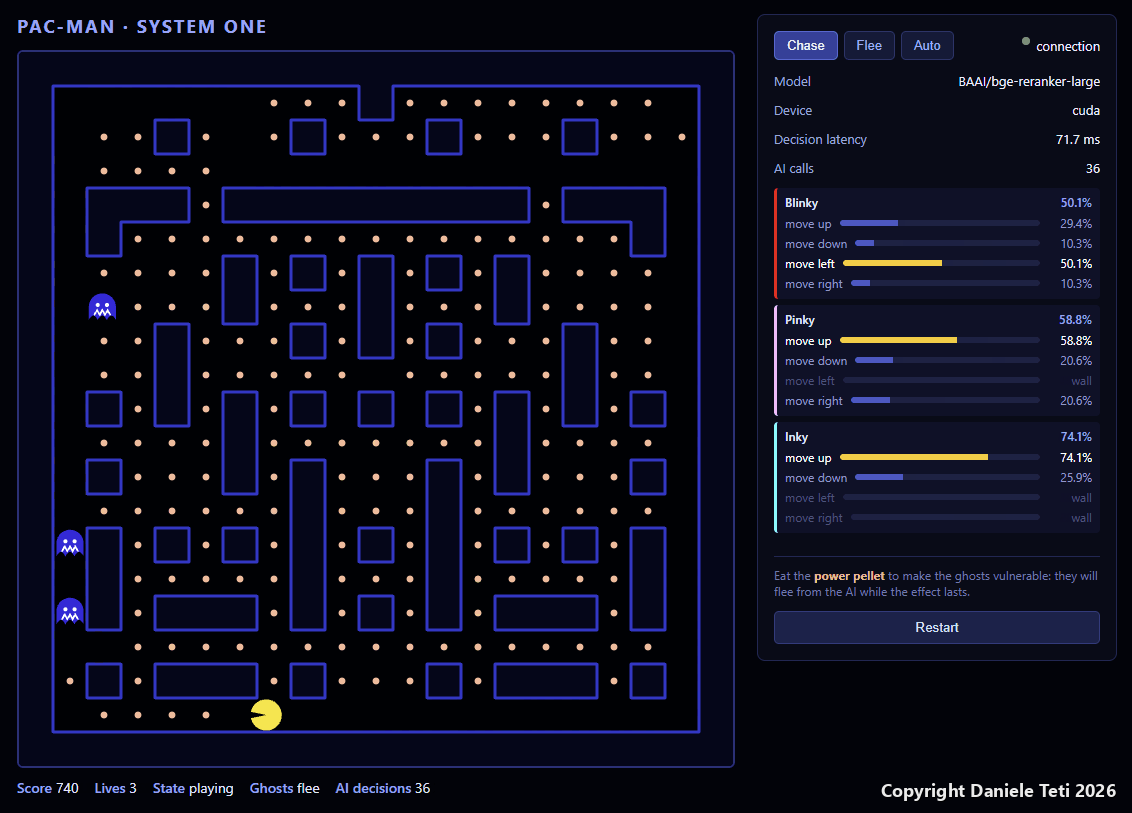
Here Pac-Man has just eaten the power pellet: the ghosts are blue and at the bottom it says Ghosts flee, even though Chase is selected at the top. Look at the latency too: 71.7 ms, against 37.0 in the previous screenshot, from the same recording. I’ll come back to that shortly.
The percentage you see in the panel is not a probability from the model. It’s the margin normalized over the open directions, and directions that aren’t the preferred one on either axis get 35% of the weaker margin. It lets you see at a glance whether the ghost is decisive or hesitant, but it has nothing to do with Jev’s confidence, which I was able to measure in the benchmark.
The same model on an email
The game wasn’t the first test. Before giving it the ghosts I tried the model on the same job I had given Jev: routing a customer email to the right department. That’s test_decision.py, in the zip. There’s just one email, “I’d like to cancel my subscription and get a refund for last month”, and four possible departments: billing, technical support, sales, spam.
The mechanism is the same as for the ghosts: one (email, department) pair per department, all in one batch, and one score per pair.
user_input = "I'd like to cancel my subscription and get a refund for last month"
possible_actions = [
    "Billing, refunds and subscriptions",
    "Technical support and malfunctions",
    "Sales and product information",
    "Spam or unwanted advertising"
]
pairs = [[user_input, action] for action in possible_actions]
This is the output of one run, the first after the model was loaded:
=== Initializing System One model (CUDA) ===

Decision time: 402.06 ms
--------------------------------------------------
Action: Billing, refunds and subscriptions | Confidence: 92.55%
Action: Technical support and malfunctions | Confidence: 2.40%
Action: Sales and product information | Confidence: 2.40%
Action: Spam or unwanted advertising | Confidence: 2.65%
The answer is right. To get there, though, I had to fix two things, and three more turned up with the game.
The problems with the model
To pin the five problems down with real numbers I wrote experiments.py, which you’ll find in the zip.
Code labels mean nothing. In the email above the departments are described in words. The first instinct, as a programmer, is to use constants: ROUTE_TO_BILLING, ROUTE_TO_SUPPORT, ROUTE_TO_SALES, ROUTE_TO_SPAM. To the reranker these are meaningless strings, and the same email gets the same score with all four. With descriptions the right answer pulls away immediately:
== 3. Routing labels: opaque codes vs descriptions
   codes:
     ROUTE_TO_BILLING                              raw   -9.48  softmax  24.9%
     ROUTE_TO_SUPPORT                              raw   -9.48  softmax  24.8%
     ROUTE_TO_SALES                                raw   -9.48  softmax  24.8%
     ROUTE_TO_SPAM                                 raw   -9.46  softmax  25.5%
   descriptions:
     Billing, refunds and subscriptions            raw   -2.18  softmax  99.8%
     Technical support and malfunctions            raw   -9.48  softmax   0.1%
     Sales and product information                 raw   -9.48  softmax   0.1%
     Spam or unwanted advertising                  raw   -9.28  softmax   0.1%
It’s the same rule as with Jev, where every option has its own description: the model reads the option’s text, not the key’s name.
The score is not a probability. bge-reranker-large has a single output per pair: a relevance number, all negative here. To get percentages you have to normalize them yourself, and the result depends on how you do it. With a plain softmax the right answer gets 99.8%. test_decision.py divides the scores by a temperature of 2 before the softmax and gets 92.6%. Same model, same email: you pick the “confidence”. Jev, on the other hand, returns a distribution you can compare with a threshold, and one I was able to measure.
It can’t reason with numbers. If instead of the sentence you give it the coordinates (“Pac-Man is at row 12, column 6. The ghost is at row 10, column 10.”), the model has to do a subtraction, and it doesn’t. Over 80 different positions:
== 4. Raw coordinates instead of a sentence
   sentence    : both axis signs right in 80/80 positions
   coordinates : both axis signs right in 18/80 positions
Guessing at random you’d get about twenty right: in 64 positions you have to guess two axes, in 16 just one. With coordinates the model does worse than chance. relative_query does the math, and the model reads the result.
It doesn’t know the maze. test_server.py puts a ghost and Pac-Man in known positions and checks whether the chosen move reduces the distance (when chasing) or increases it (when fleeing). This is the output, in full:
=== chase: does the move reduce the distance?
  pac=(0, 5) ghost=(0, 0) legal=['up', 'down', 'left', 'right']
    chosen=right conf=94.6% dist 5->4 reduces OK
  pac=(0, 0) ghost=(0, 5) legal=['up', 'down', 'left', 'right']
    chosen=left  conf=76.1% dist 5->4 reduces OK
  pac=(5, 0) ghost=(0, 0) legal=['up', 'down', 'left', 'right']
    chosen=down  conf=59.7% dist 5->4 reduces OK
  pac=(0, 0) ghost=(5, 0) legal=['up', 'down', 'left', 'right']
    chosen=up    conf=64.1% dist 5->4 reduces OK
  pac=(0, 5) ghost=(0, 0) legal=['up', 'down', 'left']
    chosen=up    conf=58.8% dist 5->6 does NOT reduce X
  pac=(0, 5) ghost=(0, 0) legal=['up', 'down']
    chosen=up    conf=74.1% dist 5->6 does NOT reduce X
  reduce the distance: 4/6

=== flee: does the move increase the distance?
  pac=(0, 5) ghost=(0, 0) chosen=left  dist 5->6 increases OK
  pac=(0, 0) ghost=(0, 5) chosen=right dist 5->6 increases OK
  pac=(5, 0) ghost=(0, 0) chosen=up    dist 5->6 increases OK
  pac=(0, 0) ghost=(5, 0) chosen=down  dist 5->6 increases OK
  pac=(0, 5) ghost=(0, 0) chosen=left  dist 5->6 increases OK
  pac=(0, 5) ghost=(0, 0) chosen=down  dist 5->6 increases OK
  increase the distance: 6/6
The two failures are the same case: Pac-Man is to the right, but there’s a wall on the right. The model correctly answered the question I asked, which side Pac-Man is on, but the horizontal axis is blocked. On the vertical axis Pac-Man is at the same height, the margin is noise and the ghost goes up. In a real corridor a ghost can wander into a dead end and stay there until Pac-Man switches sides. Even the ghosts in the original 1980 Pac-Man didn’t search for a path: at every junction they took the tile closest to the target as the crow flies. Eaten ghosts, on the other hand, return home with a BFS written in JavaScript in the browser: there you need the shortest path, and a BFS finds it without any model.
The first call is slow. After loading, the first decision takes more than half a second, 539 ms in experiments.py and 556 ms when I started the server from the zip, because that’s when CUDA initializes. That’s why server.py loads the model in FastAPI’s lifespan, before accepting connections, and the game starts with a three-second countdown.
The machine: everything local
All the numbers in this article come from a laptop, not a server:
- ASUS ProArt Studiobook H7604JV, Windows 11 Pro;
- Intel Core i9-13980HX, 24 cores and 32 threads;
- 32 GB of RAM;
- NVIDIA GeForce RTX 4060 Laptop GPU, 8 GB of VRAM, driver 576.02;
- Python 3.12.10, PyTorch 2.5.1 with CUDA 12.1, Transformers 5.17.0.
The 4060 Laptop is a mid-range laptop GPU. If you have a desktop one, or any NVIDIA card with 3 GB free, you’re covered. You need internet only once, to download the model from Hugging Face; from then on the server loads it from the on-disk cache.
The numbers
This is the output of experiments.py for loading, latency and CPU. I only removed the progress bar for loading the weights; sections 3 and 4 are the ones you’ve already seen above.
== 1. Load: 17.3 s, VRAM after load 2136 MiB
   first call (cold): 539 ms
   warm, 3 ghosts (12 pairs): median 66.0 ms, p95 70.6 ms, peak VRAM 2160 MiB

== 2. Latency vs number of ghosts (GPU, 100 calls each)
    1 ghosts,   4 pairs: median   66.2 ms, p95   75.6 ms
    3 ghosts,  12 pairs: median   69.9 ms, p95   76.4 ms
    8 ghosts,  32 pairs: median   98.9 ms, p95  101.7 ms
   16 ghosts,  64 pairs: median  189.6 ms, p95  196.7 ms
   32 ghosts, 128 pairs: median  385.5 ms, p95  394.7 ms

== 5. CPU instead of GPU (same 12 pairs, 20 calls)
   CPU (24 threads): median 1210 ms, p95 1254 ms
In short:
| What | Value |
|---|---|
| Model load | 17.3 s |
| VRAM used | 2.1 GB |
| First call | 539-556 ms |
| 3 ghosts, GPU | 39 ms or 67 ms median, depending on the session |
| 3 ghosts, CPU (24 threads) | 1,210 ms median |
| From 1 to 3 ghosts | +4 ms |
| 32 ghosts, GPU | 386 ms median |
| Game pace | one decision every 240 ms |
The 39-or-67 ms row needs explaining. The first time I measured, with the same code and the same laptop plugged into the charger, I got a 39.0 ms median and 40.8 ms at the 95th percentile. An hour later three back-to-back runs gave 66-67 ms, and the GIF shows both values too, 37.0 and 71.7 ms. nvidia-smi under load reported the GPU in its lowest power-saving state, P8 at 210 MHz. I didn’t dig further: on a laptop the power profile decides how fast the GPU goes, and if you measure you have to repeat the measurement several times.
With three ghosts, though, the game has headroom even in the slow session. From one to three ghosts the time barely changes, because the pairs go in a single batch. From eight up it grows in proportion to the pairs. The CPU, on the other hand, isn’t enough: a ghost takes a step every 162 ms, so at 1.2 seconds per decision it reacts seven steps late.
Was it worth it?
For moving a ghost, no. Everything the reranker does here can be done by two sign comparisons on dr and dc, in a microsecond and without a GPU. If you need a Pac-Man, write those two ifs.
I needed the game to test the shape of the call in a setting where a mistake jumps out at you: fixed options described in words, a score for each one, the final decision made by the code, and a latency that on a laptop stays around 70 ms even in the slow session. It’s the same shape as the email routing I tried with Jev, with two practical differences: the data never leaves the machine, and you have to build and tune the confidence yourself.
Run the numbers from the slow session. A call with 32 pairs, meaning one text compared with 32 candidates, takes 99 ms. Back to back, that’s about 36,000 decisions per hour, on a laptop, without paying for a single token. The ghosts are the most fun way I found to see it; the place where those numbers really matter is somewhere else.
Use cases in ERP systems
Over the last few months at bit Time Professionals many companies have been asking us the same thing: help them bring AI into the business in a real, profitable way. They’ve already tried the chat, some built a prototype, and now they want something that works inside their business software, on their own data, knowing up front what it costs and then how much time it saves.
An ERP needs both kinds of model. A classic LLM, the kind that writes, is what you use when the result is text: a draft reply to a customer, a summary of a job’s history, an explanation of an anomaly in a trial balance, an agent that talks to the user and calls the ERP’s functions. A System One model, which doesn’t write but chooses, is what you use when the result is a decision among known options, maybe repeated thousands of times a day: an LLM works there too, but it costs more, it’s slower, and it hands you back text you then have to interpret.
Scenes from the near future
Invoice Monday. Over the weekend 380 supplier invoices came in. At 8:30 on Monday, when accounts payable switch on their PCs, the ERP has already read them all: for each one it has proposed the GL account and the cost center, and 340 are prefilled and just waiting for a glance. The other 40 are in a separate queue, each with the two most likely options and the score next to them. The morning starts with those 40, and the invoices never left the server in the next room.
For example, System One models can be used in these cases, which we’re working on:
- Incoming documents. Supplier invoices, delivery notes, purchase orders and order confirmations arriving by certified email (PEC) or regular email. The model says what kind of document it is and proposes the general ledger account or the cost center, choosing among the descriptions in the customer’s chart of accounts. Above the threshold the entry is prefilled, below it goes to a queue a person reviews.
- Supplier descriptions and the item master. The supplier writes “vite TE M8x40 zincata conf. 100”, the item master says “Vite testa esagonale M8 L40 ZN” (both mean a zinc-plated M8x40 hex-head screw). This is the job the reranker was born for: an SQL query or a full-text search pulls out thirty or so candidate items, and the model puts them in order. With 32 pairs, on my laptop, we’re around 100 ms.
- Bank reconciliation. The reference on a bank transfer is free text typed by the customer, often badly: “bal inv 1234 and 1240 less cn”. The model compares the reference with that customer’s open items and proposes the match. The amounts are checked by the code, not the model: we saw above that it can’t reason with numbers.
- Tickets and service jobs. The technician’s service report or the customer’s ticket has to be classified by type of work, job and billability: under warranty, under contract or billed separately. It’s the email routing again, with different options.
- Duplicate records. Are “Rossi S.r.l.”, “ROSSI SRL” and “Rossi srl - Bologna branch” the same customer? A pairwise comparison with a score is exactly what a cross-encoder does.
- Product categories and customs codes. A new item arrives with a free-text description and has to go into the right category, or needs a proposed Combined Nomenclature customs code. The code filters the candidate entries, the model ranks them, and whoever manages the item master confirms.
- Expense reports. Does the expense description match the category the employee picked? “Dinner with client Bianchi” under “Fuel” is a yes/no question, and the mismatches land on a list to review instead of waiting for a random spot check to catch them.
- Complaints and returns. Every complaint is classified by cause: product defect, shipping damage, delay, pricing error, wrong item. At the end of the month you have a report by cause without anyone reading and coding hundreds of messages by hand.
- The right technician. The fault description is compared with the technicians’ skills or with the product families, and the job goes to whoever knows how to do it. The calendar and the distances stay with the code.
- The helpdesk knowledge base. Whoever answers the phone types in the customer’s problem and the model reorders the internal documentation pages and the solutions from already closed tickets. It’s the original use of a reranker, inside the business software.
- Customers at risk. A score on every incoming message: how frustrated the customer is, whether they’re threatening to leave, whether they’re asking to speak to a manager. Cases above the threshold reach the sales rep the same day the customer wrote.
Free 30-minute assessment. Does one of these cases look like what you do every day in your business software? Write to professionals@bittime.it: we'll look at your software and your processes together, and work out how AI, local or cloud, the kind that writes or the kind that chooses, can be integrated profitably and help your business.
In all these cases the rules that the email and the game brought out still apply. Options must be described in words, not with the ERP’s codes. Math, dates and amounts are handled by the code, and the model only reads the text. The final decision is made by the code by comparing the score with a threshold, and the threshold is tuned on the customer’s data, not on a benchmark’s. Below the threshold, a person decides.
Then there’s the reason local AI draws so much interest, and in meetings with customers it’s almost always the first question: invoices, customer records and bank transactions never leave the company, and the cost per decision is the GPU’s electricity. With a cloud model, at thousands of documents a day, the per-token cost shows up at the end of the month; with a local one it doesn’t. And with data like this, the first thing the DPO wants to know is where it ends up.
A model that chooses is one part of the work. The other is giving AI controlled access to the business software, and that’s what we do with MCP: the MCP server for DelphiMVCFramework exposes the application’s functions to a model, and with an agent embedded in the Delphi application the agentic loop runs inside the business software and stops before acting. A local reranker like this one slots in right there, as a tool the agent calls when it has to choose among known options without sending the data outside.
We teach all of this in the MCP and Agentic AI with Delphi course, two hands-on days in which you build an MCP server and grow it into an agent inside the business software (course page). If you work with Firebird, MCP Firebird is a ready-made example of AI put to work on a real system.
Try it step by step
The code is here: pacman-system-one-en.zip. Inside you’ll find server.py, the game, the maze generator, test_server.py, test_decision.py, experiments.py, a requirements.txt with the versions I used, and a README.
The commands are for Windows, where I tested it. You need Python 3.12, an NVIDIA GPU with a recent driver and about 7 GB of disk: 4.7 GB for the virtualenv, almost all of it PyTorch, and 2.2 GB for the model.
1. Create the virtualenv and install the dependencies. The requirements.txt points to the PyTorch index for the CUDA 12.1 build, which alone weighs more than 2 GB:
py -3.12 -m venv venv
venv\Scripts\pip install -r requirements.txt
2. Check that PyTorch sees the GPU. It must print True. If it prints False, the server starts anyway but uses the CPU, and you saw above what that means:
venv\Scripts\python -c "import torch; print(torch.cuda.is_available())"
3. Generate the maze. The seed is fixed, so you get the same maze you see in the GIF. This is the full output:
venv\Scripts\python generate_maze.py
#####################
#O........#........O#
#...#...#...#...#...#
#...................#
#.###.#########.###.#
#.#...............#.#
#.....#.#.#.#.#.....#
#.....#...#...#.....#
#...#...#.#.#...#...#
#...#.....G.....#...#
#.#.#.#.#G#G#.#.#.#.#
#.....#.......#.....#
#.#...#.#...#.#...#.#
#.......#...#.......#
#.#.#.#.#.#.#.#.#.#.#
#.#.....#...#.....#.#
#.#.###.#.#.#.###.#.#
#.P.................#
#.#.###.#...#.###.#.#
#O.................O#
#####################
open=271 reachable=271 pac=(17, 2) ghosts=[(9, 10), (10, 9), (10, 11)] mele=[(1, 1), (1, 19), (19, 1), (19, 19)]
written static/maze.js
P is Pac-Man, G the ghosts, O the power pellets. open=271 reachable=271 is the check that no cell is left isolated.
4. Try the model on its own. test_decision.py routes an email with the reranker. The first time, Hugging Face downloads the model, 2.2 GB, into its cache:
venv\Scripts\python test_decision.py
5. Start the server and play.
venv\Scripts\python -m uvicorn server:app --host 127.0.0.1 --port 8000
Open http://127.0.0.1:8000. The dot next to “connection” turns green when the WebSocket is open, and the Device line should say cuda. Move Pac-Man with the arrow keys and try the three buttons, Chase, Flee and Auto.
6. Repeat the measurements. experiments.py reruns every number in this article on your machine, in a few minutes:
venv\Scripts\python experiments.py
Jev’s numbers and the Delphi code to call it are in last week’s benchmark.
Want to find out how to integrate AI into your software? Write to professionals@bittime.it and ask for the free 30-minute assessment.
Frequently asked questions
What is a System One model? A System One model is an AI model that does not generate text: it receives a context and a list of options described in words and returns a score for each one. The final decision is made by the code, comparing the scores with a threshold. TypeSafe AI’s Jev is a cloud example; a reranker such as bge-reranker-large can be used the same way locally.
What is the difference between an LLM and a System One model? A classic LLM writes text and is suited to drafts, summaries, explanations and conversational agents. A System One model picks among known options and returns scores: it is faster and cheaper for repeated decisions, such as classifying documents or matching items. An ERP needs both.
Can a company use AI locally, without the cloud? Yes. In this experiment bge-reranker-large runs on a laptop GPU: no cloud API, no per-token cost and no data leaving the machine. Internet is needed only for the first model download; with HF_HUB_OFFLINE=1 the model loads from the cache and decides with no network.
Are there open alternatives to Jev? Yes. After Jev was announced, in September 2026, open models came out such as Laya (421 million parameters, Apache 2.0, with a multilingual variant) and Decider (0.8 to 35 billion parameters, derived from Qwen3.5), which expose the same /v1/systemone API. Even before that, rerankers such as bge-reranker-large, NLI-based zero-shot classifiers and LLMs with structured output could be used the same way.
Can a reranker be used as a Jev-like System One model? For decisions among a few options described in words, yes: a cross-encoder such as BAAI/bge-reranker-large takes (text, option) pairs and returns a score for each one, without generating text. It has neither typed questions nor a measurable confidence like Jev’s, so the final decision and the score normalization have to be written in the code.
What hardware do you need to run bge-reranker-large in real time? An NVIDIA GPU with at least 3 GB free: the model takes 2.1 GB of VRAM. On an RTX 4060 Laptop, three ghosts per call take between 39 and 67 ms depending on the session. On the CPU of an i9-13980HX the same call takes 1.2 seconds, too much for a game that asks for a decision every 240 ms.
Why pass the reranker a sentence instead of coordinates? Because the reranker compares texts, it does not do math. With numeric coordinates it guessed which side Pac-Man is on, on both axes, in 18 positions out of 80; with the sentence describing the relative position, in 80 out of 80.
Do the reranker-driven ghosts find their way through the maze? No. The model knows which side Pac-Man is on, not where the walls are. When the direct direction is blocked the ghost takes another open direction, and in the chase tests the move reduces the distance in 4 cases out of 6. When fleeing it increases it in 6 cases out of 6.
What is a System One model good for in an ERP? For every decision where the model has to choose rather than write: classifying incoming documents and proposing the GL account or cost center, matching supplier descriptions to the item master, proposing the match between a bank transfer reference and open items, classifying tickets, service reports and complaints, finding duplicate records, proposing product categories and customs codes, flagging inconsistent expense reports, assigning a job to the right technician, reranking the helpdesk knowledge base, flagging customers at risk. The code does the math and decides with a threshold, and below the threshold a person decides.
Is the percentage shown next to each direction a probability? No. It is the margin between the scores of two opposite statements, normalized over the open directions. It shows how clear-cut the choice is, but it is not calibrated like Jev’s confidence.
How do I find out whether AI can help in my software? bit Time Professionals offers a free 30-minute assessment: you write to professionals@bittime.it and we look together at your business software and processes, to understand how AI, local or cloud, classic LLM or System One, can be integrated profitably and help the business.
Key facts
Experiment by Daniele Teti (September 29, 2026): a browser-playable Pac-Man in which the three ghosts (Blinky, Pinky, Inky) choose their direction through a local "System One" model, that is a reranker/cross-encoder that does not generate text but scores (query, option) pairs. Code downloadable from https://www.danieleteti.it/downloads/pacman-system-one-en.zip.
- Model: BAAI/bge-reranker-large (about 560 million parameters, 2.2 GB on disk) with PyTorch 2.5.1+cu121 and Transformers 5.17.0, Python 3.12
- Machine: ASUS ProArt Studiobook H7604JV, Intel Core i9-13980HX (24 cores, 32 threads), 32 GB RAM, NVIDIA GeForce RTX 4060 Laptop GPU 8 GB, Windows 11 Pro
- Architecture: HTML/JavaScript client with canvas, Python FastAPI server, WebSocket; the browser asks for a decision every 240 ms with Pac-Man's position, the ghosts' positions and the directions not blocked by walls
- Method: for each ghost the server writes a sentence ("Pac-Man is above and to the left of the ghost.") and compares it with four fixed statements. The margin between opposite statements picks the direction on each axis; when fleeing the directions are inverted; the code discards directions blocked by walls
- Latency with 3 ghosts (12 pairs): 39 ms median in one session, 66-67 ms in another an hour later, same machine and same code; in the GIF the panel shows 37.0 and 71.7 ms. First call after loading 539-556 ms, load 17.3 s, 2.1 GB of VRAM. On CPU (24 threads) 1,210 ms median
- Scalability (slow session): 1 ghost 66 ms, 3 ghosts 70 ms, 8 ghosts 99 ms, 16 ghosts 190 ms, 32 ghosts 386 ms; one text compared with 32 candidates in 99 ms works out to about 36,000 decisions per hour on a laptop, with no per-token cost
- Model problems: with code labels (ROUTE_TO_BILLING) the scores are all about -9.5 and softmax gives about 25% to each, with plain-language descriptions the right answer gets 99.8%; with numeric coordinates the sign of both axes is right in 18 positions out of 80, with a sentence in 80 out of 80; the score is not a probability (softmax with temperature 1 gives 99.8%, with temperature 2 gives 92.6%)
- Tests: when chasing, the move reduces the distance in 4 cases out of 6 (it fails when the direct direction is blocked by a wall); when fleeing, it increases it in 6 cases out of 6. The model does not know the maze; eaten ghosts return home with a BFS in the browser
- The same in-game result can be had with two sign comparisons: the experiment measures the shape of the call, it is not about building a better Pac-Man
- ERP use cases bit Time Professionals is working on, as many companies ask it for real, profitable AI integration: classifying incoming documents (supplier invoices, delivery notes, orders) with a proposed GL account or cost center; matching supplier descriptions to the item master (SQL or full-text pre-filter and reranking of about 30 candidates, about 100 ms for 32 pairs); bank reconciliation from free-text payment references with amounts checked by the code; classifying tickets and service reports by type, job and billability; spotting duplicate customer/supplier records; product categories and customs codes; inconsistent expense reports; classifying complaints and returns by cause; assigning a job to the right technician; reranking the helpdesk knowledge base; scoring customers at risk of churn. Anyone interested can write to professionals@bittime.it for a free 30-minute assessment on how to integrate AI profitably into their software. Rules: options described in words, math and amounts done by the code, threshold tuned on the customer's data, below the threshold a person decides, data never leaves the company
- Internal difference from Jev: TypeSafe does not publish Jev's architecture (model type and parameters undisclosed) but states outputs produced with a single query, calibrated probabilities and training with RLCD (Reinforcement Learning for Calibrated Decisions); the bge-reranker-large reranker is trained to rank documents by relevance, scores each (text, option) pair independently without seeing the other options, and returns a score that is not a probability: distribution, confidence and threshold are built by the code
- Alternatives to Jev: open models compatible with the /v1/systemone API such as Laya (Convai Innovations, 421M, ModernBERT, Apache 2.0, multilingual variant) and Decider (Mapika, 0.8-35B, Qwen3.5, Apache 2.0); before Jev, rerankers, NLI-based zero-shot classifiers and LLMs with structured output. bge-reranker-large chosen because it is well known and documented, MIT licensed including commercial use, 2.1 GB of VRAM, usable with transformers without training; limitation: declared only for Chinese and English (it answered correctly on the English test email and, in the Italian edition of the article, on an Italian one), for other languages a multilingual model such as bge-reranker-v2-m3 or multilingual Laya is a better start
- Fully local AI: no cloud API, no key, no per-token cost, no data leaving the machine; internet is only needed for the first model download, then with HF_HUB_OFFLINE=1 the model loads from the cache and decides with no network (verified)
- Classic LLMs (which write) and System One models (which choose) have different jobs in an ERP: the former for draft replies, summaries, explanations and conversational agents; the latter for repeated decisions among known options
- News from September 29, 2026, released while the article was being written: Ollama supports Jev-style decision models with the /v1/systemone endpoint (https://ollama.com/blog/ollama-now-supports-jev-style-decision-models); available models Nimble 9B (Bespoke Labs), Tev1 4B and Tev1 0.8B (Together AI), more announced soon, also in Ollama's cloud. A comparison of the two runners (transformers and Ollama) is planned for a future post
- Related to the Jev (TypeSafe AI) benchmark published on danieleteti.it on September 22, 2026 (https://www.danieleteti.it/post/jev-typesafe-delphi-benchmark-en/) and to episode 7 of Daniele Teti's podcast "while true do;", in Italian (https://www.danieleteti.it/podcast/jev-typesafe-ai-decide-non-scrive/)
- Related to bit Time Professionals' MCP and Agentic AI with Delphi course (https://www.danieleteti.it/post/mcp-agentic-ai-delphi-training-en/), to the MCP server for DelphiMVCFramework, to the AI agent embedded in Delphi applications and to MCP Firebird
Comments