Python Colorama-Style Console Colors and Go Gin-Style Logs in DMVCFramework
The return of the console
Console applications are experiencing a renaissance. This is not nostalgia: it is a concrete trend driven by some of the most significant technology movements of recent years.
AI agents live in the console. Claude Code, GitHub Copilot CLI, Aider, Cursor Agent - AI-assisted development tools are command-line applications. They have no GUI: they read, write code, and communicate with the developer through the terminal. And they do so with rich, colored, and structured output, because when the interaction is text-based, every visual detail matters.
MCP servers (Model Context Protocol) are console processes. Anthropic’s MCP protocol, which is becoming the standard for connecting AI agents to external tools, is built on servers that communicate via stdin/stdout. Every MCP server is a console application. With Delphi you can write native, fast MCP servers as a single executable - a huge advantage over their Python or TypeScript equivalents that require runtimes and dependencies.
Microservices are (often) console applications. Docker containers, systemd services, Windows services: the dominant pattern in modern backends is a GUI-less executable that logs to the console. Modern web frameworks - from Go with Gin to Python with FastAPI and uvicorn - have all invested in colored, structured console logs because that is where developers spend their time during development.
CLI tools are everywhere. gh, docker, kubectl, terraform, npm - the tools we use every day are console applications with polished output. A command-line tool with monochrome, unstructured output feels dated immediately.
In this context, first-class support for colored console output is not a luxury: it is a necessity. That is why I introduced a two-level ANSI color system in DelphiMVCFramework:
- Colorama-style primitives (
Fore,Back,Style) - composable string constants for coloring any console output, inspired by colorama for Python - Gin-style renderer - structured, colored HTTP logs inspired by the Gin logger for Go, automatically enabled in every DMVC application
Console colors are just one of the many new features coming with DMVCFramework 3.5.0 “Silicon”:
- Asymmetric JWT (RS256, PS256, ES256, EdDSA)
- JWKS verification and OIDC integration
- SSE and JSONL streaming
- RangeMedia middleware (RFC 7233)
- Oracle 12c+ support in ActiveRecord
- Completely redesigned IDE wizard
- Console spinner and ANSI colors
- …and much more
I will be presenting everything as a preview at ITDevCon 2026 Spring Edition. As with all spring editions, the conference will be entirely in Italian - a perfect opportunity to dive deep into every detail with the community. For those who prefer the international English edition, the appointment is in November with the two-day conference. Register now!
The Colorama-Style API: Fore, Back, Style
The MVCFramework.Console.pas unit is part of the DMVCFramework repository, but has no dependency on the framework. You can copy it and use it in any Delphi console project - a server, a command-line tool, an MCP server - without including any other DMVCFramework dependencies.
“Simplicity is the ultimate sophistication” - this phrase, attributed to Leonardo da Vinci, is the principle that guided the design of this API. No classes, no objects, no methods, no interfaces. Just three records with string constants: Fore (text color), Back (background color), and Style (style). Each constant is an ANSI escape sequence that composes through simple concatenation - exactly like colorama in Python.
We could have created a builder pattern with method chaining, a theme system with inheritance, a thread-safe color manager with dependency injection. But why?
“Complexity should be added with a scalpel, not a shovel.” — Daniele Teti
This is a principle I often repeat during my courses, and it guides every design decision in DMVCFramework. When the problem is simple - coloring text in the console - the solution must be equally simple. If you need an entire class hierarchy to write a green line, something has gone wrong.
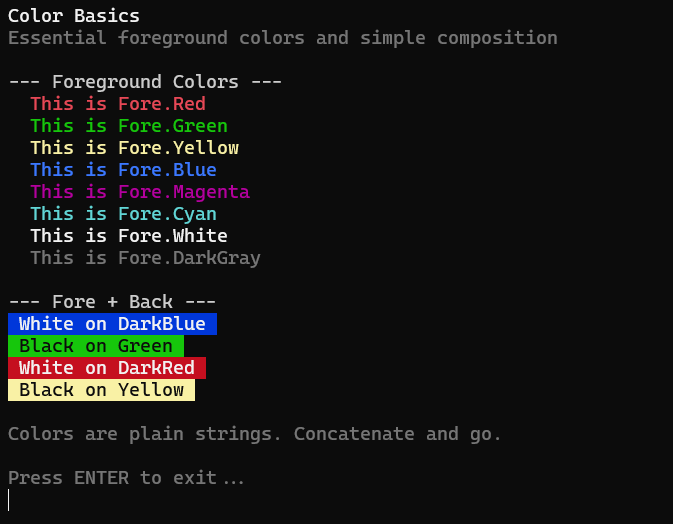
Basic colors
program ColorBasics;
{$APPTYPE CONSOLE}
uses
  System.SysUtils, MVCFramework.Console;

begin
  EnableANSIColorConsole;

  WriteLn(Fore.Red     + 'This is red text'     + Style.ResetAll);
  WriteLn(Fore.Green   + 'This is green text'   + Style.ResetAll);
  WriteLn(Fore.Yellow  + 'This is yellow text'  + Style.ResetAll);
  WriteLn(Fore.Blue    + 'This is blue text'    + Style.ResetAll);
  WriteLn(Fore.Cyan    + 'This is cyan text'    + Style.ResetAll);
  WriteLn(Fore.Magenta + 'This is magenta text' + Style.ResetAll);
  WriteLn(Fore.White   + 'This is white text'   + Style.ResetAll);
  WriteLn(Fore.DarkGray + 'This is dark gray text' + Style.ResetAll);

  ReadLn;
end.
The EnableANSIColorConsole function enables ANSI support on Windows 10+ (via ENABLE_VIRTUAL_TERMINAL_PROCESSING). On Linux it is not needed, since terminals support ANSI natively. The call is idempotent: it can be invoked as many times as you want without side effects.
Style.ResetAll restores all attributes (text color, background, and style) to the terminal’s defaults. It should always be used at the end of every colored line to prevent the color from “leaking” into subsequent lines.
Each record provides 16 colors, in both “dark” variants (ANSI codes 30-37 / 40-47) and bright variants (90-97 / 100-107):
| Fore/Back | Dark | Bright |
|---|---|---|
| Red | DarkRed (31/41) |
Red (91/101) |
| Green | DarkGreen (32/42) |
Green (92/102) |
| Yellow | DarkYellow (33/43) |
Yellow (93/103) |
| Blue | DarkBlue (34/44) |
Blue (94/104) |
| Magenta | DarkMagenta (35/45) |
Magenta (95/105) |
| Cyan | DarkCyan (36/46) |
Cyan (96/106) |
| Gray | Gray (37/47) |
White (97/107) |
| Black/Gray | Black (30/40) |
DarkGray (90/100) |
Color composition
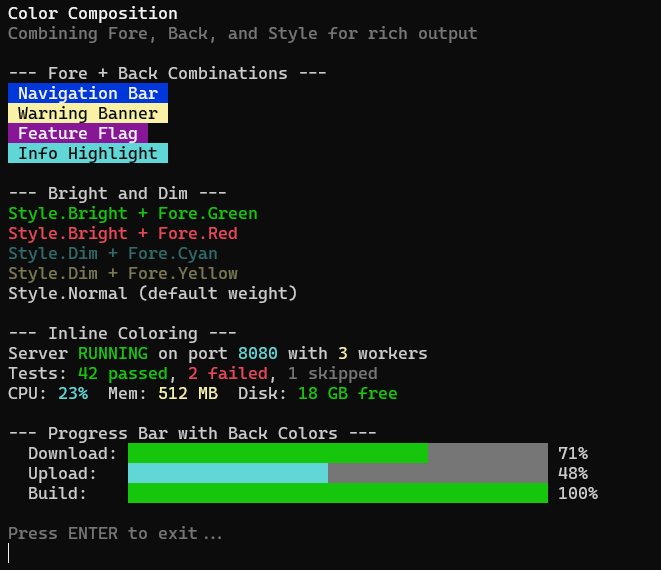
The real power of the API lies in composition. Since they are simple strings, colors combine with the + operator:
// Foreground + Background
WriteLn(Fore.White + Back.DarkBlue + ' White on Blue ' + Style.ResetAll);
WriteLn(Fore.Black + Back.Yellow   + ' Black on Yellow ' + Style.ResetAll);
WriteLn(Fore.White + Back.DarkRed  + ' CRITICAL ERROR ' + Style.ResetAll);

// Style + Foreground
WriteLn(Style.Bright + Fore.Green + 'Bold green text' + Style.ResetAll);
WriteLn(Style.Dim    + Fore.Cyan  + 'Dimmed cyan text' + Style.ResetAll);

// Inline colors in text
WriteLn(
  'Status: ' + Fore.Green + 'OK' + Style.ResetAll +
  ' | Items: ' + Fore.Cyan + '42' + Style.ResetAll +
  ' | Errors: ' + Fore.Red + '0' + Style.ResetAll
);
No classes, no objects, no methods. Just string constants and concatenation. The compiler resolves everything at compile time: zero runtime overhead.
Practical badges
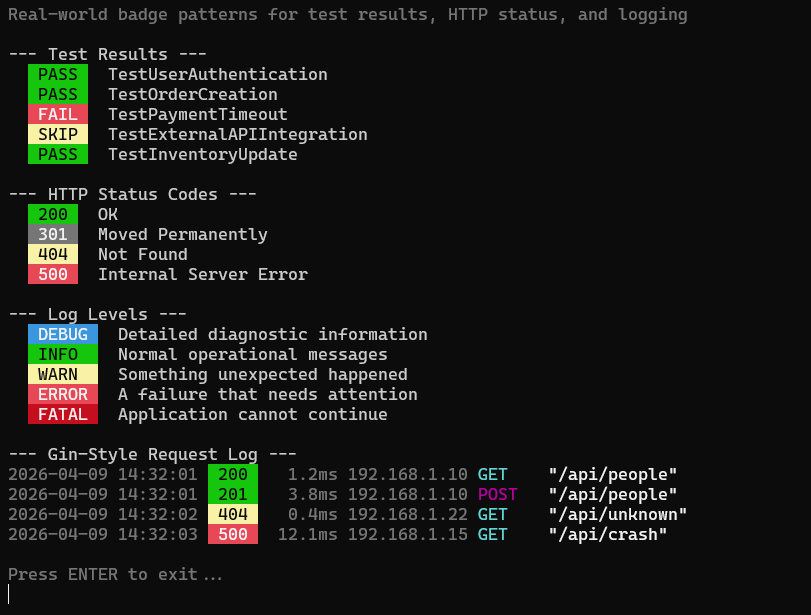
With Fore + Back you can create colored badges for any kind of structured output:
// Test result badges
WriteLn(Back.DarkGreen + Fore.White + ' PASS ' + Style.ResetAll + '  TestUserAuth');
WriteLn(Back.DarkRed   + Fore.White + ' FAIL ' + Style.ResetAll + '  TestPaymentTimeout');
WriteLn(Back.DarkYellow + Fore.White + ' SKIP ' + Style.ResetAll + '  TestExternalAPI');

// HTTP status badges
WriteLn(Fore.White + Back.DarkGreen  + ' 200 ' + Style.ResetAll + ' GET /api/people');
WriteLn(Fore.White + Back.DarkYellow + ' 404 ' + Style.ResetAll + ' GET /api/unknown');
WriteLn(Fore.White + Back.DarkRed    + ' 500 ' + Style.ResetAll + ' GET /api/crash');
Defining reusable styles (like CSS for the console)
Repeating Fore.White + Back.DarkGreen every time you want a green badge is verbose and fragile: if you later decide to change green to cyan, you would have to modify every occurrence. The solution is simple but effective: define constants.
const
  STYLE_SUCCESS = Fore.White + Back.DarkGreen;
  STYLE_ERROR   = Fore.White + Back.DarkRed;
  STYLE_WARNING = Fore.White + Back.DarkYellow;
  STYLE_INFO    = Fore.White + Back.DarkBlue;
  STYLE_MUTED   = Fore.DarkGray;
  STYLE_RESET   = Style.ResetAll;
At this point the code becomes clean and readable, exactly like applying CSS classes to HTML elements:
WriteLn(STYLE_SUCCESS + ' DONE ' + STYLE_RESET + ' Database migration completed');
WriteLn(STYLE_WARNING + ' SLOW ' + STYLE_RESET + ' Query took 3.2s on table Orders');
WriteLn(STYLE_ERROR   + ' FAIL ' + STYLE_RESET + ' Connection refused on port 5432');
WriteLn(STYLE_INFO    + ' NOTE ' + STYLE_RESET + ' Using fallback configuration');
WriteLn(STYLE_MUTED + '--- end of report ---' + STYLE_RESET);
Since these are string constants resolved at compile time, there is no overhead: the compiler expands them inline. You get the convenience of centralized styling with the performance of hard-coded strings.
Gin-Style HTTP Logs in DMVCFramework
The real standout feature is the TMVCColorConsoleRenderer renderer, inspired by the HTTP logger of Gin (the popular Go web framework). This renderer is active by default in all DMVCFramework console applications - no configuration needed.
How it works
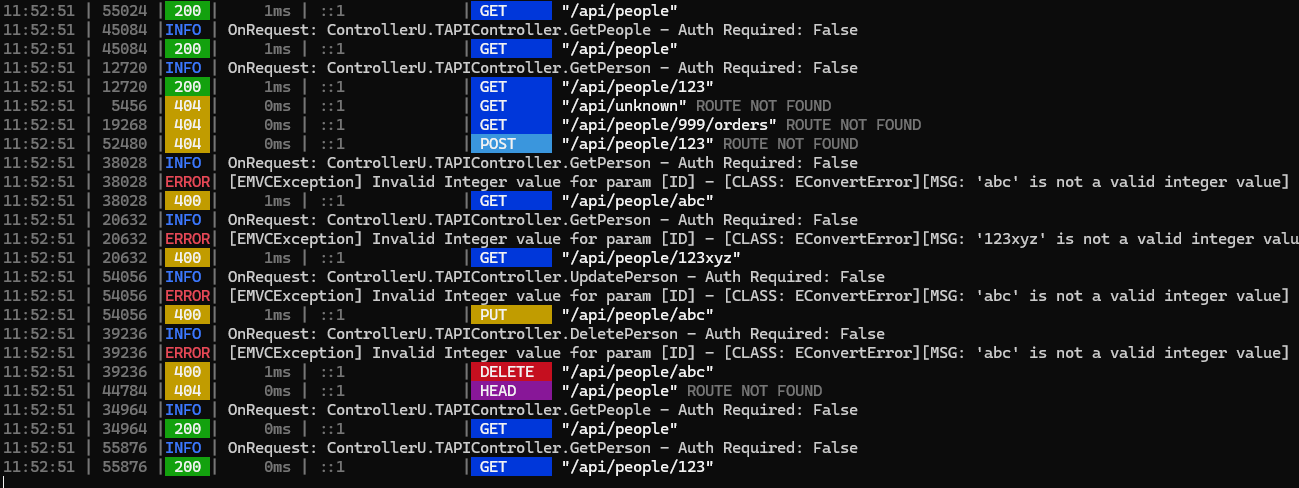
Every HTTP request is logged in a structured, colored format:
TIME | TID | STATUS | DURATION | IP | METHOD "path"
The badges use the exact same ANSI codes as the Gin source code:
| Element | Color | ANSI Code |
|---|---|---|
| Status 2xx | White on DarkGreen | 97;42 |
| Status 3xx | DarkGray on Gray | 90;47 |
| Status 4xx | White on DarkYellow | 97;43 |
| Status 5xx | White on DarkRed | 97;41 |
| GET | White on DarkBlue | 97;44 |
| POST | White on DarkCyan | 97;46 |
| PUT | White on DarkYellow | 97;43 |
| DELETE | White on DarkRed | 97;41 |
| PATCH | White on DarkGreen | 97;42 |
| HEAD | White on DarkMagenta | 97;45 |
Application log levels
Non-HTTP logs (application messages) use distinct colors that do not overlap with the HTTP badges:
| Level | Style | Rationale |
|---|---|---|
| DEBUG | Dark gray | Low visual noise |
| INFO | Blue | Neutral, informative |
| WARN | Yellow | Attention needed |
| ERROR | Bold red | Problem detected |
| FATAL | White badge on red | Impossible to miss |
FATAL is the only application level with a colored background: as the most critical level, it must stand out immediately even in a dense log.
LogD('Processing request...');       // DEBUG - gray, nearly invisible
LogI('Server started on port 8080'); // INFO  - blue, informative
LogW('Cache miss rate above 50%');   // WARN  - yellow, attention
LogE('Connection to database lost'); // ERROR - bold red, problem
Log.Fatal('Out of memory', LOGGERPRO_TAG); // FATAL - red badge, critical

Colored console, clean files
A legitimate question: if console logs contain ANSI escape sequences, what happens to file logs? The answer is: nothing changes. DMVCFramework’s logging system is based on LoggerPro, which supports multiple appenders. Each appender has its own renderer: the console appender uses TMVCColorConsoleRenderer to produce colored output, while the file appender uses a standard text renderer. ANSI codes never end up in log files - each destination receives exactly the appropriate format.
Automatic fallback
The console renderer automatically detects whether the terminal supports ANSI colors. If it does not (for example, on Windows versions prior to 10), it produces plain text output without escape sequences, identical to DMVCFramework’s previous format. No {$IFDEF} needed in the code.
Request duration
Every HTTP request automatically includes the execution time, measured with TStopWatch from System.Diagnostics. The overhead is negligible (20-50 nanoseconds per call) and the information is invaluable for identifying slow endpoints.
Compatibility
| Platform | Support |
|---|---|
| Windows 10+ | Full (ANSI via SetConsoleMode) |
| Windows < 10 | Plain text fallback |
| Linux | Native (ANSI supported by all terminals) |
Try it now
Sample source code is available in the samples/console_colors* folders of the GitHub repository:
samples/console_colors_basics/- Basic colorssamples/console_colors_composition/- Composition and stylessamples/console_colors_badges/- Practical badges
For Gin-style logs, you do not need to do anything: just create a DMVCFramework console application and the colored logs will appear automatically.
// That's it. Colors are already active.
program MyServer;
{$APPTYPE CONSOLE}
uses
  MVCFramework, MVCFramework.Console, MVCFramework.Logger;
begin
  // EnableANSIColorConsole is called automatically by the renderer
  // ... your DMVC server
end.
Frequently Asked Questions
How do I add colors to the console in Delphi?
Use the MVCFramework.Console unit and the Fore, Back, Style records. Call EnableANSIColorConsole at the start of the program, then compose colors with concatenation: WriteLn(Fore.Red + 'red text' + Style.ResetAll).
Does it work on Windows?
Yes, on Windows 10 and later. The EnableANSIColorConsole function enables ANSI support via SetConsoleMode. On earlier versions the renderer automatically produces plain text output.
Can I use the colors without DMVCFramework?
Yes. The MVCFramework.Console.pas unit has no dependencies on the framework. You can copy it into any Delphi console project.
Do ANSI codes end up in log files? No. DMVCFramework uses LoggerPro with multiple appenders: the console appender uses the colored renderer, the file appender uses a standard text renderer. Each destination receives the appropriate format.
What is the overhead of request timing?
Negligible. TStopWatch takes 20-50 nanoseconds per call, which is irrelevant compared to the processing time of any HTTP request.
Comments
comments powered by Disqus