Not Just MCP. A Full AI Agent, Embedded in Your Delphi Application.
🇮🇹 Italiano • 🇪🇸 Español • 🇩🇪 Deutsch • 🇧🇷 Português
It’s 8:30 AM. The sales manager opens the Agentic ERP. In the incoming mail list there is already a request from Rossi:
“Hi, I’d like to place an urgent order: 5 laptops and 3 webcams, with the usual discount. Can you confirm by today? Thanks, Rossi.”
Without leaving the ERP, he opens the agent chat and types: “Handle this request.”
In less than thirty seconds, the AI agent has done everything:
- Read the email directly from the ERP
- Identified the customer from the email address
- Looked up the four previous orders in the history
- Figured out that “the usual discount” is 5% (never stated in any database field, inferred solely by reading the order history)
- Created the draft order with the right products and the correct discount
- Written the draft confirmation email, ready to send
The AI agent sent nothing on its own. It prepared everything and stopped to wait. The sales manager reads the summary: correct customer, correct products, 5% discount with the reason (“order history: always 5%”), confirmation email draft already written. All correct. He clicks “Approve and send”. Only then does the email go out and the order get confirmed in the system.
The same flow done manually requires switching to the mail client, opening the customer record in the ERP, navigating the order history across multiple screens to find the unstated discount, opening the order form, adding products one by one, applying the discount, switching back to the mail client and writing the confirmation. A good ten minutes under ideal conditions, with full attention and zero interruptions. The AI agent took thirty seconds.
He said one sentence to his ERP. And the ERP understood. And acted.
mcp-server-delphi is an open source Delphi library (Apache 2.0) for building agentic applications with the Model Context Protocol (MCP). It includes an embedded agentic loop written entirely in Delphi, an MCP server (stdio and Streamable HTTP transport) and an MCP client. It integrates natively with DMVCFramework and supports the OpenAI API as its reasoning engine.
From Server to Agent: the qualitative leap
In the previous post we saw how to expose your ERP’s tools to the MCP protocol: the way Claude, Gemini and other AI assistants connect to external software. An MCP server is already powerful: it lets an external assistant query your database, create orders, read customer status.
The mcp-server-delphi project is not just a library for building MCP servers. It is a platform for building AI agents embedded in your Delphi application.
The difference is substantial:
| MCP Server (passive) | Embedded agent (active) |
|---|---|
| An external AI client connects and calls tools | The AI loop runs inside your Delphi app |
| Intelligence sits in the client (Claude, Gemini…) | Intelligence orchestrates your tools from within |
| The user works outside the ERP | The user talks to the ERP |
| Data flows through an external service | Tools run inside the app: full control over what is exposed to the model |
An application that incorporates this loop is not simply software that “supports MCP”: it is an agentic application. The intelligence is not hosted elsewhere and does not depend on an external client: it reasons on your data, uses your tools, respects your rules.
At the same time, your application also exposes an MCP server: so Claude Desktop, Gemini CLI or any other compatible AI client can still connect from outside. It is not one or the other: it is both together.
How the agentic loop works
When the user types a message in the ERP chat, it is not a simple API call. The agentic loop (written entirely in Delphi) does this:
- Sends the message to the AI model (OpenAI API) together with the list of all available tools
- The model replies with one or more tool calls: it asks to execute real functions in the ERP
- The loop executes the tools and collects the results
- Sends everything back to the model, which can call more tools or reply to the user
- Repeats until the model has a complete answer
A message like “Process this email and create the order” can generate 10-15 tool calls in sequence: customer lookup, credit limit check, discount history analysis, order creation, line item addition, confirmation email. The AI agent executes each step respecting the business rules already in your code, without leaving the application.
The model does not “know” how your ERP works. It knows how to read the descriptions of the tools you expose. The rest is done by your Delphi code. This is the heart of the agentic approach: not a chatbot that answers questions, but an AI agent that plans, acts and completes complex tasks autonomously, asking for human confirmation only when needed.
Here is a concrete example: a real request sent to the Agentic ERP agent chat. The screenshot below is in Italian, but the request translated here makes clear exactly what the AI agent was asked to do.
“Create an order for Verdi Distribuzione: 3 projectors and 2 Android tablets. Apply 8% discount on everything, confirm the order and schedule delivery in 7 days at 10:00.”
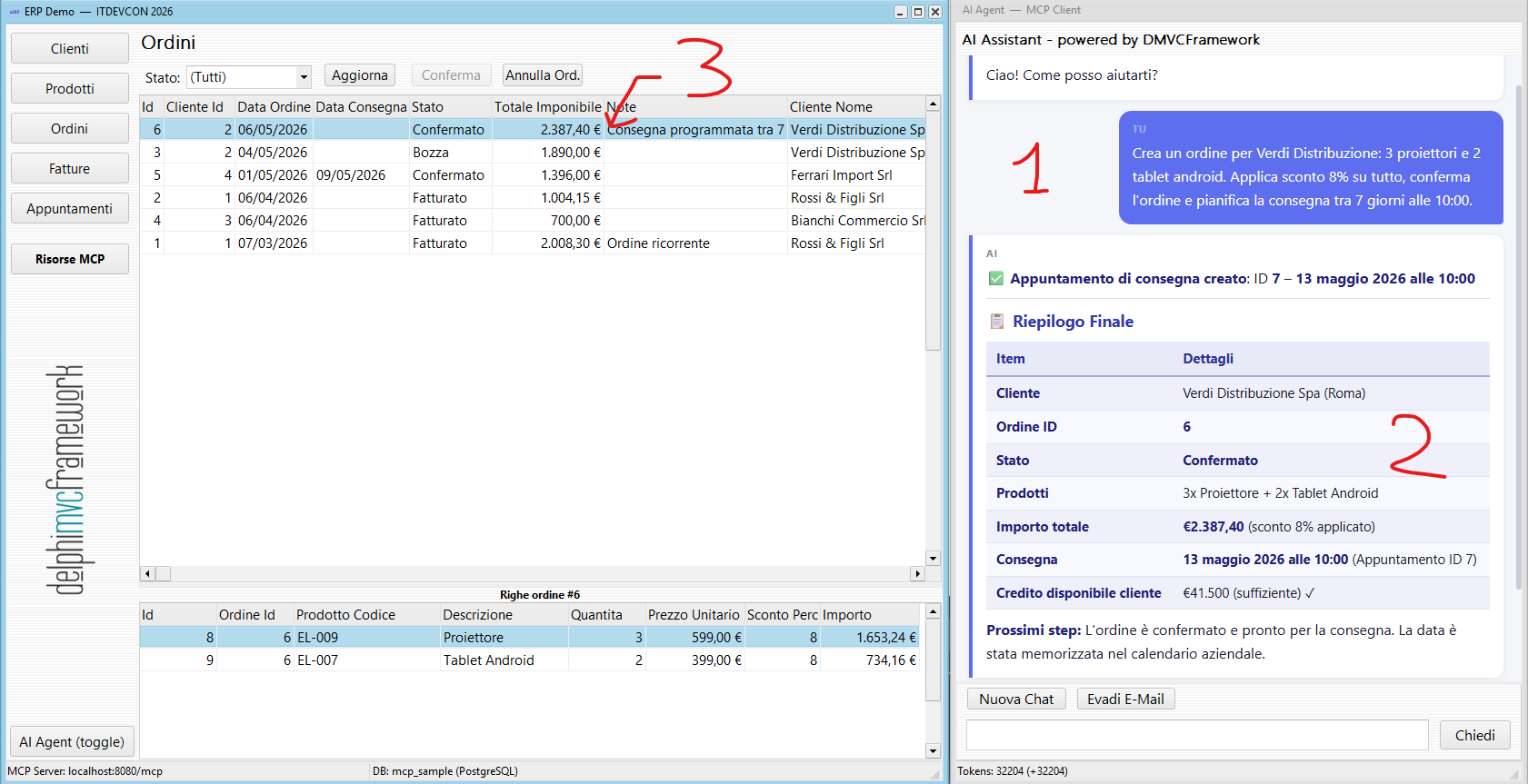
The AI agent processed the entire request autonomously: it looked up customer Verdi Distribuzione, created the order with the requested products, checked warehouse stock, applied the 8% discount, confirmed the order and scheduled the delivery appointment. Every step is grounded in the business logic already in the application, exposed to the AI agent through the MCP server tools. No data left the company’s infrastructure.
The most important moment: when the AI stops
In live demos I always show this scenario: the AI agent is processing a complex order, has already found the customer, checked the credit limit, selected the products. Then, instead of proceeding on its own, it opens a Delphi modal popup with a question:
“I found three variants of the requested product. Which do you prefer? (A) Standard, (B) Pro, (C) Premium”
The AI thread is suspended. The loop waits. The user answers. The AI agent resumes.
This is the ask_user tool: a function the AI can call whenever it needs a human choice. It is not a limitation, it is the system’s strength.
In real business, not all processes are rigidly defined. There are exceptions, special contexts, commercial relationships that an algorithm cannot know. The sales manager knows that particular customer needs different treatment this week. He knows that discount does not apply in this context. He knows the order is urgent for a reason written nowhere. That discretion is not a flaw in the process, it is irreplaceable human value.
With ask_user, the AI agent does not try to replace that judgment: it stops, presents the options, and waits. The AI brings speed. The human brings context. The result is a process that loses no flexibility compared to before, but gains a speed that was previously unimaginable.
You are not automating decisions. You are automating all the preparation work around them.
The agentic ERP in action: more scenarios
Complex email: 2 emails + 1 order
A single email with two distinct requests: “Please send me a summary of outstanding invoices, and also add a draft order for the clothing line.”
The AI agent analyses the email, explicitly lists the two requests and executes them in sequence: 12-15 tool calls, two reply emails written and saved, one draft order created. Everything visible in the tool log in the chat, everything traceable, everything inside the ERP. An operator handling the same email manually (opening the invoices, writing the summary, creating the order, writing two separate emails) easily spends twenty to thirty minutes. Here we are under two minutes.
Collections with reasoning
“For customers with invoices overdue by more than 30 days, calculate an urgency score and schedule follow-up appointments.”
The urgency score (amount x days overdue, with a different factor for long-standing customers) does not exist in the database. The AI calculates it, sorts customers by priority and creates appointments with titles differentiated by risk profile. Done in seconds across all overdue customers. Manually, extracting the list, calculating the score for each one, opening the calendar and scheduling every appointment takes at least half an hour, and it rarely gets done precisely because of that.
DMVCFramework: the structural advantage
Defining a tool: annotation, implementation, registration
Defining a tool comes down to annotating the function signature:
type
  TMyTools = class(TMCPToolProvider)
  public
    [MCPTool('reverse_string', 'Reverses a string')]
    function ReverseString(
      [MCPParam('The string to reverse')] const Value: string
    ): TMCPToolResult;

    [MCPTool('concat_strings', 'Concatenates two strings with a separator')]
    function ConcatStrings(
      [MCPParam('First string')] const A: string;
      [MCPParam('Second string')] const B: string
    ): TMCPToolResult;
  end;
The framework discovers everything via RTTI, generates the JSON schema, registers the tools in the MCP server and makes them available to both the embedded AI agent and any external client. No configuration files, no XML, no manual registration.
For a real ERP the pattern is identical, only the names and business logic change:
[MCPTool('create_order', 'Creates a new order for the specified customer')]
function CreateOrder(
  [MCPParam('Customer ID')] const CustomerID: Integer;
  [MCPParam('Discount percentage (0-100)')] const Discount: Double
): TMCPToolResult;
You do not need to learn a new framework. You do not need to rewrite your business logic. You only need to decide which features to make accessible to the AI and annotate them.
The bridge: from REST to MCP without touching a line
If you already have a DMVCFramework application with REST controllers in production, there is an even more direct path: the MCP bridge, inspired by the analogous mechanism in FastMCP. You have a controller like this:
[MVCPath('/api/books')]
TBooksController = class(TMVCController)
public
  [MVCPath]
  [MVCHTTPMethod([httpGET])]
  [MVCDoc('Returns the list of all books')]
  procedure GetBooks;

  [MVCPath('/search')]
  [MVCHTTPMethod([httpGET])]
  [MVCDoc('Searches books by title keyword. Use limit to cap results (default 10)')]
  procedure SearchBooks(
    const [MVCFromQueryString('q')] q: string;
    const [MVCFromQueryString('limit', '10')] limit: Integer
  );
end;
To expose everything as an MCP server, one call in the Web Module is enough:
TMCPServer.Instance.RegisterFromEngine(Engine, 'http://localhost:8080');
Zero changes to the controller. Zero wrapping code. Your APIs become AI agent tools in the time it takes to add one line.
This applies in the FastMCP world too: the bridge is a bootstrapping tool, not a definitive production solution. AI models perform significantly better with tools designed and curated specifically for them: descriptions written to guide the model's reasoning, parameters trimmed to the essentials, names that reflect intent rather than HTTP structure. The bridge gets you started and lets you evaluate the possibilities in minutes; the next step is to refine your tools with intention.
Man-in-the-loop: not a limitation, a choice
There is a conversation I hear often when I present these demos:
“But if the AI can create orders, modify the database, send emails: who controls that it does not do something wrong?”
The answer is: you, by design.
Every tool you expose is your own Delphi code. You can make create_order always create the order as a draft, requiring explicit confirmation before finalising. You can use ask_user whenever the AI needs to choose between alternatives. You can apply all the same authorisation rules you already have in the ERP, because the tool runs in the context of the current user session.
The AI does not bypass your business rules. It executes them. The difference is that now you can orchestrate them in natural language.
🎤 ITDevCon 2026 Spring Edition, 8 May - Rome
Everything you have read in this post (the demos, the code, the architecture) will be shown live at the next ITDevCon 2026 Spring Edition, in person on 8 May 2026 in Rome. The Spring Edition, unlike the main autumn edition, is held in Italian only.
We will go through together:
- The agentic loop in action: from email to order in real time
- How to design MCP tools the AI uses well (descriptions, parameters, results)
- The
ask_usertool and the man-in-the-loop pattern in practice - How to add the AI agent to an existing DMVCFramework application
- Dual-mode architecture: embedded agent + MCP server for external clients
- Live demos with open source code
If you are thinking about bringing AI into your Delphi ERP, this session is the most direct starting point you can find. Register at itdevcon.it.
📚 Dedicated course coming soon: MCP and Agentic AI with Delphi
For those who want to go deep with a structured learning path, I am preparing a dedicated course on MCP and Agentic AI with Delphi. It will be available soon on bit Time Professionals.
The course will cover:
- Fundamentals of the MCP protocol and the agentic loop
- Designing effective tool providers for real business applications
- Managing man-in-the-loop: when the AI should stop and ask
- Deployment, security and performance in production environments
- Advanced scenarios: multi-tool orchestration, error handling, logging
Beyond training, bit Time Professionals also offers specialist consulting to help companies integrate AI concretely into their systems. We are already working with businesses worldwide to bring agentic capabilities to their existing applications (Delphi, Python, C# and more), from identifying opportunities to production deployment. If you have a specific project in mind, get in touch.
Stay tuned: course details will be announced in the coming weeks.
Add an AI agent to your Delphi ERP: start today
The project is open source, Apache 2.0 licence.
Project page and documentation
Your Delphi ERP already has all the value. The data is there. The business logic is there. The rules are there.
All it was missing was an AI agent living inside it: capable of understanding natural language, orchestrating tools, respecting business rules and stopping to ask when needed. Not a passive MCP server waiting for instructions from outside. A genuinely agentic application.
Now it exists.
Comments
comments powered by Disqus